

AI Content Detector API Integration Guide

An AI content detector API gives developers a way to programmatically classify text or images as likely human-written or AI-generated. Rather than reviewing each file by hand, teams get back scores, labels, and metadata that slot directly into moderation queues, verification pipelines, or academic review processes.
Understanding AI Content Detector API Fundamentals
At its core, an AI content detector API is a remote analysis service. Your application sends over content, authentication details, and any optional settings you want, then receives a structured response. For image workflows, AI Image Detector handles JPEG, PNG, WebP, and HEIC files up to 10MB, returning results in real time without storing uploaded images.

Text detectors generally examine statistical and linguistic signals rather than hunting for a single smoking gun. Here are the core concepts worth knowing:
- Perplexity estimates how predictable each word is within its surrounding context.
- Burstiness measures variation in sentence length, vocabulary, and phrasing.
- Linguistic patterns cover repeated structures, unusual consistency, and model-like word choices.
- Image artifacts include lighting inconsistencies, texture errors, and synthetic details that don't appear in natural captures.
The service folds all of these signals into a verdict. A minimal endpoint might return a simple Boolean flag, while a more detailed API gives you a probability percentage, confidence band, model version, processing time, and explanatory metadata alongside it.
Reading the Response Correctly
A typical response might contain classification: "likely_ai", confidence: 0.91, and a timestamp. Treat that output as a screening signal, not as definitive proof. Hybrid content, heavy editing, translation, short samples, and unusual writing styles can all skew the confidence number.
A detector estimates the likelihood of AI involvement. It does not establish authorship, intent, or legal responsibility.
Before wiring results into automated actions, decide what each score range means in your workflow. For instance, scores above 0.90 might route to a human reviewer, while lower scores pass without intervention. That simple step prevents a probability score from turning into an unsupported accusation.
An API earns its place by applying the same first-pass logic across thousands of submissions, freeing up human reviewers to focus on the genuinely ambiguous cases. That scaling matters for marketplace safety, newsroom verification, academic integrity programs, and social moderation at volume.
Read through how AI detection works and what detector results mean before building your first integration. Then pin down accepted file types, minimum text length, response fields, and fallback behavior so every developer and reviewer on the team interprets results the same way.
An AI content detector API gives you an estimate, not definitive proof. The result shifts depending on the model, how long the sample is, what language you're working with, how heavily it's been edited, and where you've set the decision threshold. For that reason, test it against content that looks like what you actually handle day to day.
Compare Core Detection Metrics
Start with a labeled validation set: confirmed human-written samples, confirmed AI-generated ones, and hybrid cases where a human has revised machine output. From there, measure the metrics that actually matter for your setup.
- Sensitivity (recall): What share of AI samples does the system correctly flag?
- Specificity: What share of human samples does it correctly clear?
- Precision: When it says "AI," how often is it right?
- False-positive rate: How many human samples get wrongly flagged?
- False-negative rate: How many AI samples slip through?
Each of these answers a different operational question. A moderation queue under heavy volume might lean toward sensitivity to catch as much as possible. An academic review workflow, on the other hand, often needs strong specificity so you aren't making accusations without solid grounds.
| Metric | What it tells you |
|---|---|
| Sensitivity | How much likely AI content do we catch? |
| Specificity | How much human content do we protect? |
| Precision | Can reviewers trust positive alerts? |
| Recall | Are we missing many known AI samples? |
A ROC curve plots true-positive rate against false-positive rate across all possible thresholds. The area under that curve gives you a single-number summary of ranking quality, but don't let it replace testing at the actual threshold your product runs on. For a deeper dive, read how to interpret performance metrics for AI detection.
Set Thresholds for Real Workflows
A score of 0.91 might mean high model confidence, but it still doesn't tell you who wrote the text or why they submitted it. Treat the API as a screening layer that decides what happens next: send it for review, ask the author for clarification, or accept it automatically.
Here's a concrete example of a policy a platform might use:
- Scores below 0.60 pass without intervention.
- Scores from 0.60 to 0.89 go into a human review queue.
- Scores of 0.90 or above trigger an additional check, never an outright penalty.
This split keeps detection separate from judgment and lets you adjust thresholds while tracking the impact. Store the score, model version, content category, and the final reviewer decision so you can compare outcomes over time.
Important: A detector estimates the likelihood of AI involvement. It does not prove authorship, intent, misconduct, or responsibility.
Test Hybrid and Difficult Samples
Human-edited AI text sends mixed signals, and so do translations, paraphrased passages, short submissions, formulaic writing, accessibility tools, and domain-specific terminology. Include these cases in your validation set rather than testing only clean, textbook examples.
Track performance separately across categories like these:
- Original human writing
- Unedited generated text
- Lightly edited hybrid content
- Heavily rewritten material
- Short submissions versus long documents
- Each supported language and content type
When the stakes are high, review false positives first. If legitimate submissions keep getting flagged, raise the threshold, require a longer sample, or demand corroborating evidence. If the bigger danger is AI content going undetected, lower the threshold but pair it with more human oversight.
Accuracy alone doesn't tell the full story. Measure latency and failure rates too. A dead-accurate endpoint that times out under peak load still breaks the workflow. And whenever the provider updates its model, recheck your labeled set. Scores can drift even if your application code hasn't changed a single line.
Getting authentication right is the first thing you need to sort out before writing any application logic for an AI content detector API. Most providers support an API key, OAuth 2.0, or a bearer token, but the specifics vary. Check what the provider actually supports, which endpoints each credential can reach, and how long credentials stay valid before you commit to a particular approach.

Select The Right Authentication Method
| Method | Setup Effort | Security Level | Best Use Case |
|---|---|---|---|
| API key | Low | Good | Internal services and prototypes |
| Bearer token | Moderate | Good | Short-lived application sessions |
| OAuth 2.0 | Higher | Strong | Multi-user platforms and delegated access |
For a straightforward server-side integration, an API key usually does the job. The key thing is where you keep it. Use a secret manager or a protected environment variable, and pass it through an authorization header. Never hardcode it in browser-side JavaScript, mobile app bundles, log output, or anything that might end up in a public repository.
curl
-H "Authorization: Bearer $AI_DETECTOR_API_KEY"
-H "Content-Type: application/json"
Header naming conventions differ between providers, so double-check their reference docs. One practical note: handle authentication failures as a separate case from content validation errors. Retrying a request with a broken credential just adds noise to your logs and can trip rate limits for no reason.
Protect Credentials In Production
Before you push a detector workflow into production, put these controls in place:
- Generate separate keys for development, staging, and production environments.
- Scope each credential to only the endpoints and projects it actually needs.
- Encrypt secrets at rest and require TLS on every request in transit.
- Rotate keys on a regular schedule and immediately after any suspected exposure.
- Redact both authorization headers and submitted content from application logs.
IP allowlisting adds another layer if your infrastructure has fixed addresses, though it can get messy with autoscaling or remote development setups. When multiple users or organizations need delegated access, OAuth 2.0 is the better call. Short-lived tokens limit the damage if one gets compromised.
Security rule: Treat detector credentials like passwords, and treat analyzed content like sensitive data unless the provider's privacy terms explicitly say otherwise.
Keep all authentication logic in a single reusable client module. That way you avoid different services constructing headers in slightly different ways, and rotating a key becomes a one-line change. Here's a minimal Python example that reads the secret at runtime:
import os import requests
headers = { "Authorization": f"Bearer {os.environ['AI_DETECTOR_API_KEY']}", "Content-Type": "application/json", }
Run a quick test with a harmless sample before sending anything confidential through the pipeline. After that, keep an eye on unauthorized response spikes, unusual request volume, and unexpected geographic patterns in your traffic.
For related integration considerations, see our guide to the AI image detection API. And as your integration grows, document who owns which keys, when rotations are due, which environments are approved, and what the emergency revocation steps are. Clear ownership prevents security from becoming an afterthought.
{ "items": [ {"id": "essay_001", "content": "First sample"}, {"id": "essay_002", "content": "Second sample"} ], "model": "default", "language": "en" }
Production integrations that hold up under real load treat failures as routine events, not edge cases. An AI content detector API can return validation errors, authentication failures, temporary outages, timeouts, or quota responses, so your client should classify each result before deciding whether to retry.
The workflow below visualizes endpoint selection, request construction, authenticated transmission, JSON parsing, and edge-case handling.
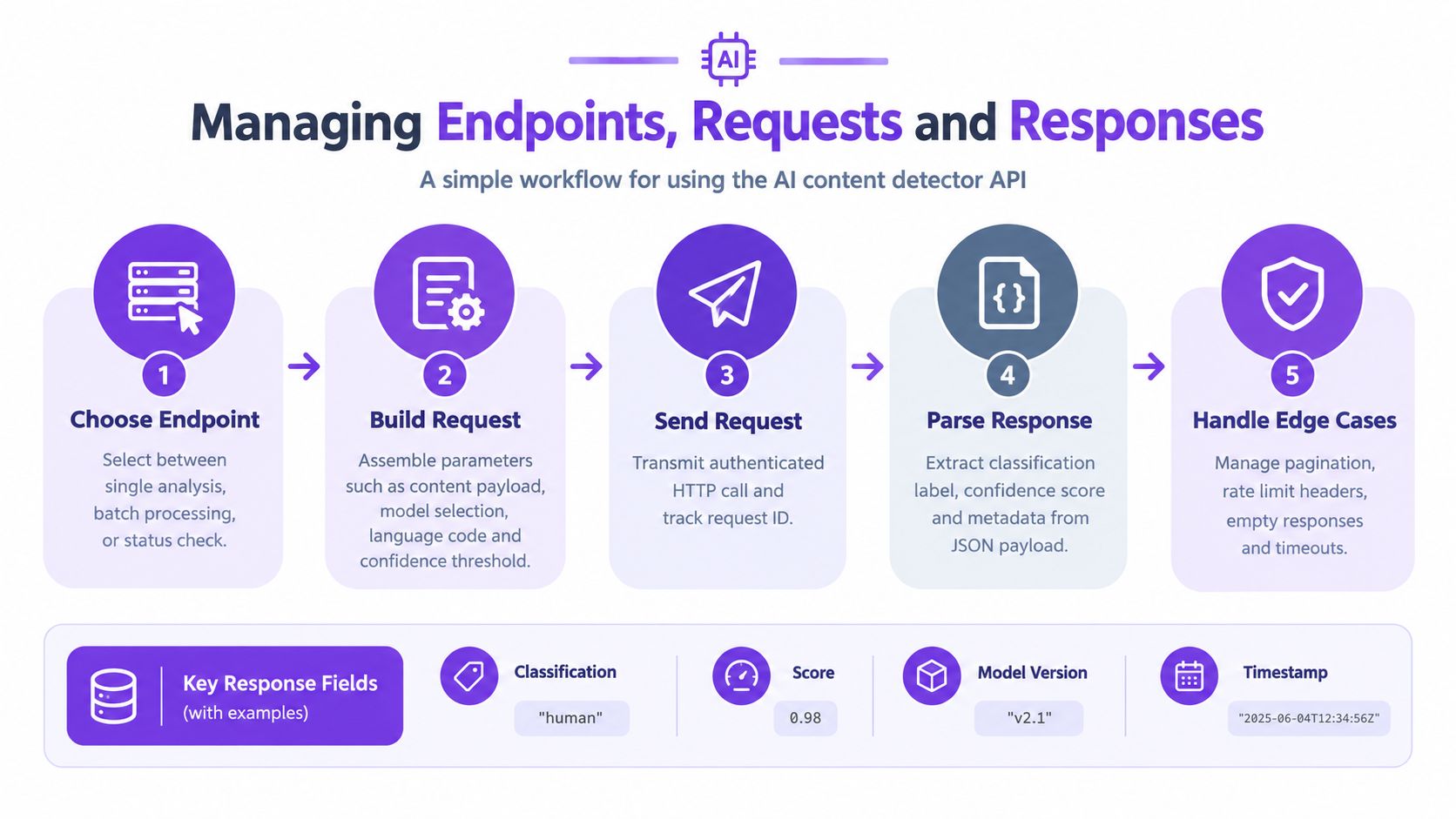
The key insight is that reliable processing depends on the entire request cycle, not only the detector's classification. Track the request ID, response fields, limits, and failures together.
Classify Errors Before Retrying
Use HTTP status codes as the first routing signal, then parse the provider's JSON error object. A useful internal structure preserves a machine-readable code, readable message, request ID, and retry recommendation.
| Status | Typical meaning | Recommended action |
|---|---|---|
| 400 | Invalid content or parameter | Fix the request |
| 401 or 403 | Invalid or unauthorized credentials | Stop and verify access |
| 429 | Rate or quota limit reached | Wait and retry later |
| 500 or 503 | Temporary service problem | Retry with backoff |
| 504 | Gateway timeout | Retry safely when idempotent |
Never retry malformed payloads or rejected credentials automatically. Doing so wastes quota and can obscure the original defect.
Apply Backoff and Circuit Breakers
For transient failures, use exponential backoff with jitter. A practical schedule might wait 250 milliseconds, then 500 milliseconds, 1 second, and 2 seconds, while adding a small random delay to prevent many workers from retrying simultaneously.
- Retry only temporary statuses and network timeouts.
- Cap attempts and total elapsed time.
- Honor
Retry-Afterwhen supplied. - Record every attempt and final outcome.
A circuit breaker stops sending requests after a defined failure threshold. It then allows a small test request after a cooldown, protecting both your application and the upstream service during an outage.
Respect Limits and Control Volume
Read headers such as X-RateLimit-Remaining, X-RateLimit-Limit, and X-RateLimit-Reset when available. Since names differ between providers, treat them as optional and confirm the exact contract in your API documentation.
For batch workflows, place submissions in a queue and let workers consume them at a controlled rate. Batch only when the endpoint supports it, preserve item-level IDs, and retry failed items instead of resending an entire completed batch.
Cache identical, immutable analyses with a content hash and model version. This reduces duplicate calls and keeps results reproducible when users resubmit unchanged material.
Operational rule: Alert on rising timeout,
429, and5xxrates before users notice an outage.
Monitor latency percentiles, success rate, retry count, queue depth, quota consumption, and classification volume. Redact submitted content and credentials from logs, retaining only safe identifiers and essential metadata. For moderation, verification, and academic review, route exhausted retries to a visible review queue rather than silently discarding submissions.
Running a detector API in production means you need to think about a lot more than just getting a response back from the service. You're designing the whole workflow around what users expect, how risky false calls are for your use case, and what your traffic actually looks like. And before you flip the switch, you need solid observability in place.

Choose Real-Time or Batch Processing
Synchronous requests make sense when someone is waiting on the other end of the interaction. Think upload screens, marketplace listing submissions, or a newsroom tool that needs to verify a piece before it goes live. The user expects an answer now, so your job is to keep that round trip fast and have a sensible fallback if the API doesn't respond in time.
For everything else, asynchronous processing is the better call. Moderation backlogs, scheduled academic submissions, and large archive imports all benefit from a queue-based approach that keeps the user interface responsive regardless of how long analysis takes.
| Workflow | Best fit | Design priority |
|---|---|---|
| Synchronous | User-facing checks | Fast timeout and fallback |
| Asynchronous | Large review queues | Durable jobs and retries |
| Batch | Archives and imports | Item-level status tracking |
Here's a practical example. A submission system can accept a document, hand back a tracking ID, and notify the reviewer once analysis is complete. That's a clean async pattern. A live moderation flow, on the other hand, should show a pending state and never block publication indefinitely while waiting for a result.
Treat detector output as a review signal, not proof of authorship or intent.
Build Observability Into Every Request
You can't fix what you can't see. Log request IDs, model versions, latency, status codes, queue depth, retry counts, and the final reviewer decision for every call. Just make sure you're not storing raw text by default, and redact credentials from every log destination before they leave your system.
Health checks should verify that your application dependencies are reachable without repeatedly submitting sensitive content to the detector. Set up alerts for rising timeout rates, 429 responses, and 5xx errors. When things go sideways, a circuit breaker that pauses outbound calls during an outage will save you from cascading failures.
Caching is worth implementing too. Store a hash of the normalized content alongside the model version and the threshold you used, then reuse the result only when those values still match. This cuts down on duplicate analysis without risking stale or mismatched outputs.
Protect Privacy and Tune Thresholds
AI Image Detector states that uploaded images are analyzed in real time and not stored on servers. That's a good baseline, but you should still confirm the current provider terms, minimize how long you retain anything in your own systems, encrypt all transport, and restrict who can access results.
Before you change confidence thresholds, run an A/B test. Compare reviewer workload, false positives, false negatives, and escalation rates across different content categories. A high detection score should never trigger an automatic penalty on its own. Always require corroborating evidence before taking action against a user or piece of content.
Your production checklist should confirm these six things:
- Separate credentials and rotation procedures are in place.
- Timeouts, backoff, queues, and idempotency have all been tested.
- Logs exclude content and authorization headers.
- Outage behavior routes items to human review instead of dropping them.
- Latency, error, quota, and accuracy dashboards are active and monitored.
- Model updates trigger validation against labeled samples before going live.
For journalists, educators, and trust teams, this kind of separation keeps automation genuinely useful without overstating what the detector can actually tell you. If you need to revisit how to interpret results, the AI detection fundamentals guide is a solid reference. And before you approve a new threshold, walk through the performance metrics to make sure you're measuring the right things. Don't deploy until security, privacy, reliability, and human-review owners have all signed off.
Why Do False Positives Occur
False positives tend to show up with short, formulaic, translated, heavily edited, or unusually consistent writing. Academic prose, technical documentation, and accessibility-assisted text can share patterns that detectors associate with generated language. Treat the score as a review signal, then compare it against the writer's drafts, sources, and process.
A detector cannot prove authorship, intent, or misconduct.
How Should Hybrid Content Be Handled
Human-edited AI content produces mixed signals. Record the confidence score, sample length, model version, and review outcome, then use separate thresholds for low-risk screening and high-stakes decisions. Require human confirmation before removing content, rejecting work, or accusing a contributor.
For images, provenance tools can add useful context. Google's explanation of SynthID and Content Credentials describes watermarking and capture records, but these signals indicate likely tool involvement, not personal authorship.
Is Submitted Data Stored or Used for Training
Privacy depends on the provider's current terms. Confirm whether requests are retained, whether they train models, how long logs remain, and whether deletion controls exist. AI Image Detector says image analysis occurs in real time, with no uploaded images stored on servers. Still, minimize local retention, encrypt transport, and avoid logging raw submissions.
How Can High-Volume Costs Be Estimated
Estimate monthly volume, average content size, retry rates, and batch discounts. Then reduce duplicate calls with content hashes, queue asynchronous jobs, and cache results by content, model version, and threshold. Monitor quota consumption before scaling.
- Measure traffic during a representative period.
- Add expected retries and peak capacity.
- Confirm billing units and batch limits.
- Set alerts before reaching quota.
For troubleshooting, first separate invalid requests from authentication, rate-limit, and provider errors. Review the relevant performance metrics guide before changing thresholds.
AI Image Detector helps teams check synthetic images quickly and privately. Try AI Image Detector for real-time analysis.