

Server Side Processing vs Client Side

You're processing a sensitive image in a web application. The user expects an answer quickly, but the application must also protect the original file, keep credentials out of browser code, control compute costs, and remain observable when traffic rises. The first architectural decision is often framed as server side processing versus client side rendering. For modern AI workloads, that framing is incomplete. The key question is where computation happens, where raw data becomes visible, and which boundary your team can secure.
Server side processing moves business logic, data access, rendering, or inference onto infrastructure your team controls centrally. Client side processing keeps more work inside the browser or device. Hybrid systems divide the workload between both. None is universally faster or automatically private. The right choice depends on latency, data sensitivity, interactivity, operational maturity, and the consequences of failure.
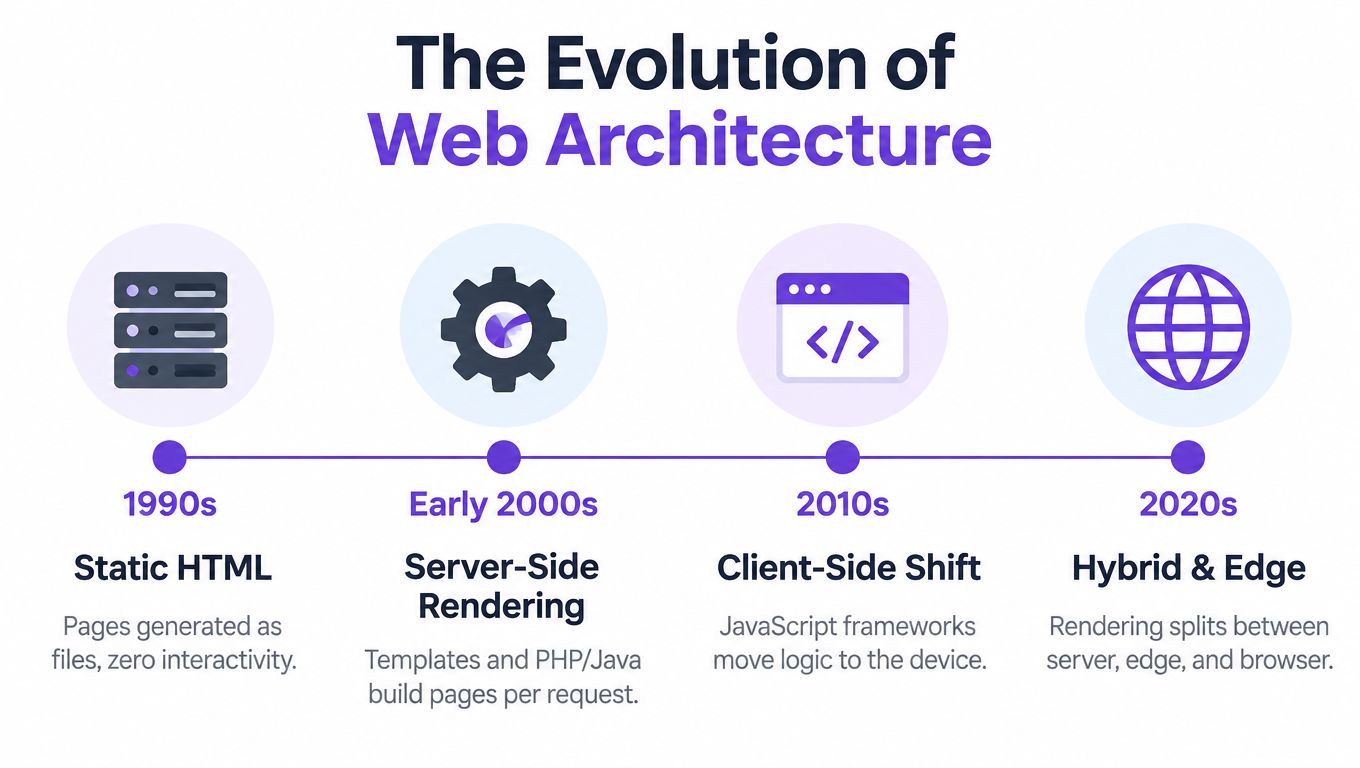
The Evolution of Web Architecture
A user opening a heavy web application today may wait while JavaScript bundles download, data arrives, and the browser constructs the interface. The device then performs routing, state management, filtering, and sometimes model inference. That approach can produce a rich experience, but it also turns every user device into part of the application runtime.
The earliest web systems made the opposite tradeoff. The server generated the complete response before the browser received it. In the early 1990s, server-side delivery became the default model for dynamic web applications, with CGI programs commonly written in C, Perl, or shell scripts. The server handled business logic, database access, and HTML generation, while the client remained comparatively lightweight. The history of server-side scripting documents this progression, including Netscape Enterprise Server's introduction of JavaScript for server-side scripting by December 1994.
Why the pendulum moved
Server-generated pages solved early constraints well. Developers could keep database credentials and business rules on the backend, generate consistent HTML, and avoid requiring powerful browser runtimes. The cost was clear, each interaction commonly required another request and another response.
As browsers improved, client-heavy applications moved more logic to the device. JavaScript frameworks enabled persistent interfaces, local state, optimistic updates, and highly interactive workflows. That shift reduced some server round trips, but introduced other costs, including larger bundles, device-dependent performance, and more code running in a security-sensitive environment.
Modern systems increasingly combine the models. A server can generate useful HTML, an edge location can handle work closer to the user, and the browser can hydrate the page and manage interactions. The server still provides a valuable control point for authentication, authorization, data access, and sensitive processing.
For teams dealing with protected pages or data collection, architecture also affects how reliably the backend can retrieve and normalize information. A technical overview of how to scrape Cloudflare protected sites can help engineers understand why server-side acquisition requires careful handling of sessions, rate limits, and access controls rather than a simple browser script.
Practical rule: Treat the browser as an untrusted execution environment, especially when it handles credentials, proprietary logic, or sensitive uploads.
Server Side Processing vs Client Side Rendering
The restaurant analogy remains useful, provided you understand its limits. With server-side processing, the kitchen prepares the meal and sends a finished dish to the table. With client-side rendering, the application delivers ingredients and instructions, then the customer's device performs much of the preparation. A hybrid system prepares the base meal centrally and leaves final assembly to the customer.
For a server-rendered page, the request reaches the backend, which authenticates the user, queries data, applies business rules, builds HTML, and returns the result. In a client-rendered application, the initial response may contain a shell and JavaScript assets. The browser then fetches data, constructs the interface, and handles later state changes locally or through API calls.
The distinction matters for state. Server-side systems typically keep authoritative state in backend services or databases. Client-side systems may maintain temporary UI state in memory or local storage, but the server still needs to validate anything that affects authorization, payment, or durable records.
Architecture comparison matrix
| Feature | Server Side Processing | Client Side Rendering |
|---|---|---|
| Initial response | Server returns generated HTML or a processed result | Browser receives application code and data, then builds the result |
| Business logic | Centralized on backend services | Some presentation and interaction logic runs in the browser |
| Data exposure | Backend can return only the fields required for the response | Data sent to the browser may be inspected by the user |
| Interactivity | Often requires server requests unless enhanced with hydration or partial updates | Local interactions can feel immediate after assets and data load |
| SEO and accessibility | Complete HTML can be available before browser execution | Requires careful rendering and indexing support |
| Sensitive AI workloads | Raw uploads can remain within a controlled processing boundary | Raw inputs and model logic may be exposed to the client runtime |
| Scaling concern | Server compute, database capacity, queues, and request concurrency | Device CPU, memory, bundle size, and network transfer |
| Failure mode | Backend latency or outages affect the experience directly | Browser capability and device performance vary more widely |
| Best fit | Protected data, centralized rules, content delivery, controlled inference | Rich interfaces, offline behavior, lightweight local transformations |
Neither column wins by default. Server-side processing centralizes control but creates backend demand. Client-side rendering can reduce repeated server work, but it expands the amount of trusted behavior that must run on a device you don't control. Product teams should choose based on the asset being protected and the workload being executed, not on framework fashion.
Performance Trade-Offs and Network Latency
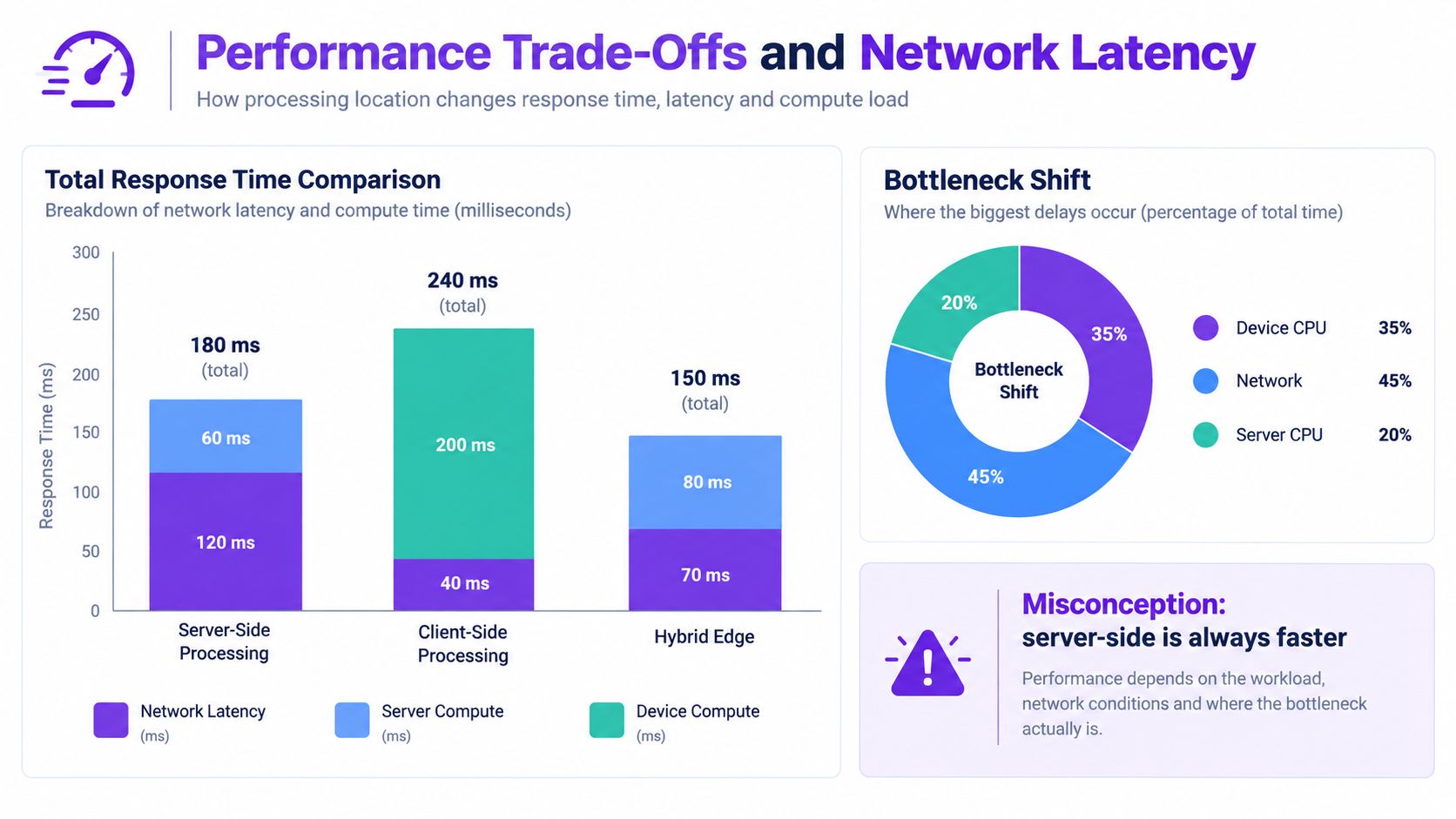
Server-side processing doesn't remove computation. It relocates it. A browser that would have spent time decoding, filtering, or running inference now waits for an upload, a network round trip, server execution, and a response. That can be an excellent trade when backend hardware is stronger and the result is compact. It can be a poor trade when users are geographically distant or the workload requires repeated exchanges.
A controlled benchmark of image verification illustrates the boundary. Native server-side processing averaged 129 ms in Chrome, and the server-side option matched client-side WebAssembly performance only when Chrome's round-trip time stayed below 46 ms. Firefox required round-trip time below 50.5 ms for the same comparison. These figures come from the benchmark's controlled environment, so they should guide testing rather than serve as a universal promise. The full image-processing benchmark explains the relationship between network delay and computation.
What the benchmark changes
The practical lesson is cause and effect. Moving image analysis to the server shifts cost from device CPU to network latency. A user near the processing region may experience a responsive workflow, while a user far away may wait longer even if the server has ample capacity.
Deployment geography therefore belongs in the architecture decision. Region selection, edge routing, upload size, connection quality, and whether the application keeps a connection open all influence perceived speed. A server-side design can also reduce browser memory pressure because the client receives a derived result rather than the entire processing pipeline.
Measure the complete path, not just model execution:
- Upload duration: Time from file selection to the backend receiving the final byte.
- Queue delay: Time spent waiting for an inference worker or image-processing slot.
- Compute duration: Time consumed by decoding, preprocessing, inference, and postprocessing.
- Response transfer: Time required to return the result and any explanation to the browser.
- Client presentation: Time needed to display the verdict and update the interface.
For batch-oriented workflows, server-side execution often makes coordination easier because workers, retries, resource limits, and audit events live in one environment. A useful implementation pattern is described in batch image processing, where the workload can be organized around backend-controlled operations instead of forcing the browser to manage every item.
Measure user-to-result latency from real regions. A fast model isn't fast for users if the network path dominates the request.
Privacy-First AI and Secure Image Analysis
Image verification changes the risk calculation. A marketing page can tolerate sending presentation logic to the browser. A biometric image, identity document, private artwork, or proprietary scan deserves a stricter boundary because the raw bytes may be more sensitive than the final classification.
Client-side inference appears attractive because the file never needs to leave the device. That benefit depends on the implementation. Browser extensions, third-party scripts, compromised dependencies, debugging tools, screenshots, and exposed model assets can all affect what remains private. Client-side processing also makes it harder to enforce consistent retention, access, audit, and revocation policies across arbitrary devices.
A server-side pipeline can provide stronger central controls when designed carefully:
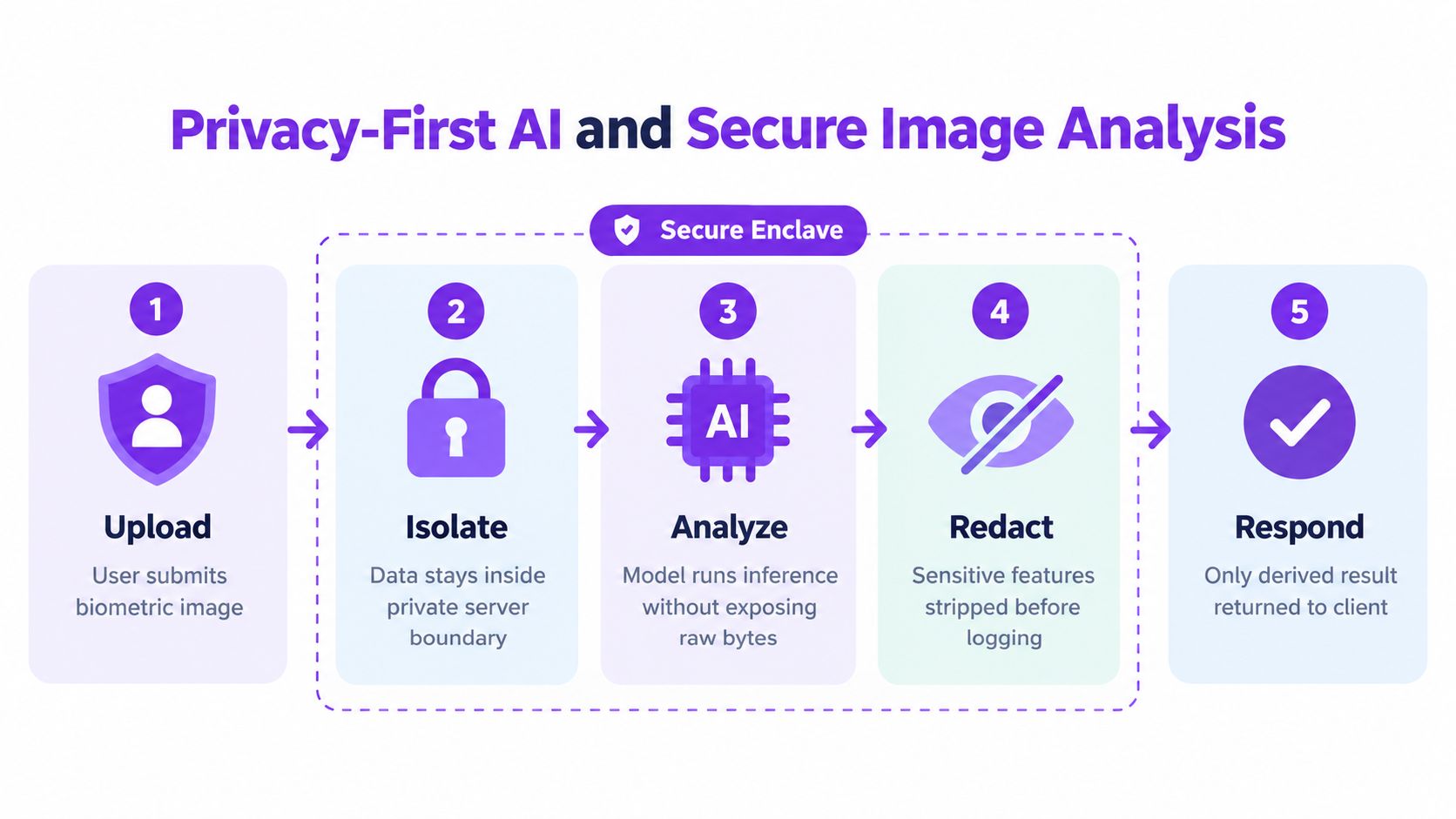
- Encrypt before transmission. The client sends the upload over an authenticated encrypted channel and the backend validates type, size, and declared metadata.
- Keep the provider boundary explicit. A backend service can mediate access to model providers without placing provider credentials in browser bundles.
- Decrypt only where required. Trusted execution environments, or TEEs, can expose unencrypted data only inside attested processing binaries.
- Separate raw and derived data. The system should return a verdict or feature set without placing original bytes in ordinary application logs.
- Apply policy to keys. Key-management mediation can restrict when and which workload may unwrap the key needed for analysis.
This model doesn't make the backend trustworthy by design. It narrows the trust surface. The research on privacy-preserving server-side processing describes architectures in which encrypted client data is decrypted inside TEE-hosted processing binaries and governed through attestation and policy-controlled key access.
Design for minimization, not just isolation
A secure enclave doesn't excuse poor data handling. The application should avoid storing originals when a transient stream is sufficient, redact sensitive features before logging, and restrict which operators or services can access intermediate artifacts. Model inputs, outputs, and diagnostic traces need separate retention rules.
For teams building detectors, the backend proxy pattern is especially useful. The browser uploads to your service, your service validates and forwards the file, and the client receives a reduced response. That design supports consent checks, rate limits, provenance parsing, and audit policies without exposing provider keys or requiring the browser to understand internal service topology. Guidance on AI privacy issues provides useful context for evaluating these risks.
The video below offers an additional visual explanation of privacy considerations in AI image analysis.
The Compliance Reality of Backend Data Handling
Moving processing to a server changes the location of the work, not the legal basis for doing it. If personal data is processed, consent and other privacy obligations can still apply. A backend endpoint that receives an image remains part of the data-processing chain, even if the browser no longer runs the model.
That distinction is easy to miss because technical controls and legal controls overlap without being interchangeable. TLS protects data in transit. Encryption at rest reduces exposure from storage compromise. Access controls limit internal use. None of those controls, on their own, establishes that the application had permission to process the image or that it keeps the data only as long as necessary.
Independent guidance on server-side tracking consent makes the central point clearly: server-side processing doesn't remove consent requirements. The same principle applies beyond tracking. Teams still need a defensible purpose, transparent notices, appropriate consent handling, and a process for honoring user rights.
Build the data map before the endpoint
Document each movement of data, including the browser, upload service, queue, inference worker, logging system, backup process, and external model provider. For every step, record what data is present, why it exists, who can access it, and when it is deleted.
A practical review should answer these questions:
- Collection: Does the application receive the minimum image and metadata needed for the task?
- Consent: Can the system prove that the user agreed to the relevant processing where consent is required?
- Retention: Does an automated policy remove originals, temporary files, and derived artifacts on schedule?
- Access: Are operators, services, and support tools limited to the data they need?
- Disclosure: Do users understand whether a third-party processor receives the upload?
- Auditability: Can the team reconstruct access and processing events without logging the raw content?
Privacy is a product behavior, not a deployment diagram.
A server-side architecture becomes legally defensible when these controls are implemented and tested. It becomes risky when the team treats a private subnet or an enclave as a substitute for minimization, consent, deletion, and accountability.
Implementation Best Practices and Observability
Production server-side processing succeeds when the workload is designed as an operational system, not just an endpoint. Start by separating request handling from expensive work. The HTTP layer should validate input, authenticate the caller, create a job or invoke a bounded worker, and return a controlled response. Long-running inference belongs behind a queue or worker boundary when it can outlive a normal request.
Structure the workload for change
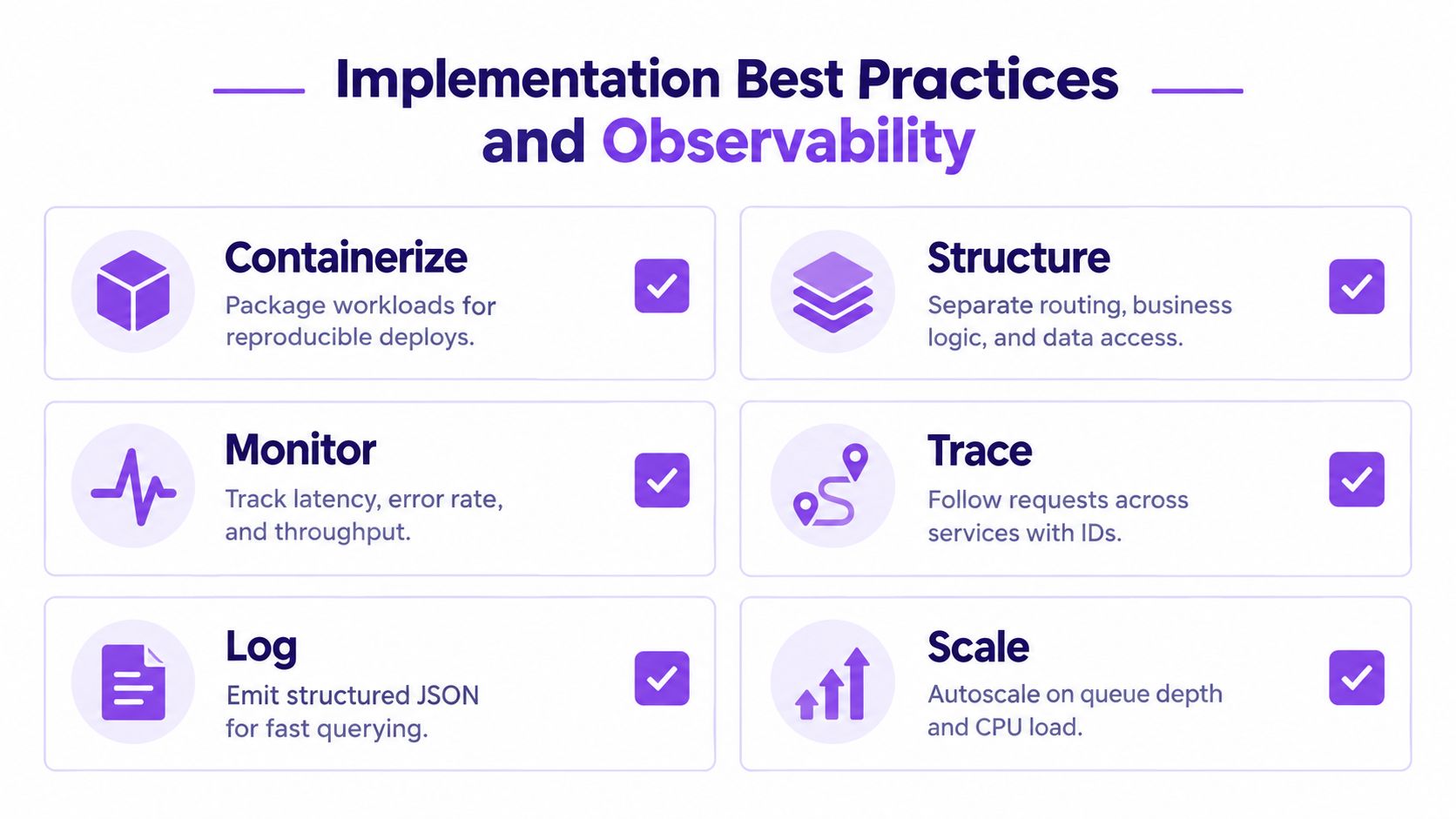
Containerize the service so deployment artifacts remain reproducible across environments. Keep routing, business logic, model orchestration, and data access separate. That separation makes it easier to replace a model, change storage, or add an authorization rule without turning the request handler into an untestable monolith.
Use bounded resources. Set upload limits, request timeouts, concurrency limits, queue policies, and memory ceilings. Reject unsupported files early, and make retries idempotent so a network failure doesn't trigger duplicate processing or duplicate billing at an external provider.
Caching needs judgment. Public, immutable results may be cacheable. Personalized responses, sensitive uploads, and policy-dependent verdicts generally require stricter cache controls. Never let a convenience cache become an accidental data-retention system.
Observe the request path
Operational dashboards should expose more than average response time. Oracle HTTP Server documentation shows how server-side status pages can report requests currently being processed, processes serving requests, idle processes, current state, uptime, and request flow. Its monitoring documentation demonstrates the value of measuring server work in concrete operational units.
Track the following signals:
- Latency: Separate network, queue, model, database, and serialization time.
- Capacity: Watch active workers, idle workers, queue depth, memory, and CPU.
- Reliability: Record timeouts, validation failures, dependency errors, and retry counts.
- Traceability: Assign a request ID and carry it through the API, queue, worker, and provider call.
- Logging: Emit structured events, but exclude raw images, secrets, and unnecessary personal data.
Teams evaluating measurement without browser cookies can use this cookieless world tracking guide as a broader reference for server-managed event flows. The same operational discipline applies to image analysis, although sensitive payloads require much stricter redaction.
Before launch, test cold starts, malformed uploads, provider timeouts, queue saturation, partial retries, and deletion failures. Then document who receives alerts and what action each alert triggers. For teams integrating a detector into an existing product, SDK implementation guidance can help organize the client and backend responsibilities without moving protected credentials into the browser.
Decision Checklist for Your Next Project
Choose the architecture by workload, not by ideology. A content-heavy page with search visibility requirements often benefits from server-generated HTML. A collaborative dashboard may need client-side state and frequent local interactions. An AI tool that receives sensitive images usually needs a server-controlled processing boundary, even if the interface itself remains highly interactive.
Use these criteria during design review:
- Does the first response need meaningful HTML? If users or crawlers must receive content before JavaScript runs, put rendering or at least the initial data assembly on the server.
- Does the interface perform frequent local interactions? Keep presentation state and lightweight transformations in the browser, while retaining authorization and durable writes on the backend.
- Is the input sensitive? For biometric images, identity documents, confidential files, or proprietary media, prefer controlled upload, centralized validation, and server-side inference.
- Can your users reach the processing region quickly? Test real network paths. If round-trip time dominates the workload, consider regional deployment, edge preprocessing, or a carefully bounded client-side step.
- Will the workload grow unpredictably? Use queues, workers, backpressure, and autoscaling rather than allowing every request to consume unbounded server resources.
- Can you meet deletion and consent requirements? If you can't explain where raw data travels and when it disappears, the design isn't ready.
- What must remain secret? Provider keys, model policy, fraud rules, and privileged data access belong behind a backend boundary.
A hybrid design is often the practical answer. Render the initial shell and sensitive decisions on the server, hydrate interactive components in the browser, and reserve client-side work for transformations that don't expose protected data or critical business logic.
Finish with a written decision record. State the chosen boundary, expected latency path, data lifecycle, failure behavior, observability signals, and the reason rejected alternatives were unsuitable. That document gives product, security, and engineering teams a shared basis for revisiting the design when requirements change.
AI Image Detector provides a privacy-first workflow for checking whether images are likely AI-generated or human-created, with analysis performed through a backend and results returned as a reduced verdict rather than raw processing logic. If you're evaluating secure image verification for a product or editorial workflow, visit AI Image Detector to test the tool or review its integration options.