

A Guide to Detect AI Generated Content

Spotting AI-generated content isn't just about running a piece of text through a tool. It's a two-part process that starts with your own intuition. You look for the tell-tale signs—the unnatural phrasing, the weird factual slip-ups, the generic, soulless language—and then you bring in specialized detectors to confirm what you suspect.
These platforms are built to analyze text and images for the statistical fingerprints left behind by machine generation, giving you a confidence score to work with. Think of it as combining good old-fashioned critical thinking with a bit of tech-powered analysis. It's that blend that gives you real accuracy.
Why Spotting AI Content Has Become a Critical Skill

The internet is changing right under our feet. What used to be a space filled almost entirely with human-made articles, photos, and conversations is now awash with synthetic media. Being able to identify AI-generated content is no longer a niche skill for tech researchers; it’s a basic competency for anyone who wants to navigate the online world responsibly.
This shift is hitting professionals hard. Journalists and editors are on the front lines, trying to uphold credibility when AI can churn out convincing—but completely fabricated—news stories. In education, teachers are struggling with AI-powered plagiarism that undermines the entire point of student assignments. Even marketers are finding that leaning too heavily on cheap AI content can quickly tarnish a brand's reputation and alienate customers.
The Tidal Wave of AI Content
The growth in machine-generated text has been explosive. Back in late 2022, around the time ChatGPT launched, AI content made up about 10% of the web. By late 2023, that number had jumped to nearly 39%, and it's on track to blow past 50% by early 2025.
The good news is that as AI models get smarter, so do the tools designed to spot them. For example, in a recent test, SurferSEO’s AI detector showed an impressive 99.4% accuracy rate on text from GPT-4o. You can see the full data on AI's internet takeover on futurism.com.
This flood of synthetic media presents some serious challenges that make detection skills more important than ever:
- Erosion of Trust: When people can't tell the difference between genuine human insight and automated filler, they start to lose faith in all online information. This has a ripple effect on everything from news sources to product reviews.
- Spread of Misinformation: AI gives bad actors the ability to create and scale disinformation campaigns with terrifying speed, shaping public opinion with entirely fabricated stories.
- Devaluation of Quality: The sheer ease of creating AI content means the web is getting clogged with generic, low-effort articles. This makes it harder for truly valuable, human-written work to get noticed. To learn more about the specifics, check out our guide on what is AI-generated content.
Learning to detect AI content is about more than just calling out fakes. It's about protecting your professional integrity, shielding your audience from bad information, and defending the value of real human creativity in an increasingly automated world.
Ultimately, this guide is meant to be a hands-on toolkit. It will arm you with the strategies and workflows you need to confidently check content for authenticity and maintain the high standards your work demands.
Human vs AI Content Red Flags at a Glance
To get started, it helps to have a quick reference for the kinds of tells you should be looking for. The table below breaks down some of the most common differences you'll notice between content created by a person and content generated by a machine.
| Characteristic | Typical Human Content | Potential AI Content |
|---|---|---|
| Tone & Style | Varies; can be informal, personal, or academic. Uses idioms, humor, and unique voice. | Often overly formal, repetitive, or strangely uniform. Lacks a distinct personality. |
| Sentence Structure | Mix of short, punchy sentences and longer, complex ones. Natural flow and rhythm. | Tends toward consistent sentence length and structure. Can feel monotonous or robotic. |
| Factual Accuracy | Generally reliable, but can contain errors. Sources are often cited or implied. | May contain subtle (or obvious) factual errors, outdated info, or "hallucinated" facts. |
| Word Choice | Uses a broad vocabulary, including slang or jargon appropriate to the context. | Often relies on a safe, generic vocabulary. May overuse certain "AI-favored" words. |
| Image Details (Faces) | Natural imperfections, asymmetries, and realistic expressions. Consistent lighting. | Faces may look too perfect, symmetrical, or have an "uncanny valley" feel. Weird artifacts. |
| Image Details (Hands/Objects) | Anatomically correct hands with five fingers. Objects interact realistically with their environment. | Often struggles with hands (extra/missing fingers), bizarre text, or objects that defy physics. |
Keep in mind that these are just indicators, not definitive proof. The most advanced AI models are getting better at mimicking human patterns, which is why combining this kind of manual inspection with a reliable detection tool is always the best approach.
Spotting AI Giveaways With Manual Checks
Before you even think about plugging content into a detection tool, you can often detect AI generated content just by using your own eyes and intuition. This is your first line of defense. Over time, you’ll develop a gut feeling for the subtle but consistent tells that AI models almost always leave behind.
Think of AI writing as being almost too perfect. It often follows a flawless, predictable structure—a neat intro, tidy subheadings, perfectly formatted bullet points, and a clean conclusion. It's organized, sure, but that perfection feels sterile. It lacks the spark, the messiness, of genuine human experience and reads more like content designed to check a box than to actually connect with someone.
Unpacking the Telltale Signs in AI Text
AI-generated text has a distinct flavor. Once you learn to recognize its quirks, they become surprisingly easy to spot. The language is frequently overly formal and goes out of its way to avoid taking a strong or controversial stance. It’s engineered to be helpful and inoffensive, which often results in a bland, soulless tone.
Keep an eye out for these common red flags in text:
- Repetitive Sentence Starters: AI models get stuck in loops. You'll see the same transitional phrases like "In addition," "Furthermore," or "Moreover" used over and over again.
- Generic Vocabulary: The word choice is almost always safe and predictable. It steers clear of slang, idioms, or the niche jargon a real expert would sprinkle in without a second thought.
- Lack of Personal Anecdotes: AI has no life experience. It can't share a story about a time it messed up, learned a hard lesson, or felt a particular way. Content that’s completely devoid of personal stories is a huge indicator.
- Perfect Grammar and Spelling: Even the best human writers make the occasional typo or bend a grammar rule for effect. AI content, on the other hand, is usually flawless to a robotic degree.
- Factual Oddities: AI is known to "hallucinate," meaning it can invent facts, dates, or sources that sound believable but are completely wrong. A quick fact-check can often expose these subtle but damning errors.
A simple question I always ask myself is, "Does this actually sound like something a person would say?" If the writing feels like a dry summary of a Wikipedia article with zero personality, my AI alarm bells start ringing.
For instance, an AI might write, "It is imperative for businesses to consider multifaceted marketing strategies." A human expert would probably just say, "If you're not using a mix of social media and email, you're leaving money on the table." The difference in voice is night and day.
Decoding the Flaws in AI-Generated Images
Just like with text, AI images have their own set of giveaways. They can create some truly stunning and photorealistic visuals, but they often stumble on the little details our brains process subconsciously. This can create that subtle "something's not quite right" feeling, often called the "uncanny valley."
When you get a suspicious image, the key is to zoom in and pay close attention. AI really struggles with consistency and the basic laws of physics.
Hands, Fingers, and Other Anatomical Nightmares
For some reason, hands are notoriously difficult for AI models. I've seen images where people have six fingers, fingers that bend at impossible angles, or hands that seem to melt right into the object they're holding. Teeth are another classic tell; you might see a single, unnervingly smooth strip instead of individual teeth.
Here are a few other common visual artifacts to look for:
- Asymmetrical Features: Check for mismatched earrings, pupils of different sizes, or glasses with two different frames.
- Bizarre Backgrounds: Look closely at textures. You might see wood grain flowing in weird directions or brick patterns that seem to melt into each other.
- Unreadable Text: Any text you see in an image—on a sign, a book cover, a t-shirt—is often a jumbled mess of nonsensical characters. AI can mimic the shape of letters but struggles to form actual words.
- Glossy Perfection: AI images often have an overly smooth, airbrushed quality. Skin has no pores or blemishes, and surfaces have an unnatural, plastic-like sheen.
By training your eye to spot these flaws in both text and images, you'll get much better at flagging synthetic media on your own. This manual check is a crucial first step that gives you essential context before you turn to automated tools for a final verdict.
Choosing and Using AI Content Detectors
When your own eyes and gut instinct tell you something is off, but you can't quite put your finger on it, it's time to bring in the specialists: AI content detection tools.
These platforms are built to see what we can't. They go beyond surface-level oddities to analyze the underlying statistical fingerprints that AI models leave behind. Think of it as a digital forensics team for text, giving you a data-driven second opinion.
Detectors don’t just make a guess; they measure specific linguistic patterns. Two of the big ones are perplexity and burstiness.
Perplexity is a fancy way of saying "how predictable is this?" Human writing is full of surprises and unusual word choices, so it has high perplexity. AI-generated text, on the other hand, often plays it safe with statistically common phrases, leading to lower perplexity.
Burstiness looks at the rhythm and flow. Humans write in bursts—a few short, punchy sentences followed by a long, winding one. AI often falls into a monotonous, uniform rhythm. If you want to go deeper into the technical side, our guide on how AI detectors work breaks it all down.
Building an Effective Detection Workflow
Tossing a block of text into a single tool and blindly trusting the result is a rookie mistake. A truly reliable process involves a more thoughtful workflow, blending multiple tools with your own critical judgment. This is how you avoid the trap of false positives and negatives and arrive at an assessment you can actually trust.
A solid workflow to detect ai generated content isn't complicated:
- First Pass with Your Go-To Tool: Start with your most trusted detector to get a baseline score.
- Get a Second Opinion: Always run the text through a second, different tool. If both platforms flag the content as likely AI, your confidence in that result should shoot way up.
- Zoom in on the Highlights: Many tools highlight the specific sentences they find most suspicious. Do these highlighted sections match the parts that felt "off" to you during your manual check? This is great for spotting where human writing might have been blended with AI-generated paragraphs.
Interpreting Confidence Scores and Results
AI detectors almost never give you a flat "yes" or "no." What you get is a confidence score, like "98% likely AI-generated." It’s absolutely critical to remember that this is a probability, not a certainty.
A score over 95% is a massive red flag, but it isn't irrefutable proof. On the flip side, a score below 50% suggests the text is probably human, but it could also mean it was created by a very advanced model or was heavily edited after generation.
Treat a detector's score as a powerful piece of evidence, not the final verdict. Your goal is to gather enough signals—both from your own review and from the tools—to make an informed decision you can stand behind.
The tech behind these tools is getting seriously good. The AI Detection Benchmark 2025 report found that the best detectors now hit 98.7% accuracy across a range of models and datasets. They've also gotten much faster, with average detection speeds dropping from 200ms to under 100ms. You can dig into the specifics and learn more about these accuracy findings on hastewire.com.
Selecting the Right Tool for Your Needs
The market is now full of detection tools, each geared toward different needs, from a student checking a paper to a large enterprise scanning content at scale. To find the right fit, think about what matters most to you.
| Feature to Consider | Why It Matters | Ideal For |
|---|---|---|
| Accuracy & Reliability | Can it correctly spot AI while avoiding false alarms? This is the most crucial factor. | Everyone, but especially journalists and academics. |
| Detailed Reporting | Does it just give a score, or does it highlight specific sentences that are likely AI? | Editors and educators who need to provide feedback. |
| Integration Options (API) | Need to build detection directly into your own website, CMS, or internal tools? | Businesses and trust & safety teams. |
| Batch Processing | Allows you to check dozens or hundreds of documents at once instead of one by one. | Content agencies, publishers, and large organizations. |
At the end of the day, the strongest defense is a hybrid one. Combine your human intuition with the analytical power of a couple of high-quality detection tools. This multi-layered approach gives you the best shot at navigating the new world of synthetic content with real confidence.
Confronting Deepfakes and Synthetic Media
Moving beyond text and static images, we’re now wading into the trickiest territory of AI detection: deepfakes and synthetic media. These aren't just slightly off images; they are sophisticated audio and video manipulations engineered to fool you. Spotting them demands a sharper eye and a real understanding of how AI models still can't quite nail a perfect copy of reality.
The stakes here are incredibly high. In 2023 alone, fraud attempts using AI-generated media shot up by a jaw-dropping 3,000%. The financial fallout is staggering, with U.S. losses expected to jump from $12.3 billion in 2023 to a projected $40 billion by 2027.
Visual and Audio Red Flags in Deepfakes
Even the best automated tools can get tripped up by high-quality deepfakes, which makes manual inspection non-negotiable. You have to train your own senses to catch the small, unnatural details that give the game away.
When you're looking at a suspicious video, here are the visual tells I always check for:
- Unnatural Facial Movements: Pay close attention to how—or if—the person blinks. Early deepfakes were notorious for subjects who barely blinked at all. Also, watch the way the head moves. Does the face seem to "float" or move just a bit out of sync with the neck and body?
- Weird Lighting and Reflections: Look into the eyes. Do the reflections you see in the pupils actually match the environment in the video? A lot of the time, they don't. The lighting on the face might also look off compared to the light in the rest of the scene.
- Skin and Hair Artifacts: AI-generated skin can look too perfect—almost waxy or overly smooth, without any natural pores or blemishes. Check the hairline and jawline for subtle blurring or digital noise. That's often a dead giveaway of a poorly mapped deepfake.
Here’s a little trick I use: I always watch the video on the largest, highest-resolution screen I can find and focus on one thing at a time. First pass, I only watch the eyes. On the rewatch, I focus just on the mouth and teeth. Breaking it down like this helps you spot tiny inconsistencies your brain might gloss over otherwise.
Audio deepfakes are just as subtle. You have to listen carefully for things like a complete lack of normal background noise or faint, robotic sounds between words. The emotional tone can also be a tell—if the voice sounds flat or disconnected from what's being said, that’s a common flaw in current voice-cloning tech. For a deeper dive, our complete guide on https://www.aiimagedetector.com/blog/how-to-spot-a-deepfake is a great resource.
The process below offers a solid, standardized way to run your initial checks on any piece of media you're questioning.
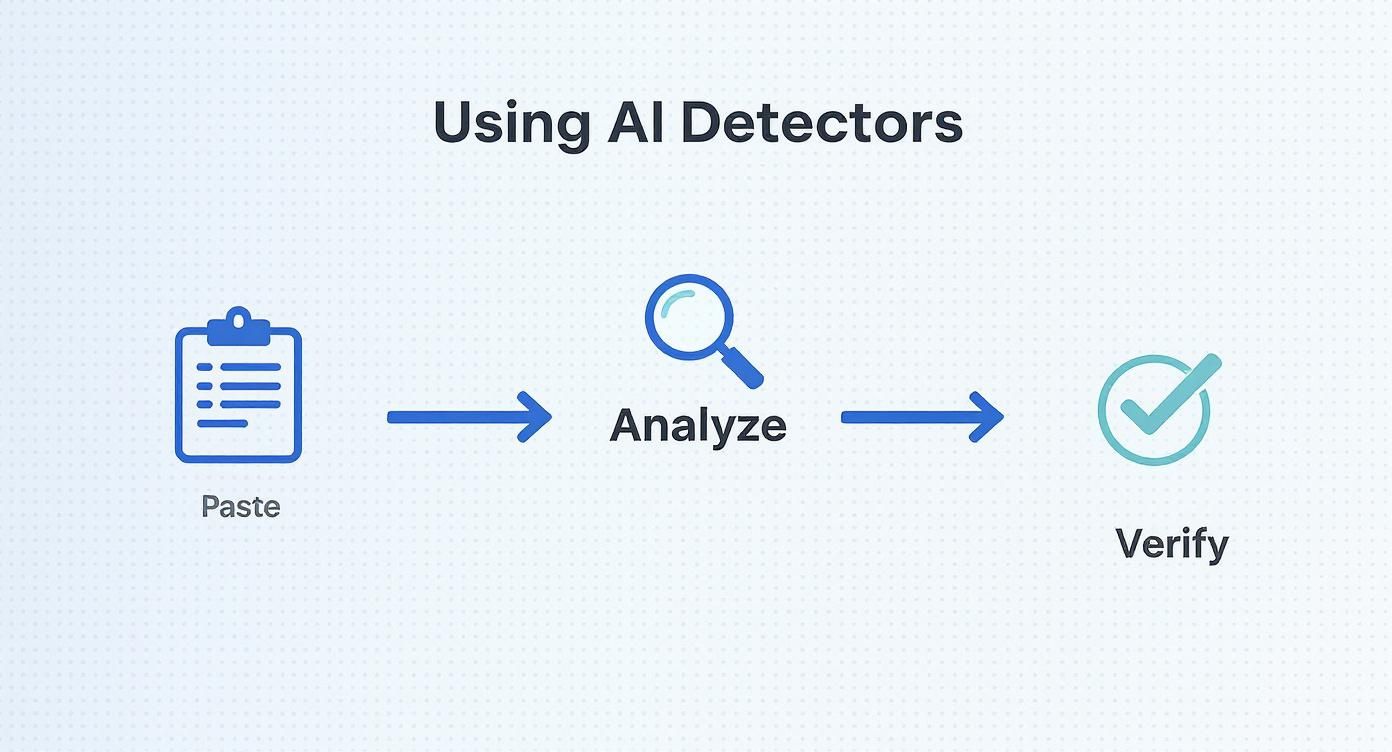
This simple workflow—paste, analyze, verify—gives you a consistent and reliable starting point for any investigation, making sure you don't miss a step.
Building a Multi-Layered Verification Workflow
For any organization where trust is everything—think newsrooms, banks, or safety teams—relying on a single tool or technique is just too risky. You need a multi-layered workflow to truly protect yourself from convincing deepfakes. It's all about combining sharp human intuition with the right technological backup.
This table breaks down a practical workflow for different professional contexts.
Verification Workflow for Different Content Types
| Content Type | Initial Manual Check | Recommended Tools | Final Verification Step |
|---|---|---|---|
| News Video Clip | Look for visual artifacts (blinking, lighting, hair). Check audio for robotic tone or lack of ambient sound. | AI-powered video authenticity tools, reverse image search on keyframes. | Contact the original source or outlet to confirm the video's authenticity. Check for a documented chain of custody. |
| Student-Submitted Audio | Listen for unnatural pacing, odd intonation, or a voice that doesn't match known samples of the student's voice. | Audio spectrogram analysis tools, voice-cloning detection software. | Cross-reference with other submitted work. In high-stakes cases, a direct conversation with the student may be necessary. |
| User-Generated Content (UGC) for a Platform | Scan for overly smooth skin, mismatched reflections in eyes, and inconsistencies in user's post history. | AI Image Detector, deepfake detection APIs integrated into the platform's moderation queue. | Check the account's history and metadata. Compare the media against known patterns of malicious activity on the platform. |
A structured approach like this moves you from initial suspicion to confirmed fact.
The best defense against sophisticated fakes involves a proactive strategy. For teams on the front lines, that might mean incorporating advanced real-time threat detection solutions. Ultimately, staying ahead requires a healthy dose of skepticism and a structured, methodical way of verifying what you see and hear.
How AI Content Evades Detection
As our detection tools get smarter, so do the methods for tricking them. This has turned into a real cat-and-mouse game. It’s no longer about a few quick edits; creators are using sophisticated techniques to make machine-generated content look and feel completely human.
Getting a handle on these evasion tactics is key. It teaches you to be skeptical and to look past a simple score from a single tool. Think of it this way: relying only on a detector without knowing these tricks is like trying to spot a master of disguise by only checking their driver's license photo. You need to know what to look for beyond the obvious.
The Art of "Humanization"
One of the most popular ways to dodge detection is to actively "humanize" AI-generated text. In its raw form, AI writing can be a little too perfect—the grammar is flawless, the sentence structure is repetitive, and the tone feels sterile. So, the goal is to intentionally introduce some of that beautiful messiness that defines human writing.
It's a surprisingly effective strategy, and it can be quite simple:
- Adding Flaws on Purpose: A few common typos, some slightly off-kilter grammar, or a clunky phrase can be enough to fool a detector trained on perfectly polished text. Sometimes, a simple sentence fragment is all it takes to bring an AI probability score down.
- Injecting Some Personality: This is all about weaving in idioms, slang, or cultural references that a language model wouldn't naturally produce. For example, instead of a formal "It is advisable," a humanized version might be, "Honestly, your best bet is to..."
- Mixing Up the Rhythm: The best paraphrasing tools don't just swap out a few words. They completely rebuild sentences, breaking up the monotonous, predictable rhythm that gives away so much AI writing. The result is a more natural, varied flow that reads like a person wrote it.
When you start digging into how AI content evades detection, you'll quickly come across techniques for humanizing AI content. The whole point of these methods is to mimic the natural, sometimes unpredictable, way people express themselves, which makes detection a whole lot harder.
Advanced Paraphrasing and "Spinning"
Going beyond basic tweaks, we're now seeing advanced paraphrasing tools—often called "spinners" or "humanizers"—become a huge part of the evasion playbook. These are a far cry from the old article spinners that just churned out gibberish. Today’s tools use their own AI models to rewrite content, keeping the original meaning intact but changing just enough to slip past detection algorithms.
These tools are specifically designed to alter the linguistic markers that detectors are trained to find. They might, for instance, systematically replace common AI word choices (think "delve," "leverage," or "utilize") with less predictable synonyms. They’re also great at flipping sentence structures, turning passive voice into active, or combining short sentences into longer, more complex ones to throw off the statistical analysis.
The core strategy here is to disrupt the patterns AI detectors are built to recognize. By rewriting the text, these tools essentially wipe away the original AI's "fingerprint" and create a new one that looks far more chaotic and, well, human.
The Human-AI Hybrid Approach
Maybe the toughest nut to crack is the "cyborg" method, where AI-generated text is skillfully blended with human writing. Imagine a writer using an AI to pump out a rough draft, then going back to heavily edit it, adding their own anecdotes, voice, and opinions.
This kind of blended content is incredibly difficult for any tool to detect ai generated content with 100% confidence. A detector might flag a few sentences here and there as likely AI, but the document as a whole will probably pass as human-written.
This is exactly where your own judgment becomes critical. You have to learn to spot the seams. Look for sudden, jarring shifts in tone, style, or even quality. If one paragraph in the middle of a personal, first-hand account suddenly reads like a dry textbook entry, you’ve probably just found where the human stopped and the machine began.
Common Questions About AI Content Detection
As you start working with AI detection tools, you'll quickly run into real-world questions that go beyond the basic instructions. It's one thing to know how a tool works, but it's another thing entirely to know what to do when the results are murky.
Let's dive into some of the most common questions that pop up. My goal here is to give you practical answers based on what we see every day.
How Accurate Are AI Content Detectors?
This is always the first question, and the honest answer is: it's complicated. You'll see tools boast accuracy rates of 98% or higher, but those numbers almost always come from clean, controlled lab environments. Out in the wild, performance can vary quite a bit.
What causes the variation? A few key things. The biggest factor is which AI model was used to generate the content in the first place. For example, text from an older model like GPT-3.5 is far easier for a detector to sniff out than content from a newer, more sophisticated model.
Then you have evasion techniques. Someone intentionally trying to fool a detector can use advanced paraphrasing tools or even sprinkle in deliberate errors to throw the algorithm off. It’s a constant cat-and-mouse game.
Think of a detector's score as a strong signal, not a final verdict. It’s a critical piece of evidence, but it should always be combined with your own critical eye. False positives and negatives are still part of this reality.
Can You Detect a Mix of Human and AI Writing?
Spotting "cyborg" content—where a person has edited AI output or woven it into their own work—is one of the toughest challenges right now. This hybrid approach can easily trick detectors that are scanning for the consistent, uniform patterns of pure AI writing.
The better tools are adapting. Many now highlight specific sentences or paragraphs they suspect are AI-generated, which is incredibly helpful for finding instances of "patchwriting"—where someone just drops a few AI-generated paragraphs into an otherwise human-written article.
But if an editor is good at their job, they can blend the two so smoothly that detection by an automated tool becomes nearly impossible. This is where your manual review skills become non-negotiable.
Look for these tell-tale signs of mixed content:
- Sudden Shifts in Tone: Does the writing abruptly go from a casual, first-person style to something that reads like a dry, formal textbook?
- Changes in Quality: You might be reading a piece with sharp, unique insights, and then suddenly hit a section filled with generic, surface-level fluff.
- Inconsistent Voice: A writer’s unique personality might vanish for a few paragraphs, replaced by that bland, slightly-too-helpful AI voice, only to return later on.
Are There Good Free Tools to Detect AI Content?
Yes, there are plenty of solid free tools out there. They're great for a quick first pass on a document or for anyone who only needs to check content occasionally. A good free tool can absolutely give you a baseline reading and flag anything that's obviously machine-generated.
But you'll almost always hit a wall with them. Free versions typically come with some strings attached:
- Word Count Caps: Most limit you to a few hundred or maybe a thousand words per scan.
- Limited Features: Advanced capabilities like detailed sentence-level analysis, batch scanning, or API access are usually behind a paywall.
- Usage Limits: You might be capped at a handful of scans per day or month.
If you're a professional—an editor, educator, or SEO specialist—investing in a paid subscription is a no-brainer. The higher accuracy, more granular reports, and better support you get with premium tools are essential when your work and reputation are on the line.
What if a Tool Says It Is Human but You Disagree?
If an AI detector returns a "likely human" score but your gut is telling you something is off, always trust your gut. A low AI score is not an automatic all-clear, especially as people get better at "humanizing" AI text.
Your first move should be to get a second opinion. Run the same text through a different detection tool. Since different platforms use unique algorithms and training data, one might catch something the other missed. If two or three tools all give it a low score, the odds of it being human-written go up, but don't stop there.
This is where you have to circle back and do a meticulous manual review. Go through the content with a fine-tooth comb, actively hunting for those subtle red flags—the generic phrasing, the lack of real anecdotes, the strangely repetitive sentence structures. An AI score is just one data point; your own expert judgment is the most powerful tool you have.
Ready to move from suspicion to certainty? The AI Image Detector provides fast, reliable analysis to help you verify images in seconds. Stop guessing and start detecting. Try our free AI detection tool today and see the difference for yourself.
