

A Practical Guide to Image Recognition Software

Ever look at a photo and instantly know you’re seeing a cat? Image recognition software is all about teaching computers to do that exact same thing—to see and make sense of the visual world around us. It’s the tech that lets a machine identify objects, people, places, and even actions, all from a simple picture.
In essence, it turns a bunch of meaningless pixels into real, actionable information.
So, What Exactly Is Image Recognition?
At its heart, image recognition is a type of artificial intelligence built to interpret what's inside an image. Think of it as a translator that takes the visual language of pixels, colors, and shapes and converts it into something a computer can understand and work with. The whole point is to automate a task that feels completely natural to us humans.
To really get it, you have to see where it fits in the bigger picture. Image recognition is a major part of a much broader field. A great starting point is to understand What Is Computer Vision, which is the entire science of getting machines to "see." If computer vision is the university, then image recognition is one of its most important degree programs.
Turning Pixels into Purpose
This technology does more than just label things. It sorts and adds context to visual data, which is why it’s become so valuable for countless real-world tasks. This isn't a niche field anymore; it's a massive, growing industry. The global image recognition market was valued at USD 62.7 billion and is on track to hit USD 231.54 billion by 2034. That kind of growth shows just how deeply it's being woven into our daily lives and business operations.
What can it actually do? Image recognition is the engine behind a lot of a features you probably use every day.
- Object Detection: This is about pinpointing specific items in a picture. Think of an app that can find and count all the cars in a photo of a busy street.
- Facial Recognition: It can identify or confirm a person's identity from a photo or a video clip—this is how your phone unlocks when it sees your face.
- Text Recognition (OCR): This involves pulling printed or handwritten text out of an image, like an app that can scan a business card and save the contact information.
- Scene Understanding: This is the big-picture analysis. Instead of just seeing a "tree" and "sand," it understands the entire context and labels it as a "beach scene."
By teaching machines to interpret visual data, we unlock new ways to solve problems, verify information, and create more intuitive user experiences. It’s not just about seeing; it’s about understanding.
How Computers Learn to See Images
When we look at a photograph of a sunny beach, we see sand, water, and sky. A computer sees something very different: a massive grid of numbers. Each number simply represents the color and brightness of a single pixel. So, the fundamental challenge for image recognition software is to teach a machine how to find meaningful patterns in that giant sea of data.
It's a process that builds understanding step-by-step, not unlike how a child first learns to recognize basic shapes before they can point out a car or a dog.
This hierarchy shows where image recognition fits into the bigger picture of computer vision and artificial intelligence.
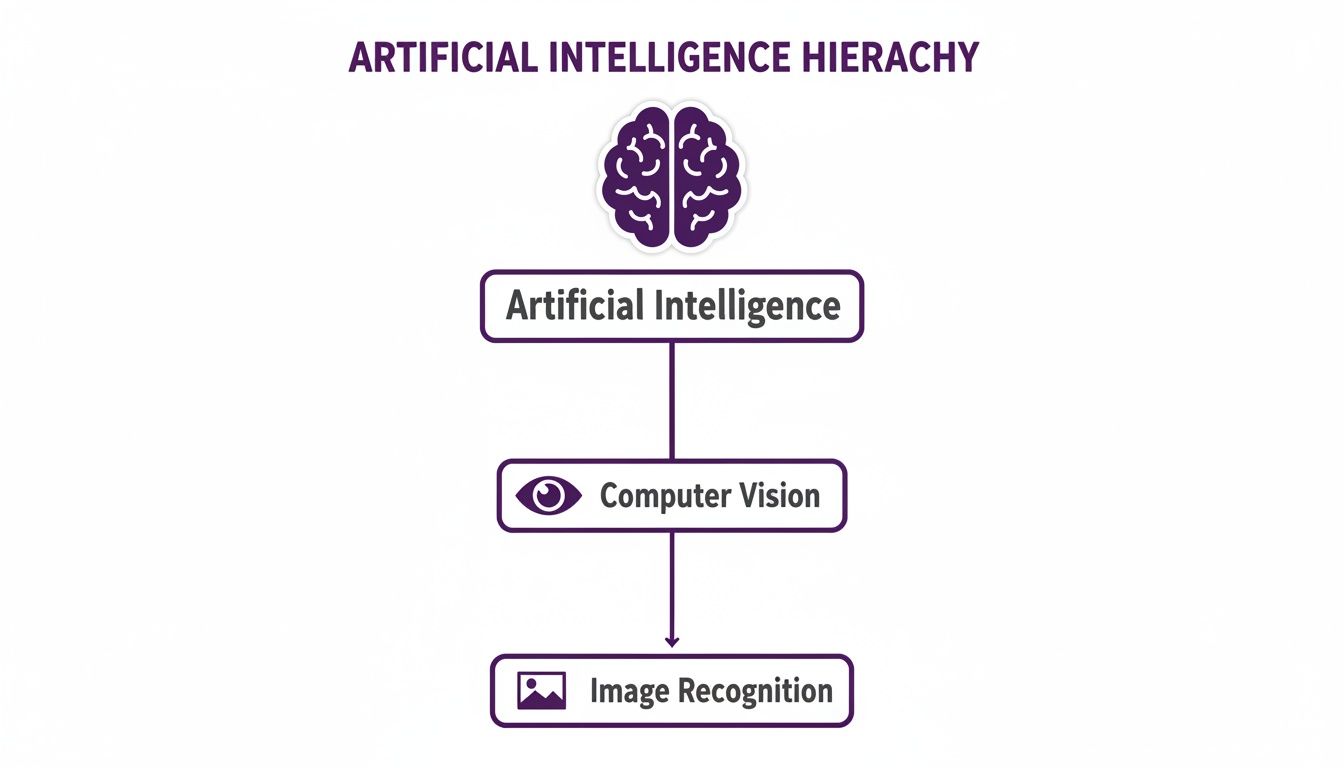
As you can see, all image recognition is a form of computer vision, which in turn is a major branch of AI. It’s a specialized skill within a broader field.
From Pixels to Patterns
The first step in this learning journey is something called feature extraction. Think about how an artist sketches a portrait. They don't meticulously draw every single strand of hair right away. Instead, they focus on the defining features—the curve of the jaw, the shape of the nose, the angle of the eyes.
An algorithm does something similar. It sifts through all the pixel data to find the most important, foundational features. It's looking for the basic building blocks of the image.
- Edges: The lines where different objects or colors meet.
- Corners: The specific points where two edges come together.
- Textures: Repeating visual patterns, like the grain in a piece of wood or the weave of a shirt.
By isolating these simple features, the software creates a kind of simplified map of the image. It learns to ignore the noise and focus only on the information that helps define what's actually in the picture.
Introducing Convolutional Neural Networks
This is where the real magic begins, thanks to a special type of algorithm called a Convolutional Neural Network (CNN). You can think of a CNN as a series of specialized filters, where each filter is trained to spot a particular pattern. The first few filters in the network might only be able to detect simple things, like straight lines and gentle curves.
The output from these initial filters gets passed along to the next layer of filters. This next layer learns to combine those simple patterns into more complex shapes, like an eye or a car's wheel. This continues layer after layer, getting more sophisticated each time.
A CNN builds understanding progressively. It starts by seeing basic edges, then combines them into shapes, assembles those shapes into objects like faces or cars, and finally recognizes the complete scene.
This layered approach is what allows the software to develop such a deep understanding of visual information, moving from raw pixels to abstract ideas. This same principle of layered learning is a crucial part of AI image identification, which helps systems tell different kinds of images apart.
Ultimately, after an image passes through all these interconnected layers, the CNN can assign a final label—"dog," "car," or "tree"—with a high degree of confidence. It has effectively learned to "see" in a way that starts to mimic our own human perception.
Real-World Applications of Image Recognition

The theory behind how machines learn to see is interesting, but where image recognition software really shines is in solving real, tangible problems. This isn't just lab-based tech anymore; it's actively working in countless industries, making things more efficient, safer, and opening up entirely new ways of doing business.
From a factory floor to your online shopping cart, the applications are as diverse as they are powerful. Each one is a great example of how turning visual data into actionable insights creates real value.
Transforming Commerce and Media
The retail and e-commerce world has been one of the biggest adopters, making up 25.2% of the market's use. It’s not hard to see why—image recognition directly improves everything from the customer experience to backend logistics. Looking at the wider picture, scanning and imaging are the most common applications overall, responsible for a whopping 32.2% of market activity, according to data from Verified Market Research.
So, what does this look like in practice?
- Visual Search: Forget trying to describe a "blue floral dress with puff sleeves." Shoppers can now just upload a photo of a dress they love and instantly get a list of similar items. It closes the gap between seeing something you want and actually buying it.
- Inventory Management: Imagine automated systems in warehouses and stores that constantly scan shelves. They can track stock levels, spot misplaced items, and even help prevent theft, all without needing a human to manually count boxes.
- Personalized Marketing: By analyzing the kinds of images a customer clicks on or saves, brands can serve up far more relevant product recommendations and ads. The result is a shopping experience that feels like it was built just for you.
In media and journalism, image recognition has become an essential verification tool. It helps fact-checkers confirm whether a photo is authentic, identify where it was taken, and spot manipulated content—a critical function in the fight against misinformation.
Enhancing Accessibility and Safety
Beyond shopping and media, image recognition is delivering some profound benefits to society, especially in accessibility and public safety.
For someone who is visually impaired, a smartphone can now act as their eyes. Apps can describe the world around them in real-time by pointing the camera at a scene to identify objects, read text from a menu, or even recognize the faces of friends and family as they approach.
This same core technology is the bedrock of autonomous vehicles. Self-driving cars depend on sophisticated image recognition to see and identify everything from pedestrians and other cars to traffic lights and road signs. They make split-second decisions based on this constant stream of visual information, which is absolutely essential for navigating our roads safely.
If you're curious about how these systems break down and process visual data, you can learn more about the role of an image analyzer AI in making sense of complex scenes. This technology is fundamental to everything from accessibility apps to advanced driver-assistance systems.
The table below provides a snapshot of how different sectors are leveraging image recognition technology to solve specific challenges and create value.
Image Recognition Applications Across Industries
| Industry | Primary Use Case | Example Application |
|---|---|---|
| Retail & E-commerce | Product Discovery & Management | Visual search tools, automated inventory tracking, personalized recommendations. |
| Healthcare | Medical Imaging Analysis | Detecting anomalies in X-rays, MRIs, and CT scans to assist in diagnosis. |
| Automotive | Autonomous Driving & Safety | Pedestrian detection, lane-keeping assistance, traffic sign recognition. |
| Manufacturing | Quality Control & Automation | Identifying product defects on an assembly line, robotic guidance. |
| Security | Surveillance & Access Control | Facial recognition for secure entry, threat detection in crowded areas. |
| Agriculture | Crop & Livestock Monitoring | Identifying plant diseases, monitoring crop health via drones, tracking livestock. |
| Media & Entertainment | Content Moderation & Organization | Automatically flagging inappropriate content, tagging photos for easy search. |
As you can see, the applications are incredibly broad, touching nearly every aspect of modern life and business. Each industry is finding unique ways to turn sight into strategy.
Understanding the Risks and Ethical Challenges
As powerful as image recognition software is, we have to go in with our eyes wide open about its limitations and the ethical minefields it presents. No technology is truly neutral; its impact is shaped by how we build and use it. The data we feed these systems can bake in serious, often unintended, flaws that cause real-world problems.
One of the biggest issues we're grappling with is algorithmic bias. Imagine an AI model trained almost exclusively on images of one demographic. It’s not a stretch to see how it would stumble when asked to analyze images of people from other groups. This isn't just a hypothetical scenario—biased systems have already contributed to wrongful arrests and discriminatory decisions.
At the end of the day, an AI is only as good as the data it learns from. If the training data is skewed, the software’s judgments will be skewed, which can reinforce and even amplify existing societal inequalities.
This puts a huge weight on developers' shoulders to build datasets that are diverse and truly representative of the world. Without that foundational work, even the most sophisticated image recognition tools can fail when it matters most.
When AI Can Be Deceived
Beyond bias, these systems have some specific blind spots that can make them unreliable. Two of the most common vulnerabilities are adversarial examples and domain shift.
Adversarial Examples: Think of these as optical illusions for AI. They are images that have been slightly altered—often in ways a human wouldn't even notice—with the express purpose of tricking the model. A tiny, strategically placed sticker on a stop sign could, for example, cause an autonomous vehicle’s AI to misread it completely, creating a massive safety hazard.
Domain Shift: This happens when a model trained for one environment is dropped into a totally different one. An AI that's an expert at spotting product defects on a pristine, brightly-lit factory line might be useless when deployed in a dusty, dimly-lit warehouse. The context changed, and its performance plummeted.
These are not just edge cases; they are active areas of security research. To get a better sense of how these things play out, you can learn more by analyzing artificial intelligence security failures, which covers real-world challenges and what we can learn from them.
The Privacy Dilemma
Perhaps the thorniest ethical issue is privacy, especially when it comes to facial recognition. The ability to collect and analyze facial data at scale opens up a Pandora's box of questions about consent, surveillance, and personal security.
If a company's database of biometric data is breached, the consequences are far more severe than a simple password leak. You can't just reset your face. This reality makes robust data security and transparent policies an absolute must for any organization using this technology. Collecting data ethically, storing it securely, and using it only as intended aren't just best practices—they're essential for building trust and wielding this powerful tool responsibly.
Finding the Right Image Recognition Solution for You
Picking the right image recognition software isn't about chasing the "best" tool on the market. It’s about finding the best fit for what you're actually trying to accomplish. A common mistake is jumping into a solution without a crystal-clear plan.
First things first: what's the core problem you're trying to solve? Are you looking to automatically flag product defects on an assembly line? Or maybe you need to moderate thousands of user-uploaded images for inappropriate content?
Your goal sets the bar for everything else, especially accuracy. For a social media app, catching 95% of policy-violating content might be a solid win. But if you’re building a medical imaging tool to help doctors spot tumors, you need to get as close to 100% accuracy as humanly (and technologically) possible. Nail this down first, and you’ll avoid investing in a system that doesn’t actually meet your needs.
On-Premise vs. Cloud APIs: Where Does the Magic Happen?
One of the biggest forks in the road is deciding where your software will run. This choice comes down to a classic trade-off between control, cost, and complexity.
Cloud-Based APIs: Think of services like Google Cloud Vision or Amazon Rekognition. These are essentially "plug-and-play" solutions. They're fantastic for getting off the ground quickly with minimal upfront cost, and they come with powerful, pre-trained models ready for common tasks.
On-Premise Solutions: This is the DIY route, where you host and manage the software on your own servers. It gives you absolute control over your data and allows for deep customization, but it’s a heavy lift. You'll need serious technical know-how and a budget for hardware and ongoing maintenance.
It really boils down to control versus convenience. If data privacy is non-negotiable or your use case is incredibly niche, on-premise is the way to go. For almost everyone else looking for speed and efficiency, cloud APIs are the smarter bet.
How to Vet Potential Vendors
Once you start looking at different options, you have to see past the flashy marketing. While North America has historically dominated the image recognition software market, the Asia-Pacific region is catching up fast, with new applications popping up everywhere from healthcare to self-driving cars. You can get a better sense of the global image recognition market trends on Towards ICT.
When you're sitting in a demo, don't be afraid to ask tough questions.
Ask about their training data. How diverse is it? This gives you a clue about potential biases lurking in their models. Push for case studies from companies with problems similar to yours, and scrutinize the performance metrics they brag about.
Finally, dig into their data privacy and security policies. You need to know exactly how your data will be handled, stored, and secured. Doing this homework upfront ensures you find a partner who doesn't just check the technical boxes but also aligns with your company's security and ethical standards.
The New Challenge: Verifying AI-Generated Images
For years, image recognition software has been great at answering one simple question: what is in this picture? It can tell you if you're looking at a dog, a car, or a sunset. But now, a much tougher question is just as important: where did this picture actually come from?
The explosion of AI image generators has created a whole new problem. Suddenly, we need tools that can tell the difference between a real photograph and a convincingly fake one. This is a job most standard recognition models just weren't built for. Their training is all about generalizing—seeing a cat as a cat, regardless of minor variations—not hunting for the tiny imperfections that give away a synthetic image.
This new reality has created a serious verification gap. As AI-generated images get harder to spot, the risk of them being used for misinformation, fraud, or copyright abuse skyrockets.
Looking for Clues Beyond the Obvious
To close that gap, a new type of specialized tool is becoming essential. Think of these AI image detectors as a companion to traditional image recognition. They work by hunting for the subtle, almost invisible signatures that AI models leave behind in their creations.
Instead of just identifying objects, these tools perform a kind of digital forensic analysis. They're not looking at the big picture; they're examining an image's DNA, searching for the tell-tale artifacts that separate a machine's work from a photographer's.
These detectors are trained on huge libraries of real and AI-generated images, which teaches them to spot patterns the human eye would almost certainly miss.
The Digital Fingerprints of AI
So, what are these detectors actually looking for? It's not about the content. It’s all about the hidden structure of the image itself.
- Pixel-Level Inconsistencies: AI models can create textures that are a little too perfect or unnaturally smooth compared to the chaotic detail of the real world.
- Subtle Lighting Flaws: Getting the physics of light right is incredibly hard. An AI might create shadows that don’t quite line up or reflections that just feel a bit off.
- Unusual Digital Artifacts: The process of generating an image can leave behind unique noise patterns or artifacts, almost like a watermark specific to a particular AI model.
By focusing on how an image was made rather than what it contains, AI detection tools add an essential layer of trust and safety. They help verify authenticity in an environment where seeing is no longer believing.
For journalists, researchers, and anyone moderating content, this is no longer a "nice-to-have"—it's a necessity. It gives them a way to validate sources and push back against the tide of convincing fakes. If you want to see how this works in a real-world scenario, you can get a detailed breakdown in this guide on how to perform an AI-generated image check to confirm a picture’s origin. This extra step is quickly becoming a non-negotiable part of any modern verification process.
A Few Common Questions
If you're just starting to explore image recognition, you've probably got a few questions. Let's tackle some of the most common ones.
What’s the Difference Between Image Recognition and Computer Vision?
Think of it like this: Computer Vision is the entire university, the whole field of study dedicated to teaching computers how to see and understand the visual world. It’s a huge discipline that covers everything from tracking a moving car in a video to reconstructing a 3D model of a room.
Image Recognition, on the other hand, is like one specific, very popular course within that university. Its job is much more focused: to look at a single image and say, "That's a cat," or "That's the Eiffel Tower." It’s one of the most practical and well-known applications to come out of the broader science of computer vision.
Just How Accurate Is Image Recognition Software?
That's the million-dollar question, and the honest answer is: it depends. The accuracy you'll see comes down to the algorithm, the quality of the data it was trained on, and how tough the job is.
For a very specific task in perfect conditions—say, identifying a brand of soda in a high-res photo—the best models can hit over 99% accuracy. But throw it a curveball like a blurry, poorly lit photo or an object it’s never seen before, and that accuracy can plummet. In the real world, performance is always a tug-of-war between how well the model was trained and how messy the real-world data is.
A model’s accuracy isn't some fixed number. It’s a direct reflection of how well its training prepared it for the specific visual challenges it's facing right now.
Can I Build My Own Image Recognition Model?
Technically, yes, but it’s a massive project. Building a model from the ground up requires serious machine learning expertise, a ton of computing power, and access to huge, meticulously labeled datasets. It’s not a weekend project.
For most businesses and developers, starting from scratch just doesn't make sense. It's far more practical to use a pre-built solution or a customizable API from a cloud provider. This approach gives you all the power without the years of development and heavy infrastructure costs.
Verifying where an image comes from is the next major step in visual analysis. Protect your platform and content with AI Image Detector, the privacy-first tool built to tell the difference between human-made and AI-generated images. Get your free analysis at https://aiimagedetector.com.

