

How to AI Identify Picture Content and Spot Fakes

To figure out if a picture is AI-generated, you really need a two-pronged attack: start with automated tools, then bring in your own human intuition. The process usually begins with a quick scan using an AI image detector. After that, it’s all about a careful manual inspection, looking for those classic visual tells—weird textures, wonky lighting—that AI models often get wrong.
The Rise of AI Images and Why It Matters
Is that incredible photo of a deep-sea creature real, or did an AI dream it up in five seconds? With the flood of AI-generated images, it's become nearly impossible to trust our own eyes. Learning to spot AI-made pictures isn't just for tech geeks anymore; it's a critical skill for journalists vetting sources, teachers grading assignments, and frankly, anyone who scrolls online.
This image perfectly captures the question we’re all asking now: Is what I’m seeing real or fake? This isn't just a tech problem anymore; it's a fundamental part of modern media literacy.
The Growing Need for Verification
The damage from digital fakes—from spreading misinformation to muddying the waters of creative ownership—is already huge. As the AI models get scarily good, the line between what's real and what's artificial practically vanishes, making reliable verification tools more important than ever.
The market for AI detection tools tells the whole story. It's already valued at a staggering USD 583.6 billion for 2025 and is expected to rocket to USD 3,267.5 billion by 2032. That explosive growth, detailed in a report from Coherent Market Insights, shows just how urgent the fight against fake content has become.
Understanding the Tech Behind the Fakes
This new breed of imagery is known as synthetic media—a catch-all term for any content that's been created or heavily altered by artificial intelligence. Getting a handle on what synthetic media is gives you a huge advantage in understanding why it can be so tricky to detect. For a more thorough explanation, check out our guide on what is synthetic media.
Here's the challenge in a nutshell: AI models learn from millions of real photos, so their fakes are getting better and better. But they still make tiny, predictable mistakes that a sharp eye—or a specialized tool—can pick up on.
This guide will walk you through the entire toolkit, from using the best detectors out there to sharpening your own critical observation skills. You'll be ready to tackle this new reality head-on.
When you first suspect an image might be AI-generated, your fastest and most reliable starting point is a dedicated detection tool. Think of it as your first line of defense.
Getting that initial check is usually dead simple. Most of these platforms have a clean, drag-and-drop interface. You just upload the picture in question, and the tool gets to work in seconds. It’s not just scanning for the obvious stuff; its algorithms are trained to find the tiny, microscopic giveaways in patterns, textures, and lighting that our own eyes almost always miss.
The whole process is built for both speed and privacy. The good detectors analyze the image on the fly without permanently storing your files, which means your content stays confidential. It’s a safe, efficient way to get a quick read on an image.
Making Sense of the Confidence Score
The results you get back aren't just a simple "yes" or "no." Instead, you’ll see a confidence score, usually a percentage. For example, a result might say "95% Likely AI-Generated" or place the image on a scale from "Likely Human" to "Likely AI." This nuance is key, especially as the lines between human and AI creation get fuzzier every day.
A high score, say over 90%, is a pretty strong signal that you're looking at a machine-made image. On the flip side, a very low score suggests it's probably authentic. But what about that gray area in the middle? Scores floating between 40% and 60% are where things get interesting and often point to more complex scenarios.
- Heavily Edited Photos: A real photo that’s been put through some serious digital editing—heavy color grading, object removal, that kind of thing—can sometimes throw the algorithm for a loop.
- Hybrid Images: This is common with digital artists who might use AI to generate a specific element, like a background, while creating the rest themselves.
- Low-Quality Files: Heavy compression and low resolution can wipe out the very artifacts the detector is trying to find, leading to a much less certain result.
Key Takeaway: An AI image detector is a powerful forensic tool, but it's not a magic eight ball. Think of its output as a crucial piece of evidence that guides your next steps, not the final verdict.
A Peek Under the Hood
So, how do these tools work their magic so quickly? They're built on machine learning models that have been trained on massive datasets—we're talking millions of images, both real and AI-generated. By studying this data, the models learn to spot the unique "fingerprints" that different AI image generators leave behind.
For instance, an AI might create a brick wall with a repeating pattern that's just a little too perfect, or it might render human skin that's unnaturally smooth and lacks the tiny imperfections of real life. The detector is specifically built to catch these subtle but telling signs. The more you learn about how a top-tier image AI detector works, the better you’ll get at spotting these things yourself during a manual review.
Ultimately, using a detector gives you a data-backed starting point. It cuts out the initial guesswork, letting you focus your attention on the images that truly need a closer, more experienced human eye. This blend of automated speed and expert manual review is the most effective way to operate today.
Spotting the Telltale Signs: A Forensic Look at AI Images
While an AI detector gives you that critical first pass, nothing beats a trained human eye. Think of it as the next layer of your verification process. Automated tools are fantastic for a quick check, but to truly understand why an image gets flagged, you need to roll up your sleeves and do a bit of forensic work.
This means looking past the obvious stuff, like the classic six-fingered hands that were a dead giveaway in early AI models. The mistakes are getting much more subtle now.
You have to become a bit of a digital detective, hunting for the small artifacts and inconsistencies that reveal an image’s artificial roots. These clues are often hiding in plain sight, easily missed if you don't know what you're looking for.
And this skill is more important than ever. The market for AI-based image analysis is exploding—it hit an estimated USD 13.07 billion in 2025 and is on track to reach USD 36.36 billion by 2030, growing at a blistering 22.7% each year. This surge, detailed in a report from MarketsandMarkets, shows just how critical it is for professionals to be able to tell real from fake.
Hunt for Unnatural Textures and Surfaces
One of the first places I always look is texture. AI generators are notorious for getting surfaces wrong, especially when it comes to anything organic—people, plants, food, you name it.
- Skin that’s too perfect: AI often renders skin that’s waxy, overly smooth, or plasticky. It lacks the natural pores, tiny hairs, and subtle imperfections that make human skin look real.
- A strange, uniform gloss: You might see a weird sheen on things that shouldn't be shiny, like clothing, hair, or even the bark on a tree. It’s a sign the AI doesn’t quite understand how different materials reflect light.
- Muddled background details: This is a big one. Zoom in on complex patterns like a field of grass, a gravel path, or a crowd in the distance. The details often dissolve into a blurry, nonsensical mess.
An AI model is a master of imitation, not creation. It pieces together what it thinks a texture should look like based on its training data, but it doesn't understand the underlying physics or biology. That's where these telltale imperfections come from.
This is especially critical when dealing with deepfakes. A manipulated face can look shockingly real at first glance, but a closer look at the skin texture often gives it away. We cover this in much more detail in our guide on how to spot a deepfake.
Sometimes it's helpful to see a direct comparison. This table breaks down what to look for when you're trying to decide if a flaw is from an AI or just a normal photographic imperfection.
Common AI Artifacts vs Human Imperfections
| Artifact Type | What to Look For in AI Images | What to Expect in Human Photos |
|---|---|---|
| Skin & Hair | Overly smooth, waxy texture; strands of hair blending into skin or clothing; unnatural uniformity. | Natural pores, blemishes, fine lines; flyaway hairs; variations in skin tone and texture. |
| Backgrounds | Muddled, "dream-like" details; objects that morph together; nonsensical shapes when zoomed in. | Motion blur, lens flare, or soft focus (bokeh), but objects remain distinct and logically placed. |
| Light & Shadow | Conflicting light sources; shadows pointing in impossible directions; objects lacking proper shadows. | Consistent shadows based on one or more clear light sources; natural reflections in eyes and shiny surfaces. |
| Text & Fingers | Garbled, unreadable text; warped or extra letters; extra or missing fingers; unnatural hand poses. | Clear, readable text (unless intentionally blurred); anatomically correct hands and fingers. |
Looking at this side-by-side really helps sharpen your eye for what feels "off" versus what's just a quirk of regular photography.
Scrutinize Light, Shadows, and Reflections
Physics is hard, even for a powerful AI. I’ve found that one of the most reliable giveaways is when a generative model makes a fundamental mistake with light and shadow.
Keep an eye out for inconsistencies. You might see shadows pointing in the wrong direction relative to the main light source. Or maybe an object in bright sunlight casts no shadow at all.
Reflections are another major weak point. Check windows, mirrors, sunglasses, or even the pupils of a person's eyes. Do the reflections accurately match the surrounding environment? Often, they don't. These subtle physical impossibilities shatter the illusion of reality, and once you start looking for them, they become much easier to spot.
Looking Beyond the Pixels
Visual glitches and weird artifacts are just the first layer. If you really want to be sure about an image's origin, you have to play detective and dig into its digital history. The idea is to go past what you can see and follow the image's footprint across the web.
This is especially critical in professional settings, like journalism or academic research, where verification is non-negotiable. It adds a hard, evidence-based layer to your analysis that complements what AI detectors and your own visual checks suggest.
Trace the Image with a Reverse Search
Your go-to tool for this is a reverse image search. Instead of using words, you give the search engine the image itself, and it scours the web for other places it exists. Google Images and TinEye are the heavy hitters here, and both are incredibly useful.
The results can tell you a lot. Maybe you find the image posted on an AI artist’s DeviantArt page or in a gallery full of other synthetic art. Boom—that gives you immediate context that just staring at the pixels never could.
On the other hand, you might find the image on a professional photographer's portfolio or a well-known stock photo site. That's a pretty strong signal that you're looking at a genuine photograph. A reverse search helps you build a timeline for the image, which is often the most concrete proof you'll find.
Pro Tip: An image with zero online history is a major red flag. It’s not a slam dunk for AI, but most real, high-quality photos have some kind of digital trail. If a picture just appears out of thin air, approach it with a healthy dose of skepticism.
Uncover Hidden Clues in the Metadata
Every digital photo carries a backpack full of hidden information called EXIF (Exchangeable Image File Format) data. Think of it as the image's birth certificate. This metadata can be a goldmine for verifying authenticity.
Here’s what you should be looking for:
- Camera Model: Seeing something like "Canon EOS R5" or "Apple iPhone 15" is a fantastic sign that the image came from a real device.
- Lens Information: Specifics about the lens used just add more weight to the evidence.
- Software: You might see tags for "Adobe Photoshop," which can explain any edits or touch-ups.
- Date and Time Stamp: This can help you place the photo in a real-world timeline.
AI-generated images almost never have this kind of specific camera data. Their metadata is usually empty or contains a simple software tag like "Midjourney." Using image metadata extraction tools is a simple way to peek under the hood and see what’s really there.
Just keep one thing in mind: social media platforms usually strip out all this metadata when you upload a photo to save space. So, if the data is missing, it doesn't automatically mean the image is fake. But when that EXIF data is there, it’s some of the strongest objective evidence you can get.
Building a Professional Verification Workflow
When you're dealing with potentially fake images professionally—whether as a journalist, a researcher, or a content moderator—a casual glance isn't enough. You need a repeatable, structured process. This isn't about finding one magic bullet tool; it's about building a multi-layered approach where each step informs the next, creating a defensible case for your final judgment.
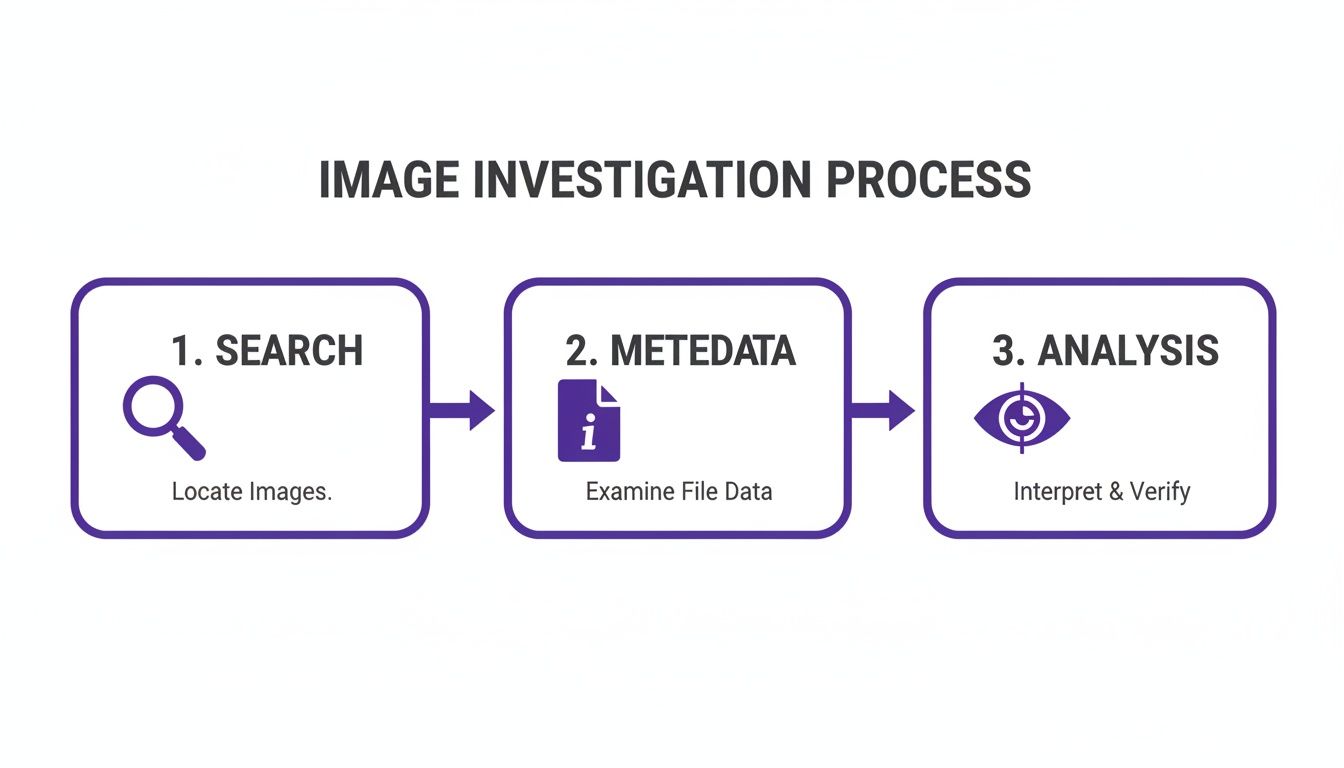
A solid workflow takes the abstract idea of spotting fakes and turns it into a concrete series of actions. The whole point is to gather different kinds of evidence—technical, visual, and contextual—to build a comprehensive picture of an image's origin.
First Pass: Triage and Technical Checks
Your first move should always be a quick technical triage. Start by running the image through a reliable AI detector. This gives you an initial confidence score, a data point that helps you decide how much deeper you need to dig.
At the same time, perform a reverse image search and pull the EXIF data. This two-pronged check can sometimes give you a quick win. The reverse search might lead you straight to a digital artist's portfolio, while the metadata might show a total lack of camera information—a huge red flag for a supposed photograph. Tools like picture annotation software for AI workflows can help streamline this part of the analysis.
This initial process is all about collecting the low-hanging fruit of technical data before you even start squinting at pixels.
Next Up: Forensic and Contextual Analysis
With the technical data in hand, it's time to put your own eyes on it. This is the manual forensic analysis—zooming in, looking for those tell-tale AI artifacts. You’re hunting for the unnatural skin textures, the impossible shadows, and the weird anatomical mistakes we've talked about. I always recommend documenting what you find, because these visual clues will either back up or challenge that initial detector score.
Finally, and this is crucial, you have to investigate the context. You need to ask some hard questions:
- Who shared it? Is the source a reputable organization or a brand-new, anonymous account?
- What's the story? Is the image pushing a narrative that feels a little too perfect or is designed to provoke a strong emotional reaction?
- Where and when did it appear? Does its timing make sense with real-world events?
The most sophisticated fakes often look technically flawless but completely fall apart under basic contextual scrutiny. If the story surrounding the image doesn't add up, its authenticity is immediately suspect.
Scaling Up Your Workflow with an API
For news organizations or social media platforms that see thousands of images an hour, this manual workflow obviously doesn't scale. That’s where an API comes in. Integrating an AI detection API allows trust and safety teams to build this verification step directly into their content moderation platforms. Suspicious images can be automatically flagged, sending them to a human reviewer for a final call.
This isn't just a "nice to have" feature anymore. The global image recognition market is expected to balloon to USD 128.3 billion by 2030, a number driven by the very real cost of fake images circulating in media and e-commerce. With reports showing AI-doctored news images are up by 40%, having a professional, scalable verification workflow is a core operational necessity. You can read more on this trend over at Grand View Research.
Common Questions We Get About Spotting AI Pictures
Once you start trying to identify AI-generated images regularly, you’ll inevitably run into some tricky situations. Getting a feel for these gray areas is what separates a novice from someone who’s truly confident in their verification skills. Let's walk through some of the most frequent questions we hear.
These aren't just academic questions; they pop up in real-world scenarios all the time. Knowing how to handle them will make your analysis much sharper.
Is Any AI Detector 100% Accurate?
In a word, no. No tool can ever promise 100% accuracy, and anyone who tells you otherwise isn't being straight with you. The reason is simple: the AI models that create these images are in a constant state of evolution. This is exactly why a good detector gives you a confidence score—a percentage—rather than a black-and-white "yes" or "no." A high score is a very strong signal, but it's not the final word.
Treat a detector's result as your first, most powerful clue. For anything important, you absolutely must back that score up with your own manual checks and a bit of digging into the source.
What if a Real Photo Gets Flagged as AI?
This is a classic "false positive." It’s not common, but it definitely happens. Photos that have been heavily edited, run through artistic filters, or are just very low-resolution can sometimes trick the algorithms. All that digital manipulation can sometimes look a lot like the artifacts an AI might leave behind.
If a photo you’re pretty sure is authentic gets flagged, think about what might have been done to it. This is where that "Likely Human" to "Likely AI" spectrum is so valuable—it’s built to handle these messy, mixed-media situations that aren't clear-cut.
Here's the bottom line: A detector's score is a single data point, not a final judgment. Use it to steer your investigation, especially when the results are somewhere in that murky middle. It'll keep you from making snap decisions.
How Do You Spot AI Images That Look Flawless?
This is where you have to retrain your eyes. When an image looks perfect on the surface, the secret is to stop focusing on the main subject and start hunting for errors in the background and periphery. The AI’s mistakes are almost always lurking in the details.
- Scan the Background: Look for nonsensical things. Is the text on a sign behind the person just a jumble of warped letters? Are the bricks on a wall repeating in an unnaturally perfect pattern?
- Check Reflections: This is a classic tell. AI is notoriously bad at creating logical reflections in things like windows, puddles, or even the lenses of sunglasses.
- Examine the "Boring" Stuff: AI generators pour all their energy into making the main subject look amazing. They often get lazy with the unimportant details, like the texture on a carpet or the subtle shadows cast by a piece of furniture.
Does Taking a Screenshot Hide AI Traces?
Screenshotting an image definitely makes detection more challenging, but it doesn't make it impossible. The process essentially creates a new image, which degrades the quality and, more importantly, wipes out all the original metadata. That erases a whole category of clues.
But the core visual evidence—the weird textures, the slightly-off anatomy, the inconsistent lighting—is literally baked into the pixels. A screenshot doesn't remove those artifacts. A good detector is trained to spot these fundamental visual patterns and can often still make an accurate call, even on a screenshot.
Ready to see for yourself? Get a quick, dependable analysis with the AI Image Detector. Just drag and drop your file to get a clear confidence score in seconds. It's the fastest way to start separating real photos from AI fakes.


