

Preventing copyright violations: Practical licensing and AI content tips

Making sure every image you publish is either original or properly licensed isn't just a good idea—it's a fundamental part of a modern content strategy. It means having a clear process for sourcing visuals from reputable places, double-checking the license terms, and keeping a record of your permissions before anything goes live. With AI-generated content now in the mix, having a rock-solid compliance plan is absolutely essential.
Why Copyright Compliance Is More Critical Than Ever
In a world of one-click shares and AI-powered art, the line between being inspired by something and stealing it has become dangerously fuzzy. Preventing copyright violations is no longer a task for the legal department; it's an active, daily responsibility for every creator, marketer, and business owner. The stakes for getting it wrong are higher and more public than ever.
The days of slapping "credit to the photographer" on an image and calling it a day are long gone. Today, sophisticated tracking tools and aggressive legal teams mean even an honest mistake can lead to a demand letter and a hefty fine. For any business, the damage goes far beyond the bank account.
The Real-World Risks of Infringement
The financial penalties for copyright infringement can be shocking. We're talking statutory damages that can run from a few hundred dollars to tens of thousands per violation, especially if the infringement is proven to be intentional.
Just think about it: one unlicensed photo used on your website, your social media channels, and a marketing brochure. Each one of those could be treated as a separate violation, causing the total cost to skyrocket.
But the financial blow is only half the story. A public copyright battle can do permanent damage to your brand's reputation. It broadcasts a lack of professionalism and a disregard for creative work, which can erode trust with your customers, partners, and even your own team. This is particularly true now, as more people understand and care about intellectual property. To get a better handle on this, you can learn more about protecting intellectual property rights in our detailed guide.
A copyright violation isn't just a legal slip-up; it's a public statement about your company's values. In a market where authenticity and ethics matter, the reputational damage can far outweigh any financial penalty.
The New Frontier of AI and Copyright Law
The recent explosion of generative AI has thrown another massive wrench into the works. These tools are incredibly powerful, but they also come with some serious legal question marks. Major lawsuits are already flying, with artists and creators suing AI developers for allegedly training their models on huge datasets of copyrighted images without permission.
That legal gray area affects you directly. If an AI tool spits out an image that's a dead ringer for a copyrighted work it was trained on, using that image could put you on the hook for infringement. This means every organization needs clear rules for using AI-generated content.
Here’s where to focus:
- Vet Your AI Tools: Stick with platforms that are upfront about their training data and, ideally, offer some kind of legal protection or indemnification against copyright claims.
- Document Your Process: Keep a meticulous record of the prompts you use and the images the AI generates. This helps show your unique creative process if a problem ever arises.
- Don't Replicate, Create: Use AI as a starting point for something new, not as a tool to mimic existing styles or specific artworks.
The laws around AI are changing fast, and new legislation is on the horizon. A proactive, cautious approach is your best defense in this new landscape.
Building Your Copyright Compliance Framework
Let's be honest: good intentions don't stand up in court. The only real defense against a copyright claim is a clear, documented internal playbook that everyone on your team actually uses. Preventing copyright violations means being proactive with a solid system, not just reacting when a demand letter shows up. This framework is your organization's go-to guide for sourcing, using, and publishing images legally and safely.
The goal here isn't to create a dense legal document that gathers digital dust. It's to build a living, practical guide that fits right into your team's workflow. It should empower everyone—from the fast-moving marketing team on a tight deadline to a global enterprise with complex content needs—to make confident decisions every single day.
A simple act of sharing an image online can spiral into a serious infringement claim with hefty financial penalties.
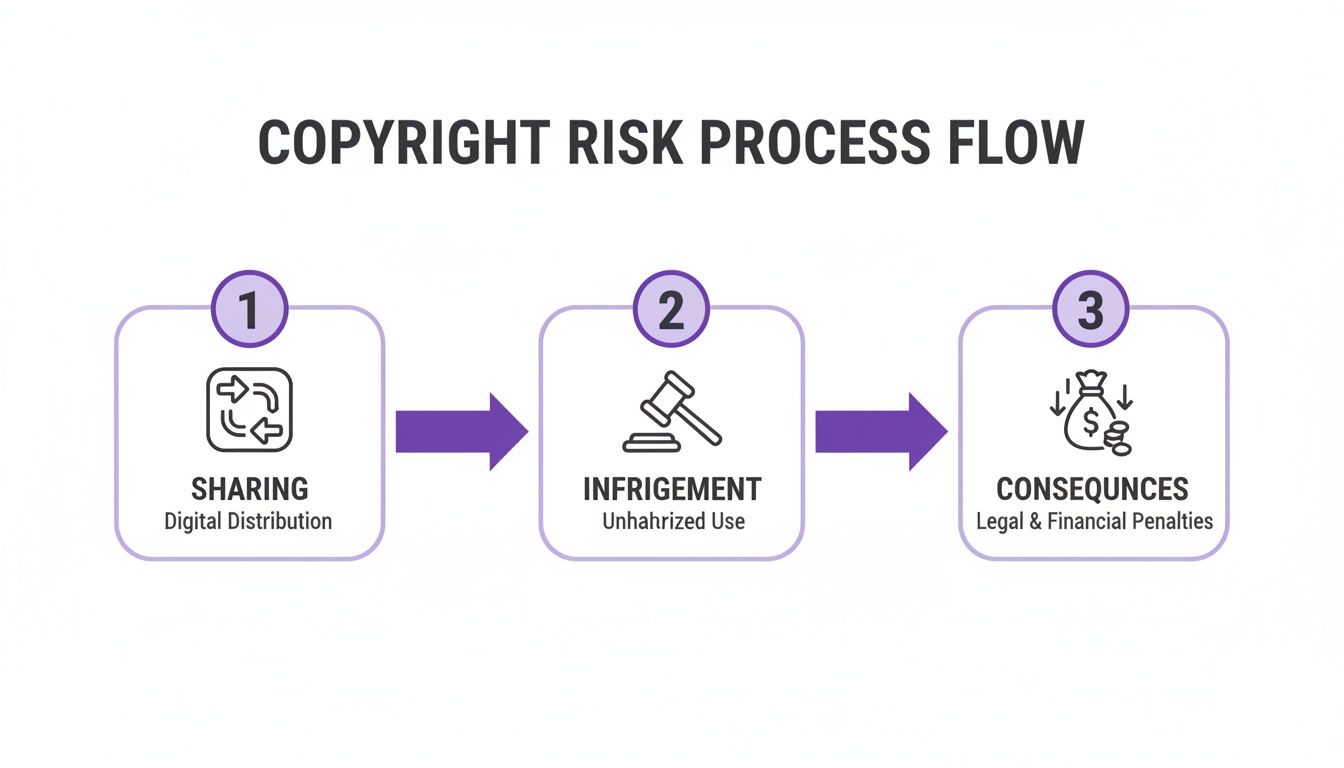
This process shows just how quickly things can go wrong, which is precisely why a strong compliance framework is non-negotiable.
Establish Your Content Sourcing Guidelines
The first pillar of your framework is deciding exactly where your team is allowed to get visual content. Without clear rules, the default move is often a quick Google search, which is one of the fastest ways to get an infringement notice. Your policy needs to spell out every single approved source.
Think of this list as a "safe zone" for your content creators. It eliminates the guesswork and massively cuts down on your risk.
Your approved sources might include:
- Specific Stock Photo Services: Name the platforms you have subscriptions with, like Getty Images or Adobe Stock.
- Creative Commons Platforms: List approved sites such as Unsplash or Pexels, but be sure to include a mandatory step to double-check the specific license for each and every image.
- In-House Assets: Clearly state where to find your company’s library of original photography, graphics, and brand materials.
- AI Generation Tools: If you allow AI, list the specific tools your legal team has vetted based on their terms of service and how they train their models.
By creating this approved list, you draw a clear line in the sand. Any source not on this list is off-limits without special permission. It’s a simple rule, but it’s an incredibly powerful way to prevent violations.
Design a Multi-Step Asset Review Process
Once an image is sourced, it needs a clear path to publication. A multi-step review process makes sure every asset gets properly vetted before it goes live. This isn't about creating red tape; it's about building in checkpoints to catch potential slip-ups.
For a smaller team, this could be as simple as a two-person check. The creator finds the image, and a manager verifies the license and its intended use before hitting "publish."
In a larger organization, the process will naturally involve more people.
A well-defined review workflow turns compliance from an abstract idea into a concrete, repeatable action. It distributes responsibility and builds a culture of accountability where everyone understands their role in protecting the company.
The recent explosion in AI-related copyright litigation is a perfect example of why this rigor is essential. The industry saw over 60 copyright infringement cases filed against AI companies by the end of one recent year alone. This surge shows that intellectual property holders are aggressively defending their work from being used in AI training, a trend that directly impacts anyone using AI-generated content. You can read more about the findings on the rise of AI-related copyright cases to see just how heated this area has become.
Train Your Team on Their Responsibilities
A framework is useless if your team doesn't understand it or, worse, doesn't use it. Ongoing training is absolutely critical. Your sessions should be practical, using real-world scenarios that your employees will actually encounter in their day-to-day work.
Focus on the essentials:
- Understanding Basic Licenses: Break down the difference between "royalty-free" and "rights-managed" in plain English.
- Attribution Requirements: Show them exactly how and where to provide credit when a license demands it.
- Documentation: Lay out a simple process for saving license information for every single asset used. This could be a shared spreadsheet or a more robust digital asset management (DAM) system.
Make this training a standard part of onboarding for anyone in a creative, marketing, or communications role. For your current staff, hold short annual refreshers to cover new developments—especially around emerging tech like generative AI. When you invest in your team's knowledge, you turn them from potential risks into your best line of defense.
Every single visual you publish is a decision that carries potential legal weight. A quick image grab from a web search can easily spiral into a demand letter with a four-figure price tag. This is why having a solid process for sourcing and licensing images isn't just for the legal department—it's a critical skill for any creator.
The right image makes your content sing, but the wrong one can bring everything to a screeching halt. You don't need to be a lawyer, but you do need to understand what you're agreeing to. The language can seem dense, but it all comes down to one crucial question: What does this license actually let me do with this image?
Decoding Common Image Licenses
Assuming all licenses are the same is a rookie mistake that can cost you dearly. The way you plan to use an image—whether it’s for a blog post, a social media ad, or your new product's packaging—directly dictates the kind of license you need.
Let's cut through the jargon and look at what you’ll actually encounter out there.
A Practical Comparison of Image License Types
Use this quick reference to understand the most common image licenses, helping you choose the right one and avoid costly mistakes.
| License Type | Best For | Key Restrictions to Watch For |
|---|---|---|
| Royalty-Free (RF) | General digital content like blog posts, websites, and social media where you need flexibility for multiple uses. | Doesn't mean "free." Often prohibits use in "items for resale" (like t-shirts or mugs) unless you buy an extended license. |
| Rights-Managed (RM) | High-impact, exclusive campaigns like major ad launches or book covers where you need a specific, unique image. | Highly restrictive. Governs usage duration, geographic location, and media type. Using it outside the agreed terms requires renegotiation. |
| Creative Commons (CC) | Budgets are tight, and you're willing to follow specific attribution or usage rules. Great for blogs, presentations, and internal projects. | "Free" comes with strings attached. NonCommercial (NC) is a common tripwire for businesses, and NoDerivatives (ND) means no cropping or edits. |
This table is a great starting point, but always, always click through and read the full license terms. The devil is in the details, and what you don't know can absolutely hurt you.
Getting a Handle on Creative Commons
Creative Commons (CC) is a fantastic system that lets creators share their work more freely. But "free" here comes with rules you have to follow to the letter. Ignoring them is still copyright infringement.
Think of CC licenses as a recipe built from a few core ingredients:
- Attribution (BY): This is the baseline for almost all CC licenses. You must credit the creator exactly as they specify. No exceptions.
- NonCommercial (NC): The image cannot be used for any commercial purpose. This is a huge trap for businesses—if your blog post promotes a product or service, using an NC image is a violation.
- NoDerivatives (ND): You can use the image as-is, but you can’t change it. At all. That means no cropping, no filters, and no adding your logo.
- ShareAlike (SA): If you remix or transform the image, you must release your new creation under the exact same CC license.
These components get mixed and matched into various licenses, like CC BY-SA or CC BY-NC-ND. If you're ever unsure, our guide on how to check images for copyright breaks down the process even further.
Your Secret Weapon: An Asset Tracking System
Sourcing an image correctly is only half the job. You also have to be able to prove you did it right, sometimes months or years down the road. This is where a simple tracking system becomes your best defense.
You don't need fancy software. A shared spreadsheet is often all it takes.
For every single third-party visual your team uses, make it a rule to log this information:
- A thumbnail of the image for quick visual reference.
- The source URL where you downloaded it.
- The specific license type (e.g., Royalty-Free, CC BY 2.0).
- Proof of the license—this could be a link to the terms, a PDF, or a screenshot of your purchase confirmation.
- Where you used it, like the blog post URL or the name of the social media campaign.
This simple logbook creates an instant audit trail that can shut down a copyright claim before it even starts. It transforms compliance from something you hope you did right into a documented, verifiable fact. Make this a non-negotiable step in your workflow, and you'll sleep a lot better at night.
Navigating Copyright in AI-Generated Content
Generative AI has thrown a massive curveball into the world of copyright. It’s easy to see AI image tools as a fantastic shortcut—a way to conjure up custom visuals without wading through stock photo licenses. But that thinking is a trap, and it’s one that carries some very real, and very new, legal risks.
The heart of the issue is how these AI models learn. Most are trained on gargantuan datasets scraped from the internet, a digital buffet that includes billions of copyrighted photos, paintings, and illustrations—all typically used without the original creator's consent. So, when an AI spits out an image based on that training, there's a strong legal argument that the result is an infringing derivative work.
This creates a serious problem. You could use an AI tool with the best intentions and still unknowingly publish an image that steps on someone else's copyright. Suddenly, your organization is in the legal hot seat.
Assessing the Risks of AI Content
Before you let any AI tool touch your creative workflow, you need to put on your skeptic's hat. The legal dust is far from settled, with major lawsuits and new regulations constantly shifting the ground beneath our feet. A proactive, defensive mindset is your best defense.
Your very first move should be to dive deep into the AI tool's Terms of Service (ToS). This isn't just fine print; it's the rulebook that governs how you can use the tool and who is responsible when things go wrong.
Be a detective and look for clear answers to these questions:
- Training Data: Is the company open about its training data sources? Vague or evasive language here is a huge red flag.
- Usage Rights: What rights do you actually get for the images you create? Do you own them outright, or are you just getting a license to use them? The difference is critical.
- Indemnification: Will the provider cover your legal costs if a copyright claim comes knocking? Some of the big players, like OpenAI and Google, are now offering this for their enterprise customers, which is a good sign.
Digging into these terms tells you a lot about the company's approach to ethics and the law. A provider that’s transparent about its data and willing to back you up legally is a much safer partner than one operating in the shadows. For a primer on the basics, check out our guide on what is AI-generated content.
The output of an AI is only as legally sound as its input. If the training data is a minefield of unlicensed content, the images it produces are built on that same shaky ground.
Creating a Defensible AI Workflow
Beyond vetting your tools, you need a rock-solid internal process for generating and using AI content. Think of it as building a paper trail that proves you made a good-faith effort to act responsibly if a problem ever pops up.
A strong workflow has a few key parts.
Document Everything
Keep meticulous records of your entire AI generation process. This isn't just busywork; it's your proof of unique creative effort.
- Log Your Prompts: Save the exact text prompts you used for every image. A series of detailed, evolving prompts shows you were guiding the AI to create something original, not just trying to mimic an existing piece of art.
- Save Output Versions: Keep the different image options the AI gave you. This visual history helps demonstrate your creative decision-making process.
- Record Post-Generation Edits: Did you tweak the image in Photoshop or another editor? Document those changes. This further cements the work as a product of your own labor and creativity.
This documentation is your audit trail. It proves you were an active participant in the creative process, not just a passive user of a tool that might be infringing on copyright.
You can also add a verification step to your process. An AI Image Detector, for instance, can help you determine if an image was created by a human or an AI model, giving you more insight into the origins of your visual assets before you publish them.
Remember, the legal environment is changing quickly. Lawmakers are moving to strengthen copyright protections, with new rules on the horizon aimed at stopping the unauthorized use of copyrighted material for AI training. This signals a clear shift toward greater accountability for AI developers.
To really get ahead of the curve on the commercial and legal side of AI art, you might even consider formal training, like a Certificate in AI Art Monetisation. By approaching AI with a clear strategy—vetting your tools, documenting your process, and staying informed—you can tap into its power while keeping your legal risks to a minimum.
How to Audit and Monitor for Ongoing Compliance
Let’s be honest: preventing copyright violations isn't a one-and-done task you can just check off a list. It’s a commitment. A solid policy is a great start, but it's only as effective as its implementation. That’s where regular audits and continuous monitoring come in—they're the critical follow-through that keeps your organization protected.
Think of it like maintaining a car. You don't just buy it and hope it runs forever. You have to check the oil, rotate the tires, and listen for anything that sounds off. A content audit does the same thing for your intellectual property, letting you catch small issues before they turn into costly breakdowns.
Conducting Your Content Audit
A systematic content audit is your first line of defense. The goal is to review everything your organization has published—across all platforms—to make sure every single visual asset is properly licensed and attributed.
It sounds like a massive job, I know. But you can make it manageable by breaking it down. A good rhythm for most organizations is a full-scale audit once a year, with smaller, more focused spot-checks on new content every quarter.
Start with your most visible and oldest content first. These are often the biggest minefields.
- Websites and Blogs: This is usually the largest pile to sort through. Pay extra attention to those ancient blog posts and static "About Us" pages. Images there were likely added years ago, probably long before your current policies were even a thought.
- Social Media Channels: The fast-paced, high-volume nature of social media makes it a prime spot for compliance gaps. You'll need to scroll back through your feeds on Instagram, LinkedIn, Facebook, and anywhere else you have a presence.
- Marketing Collateral: Don't forget the offline and downloadable stuff. Every image in your PDFs, white papers, ebooks, and sales decks needs to be verified.
For every single image you review, you have to be able to trace it back to a valid license in your asset tracking system. If you can't find a record, that image is a potential liability.
Building Your Audit Checklist
To keep your audit consistent and prove you’ve done your due diligence, a simple checklist is your best friend. For every image, ask four key questions:
- Can I find the license? Is the original source and proof of license logged in our system?
- Are the usage rights correct? Does the license actually permit how we've used it (e.g., for commercial use on a website)?
- Is attribution handled properly? If credit is required, is it there? Is it formatted exactly how the creator specified?
- Has the license expired? For Rights-Managed licenses, are we still within the agreed-upon time frame?
If an image fails any of these checks, flag it immediately. The safest move is always to take the image down until you can either confirm its license or replace it with a compliant one.
An audit isn't about pointing fingers; it's about reducing risk. The goal is to build a culture where finding and fixing a compliance issue is seen as a collective win for the whole team.
Monitoring Your Assets Online
Auditing isn't just an internal affair. You also need to keep an eye on how your own original content is being used across the web. When others use your proprietary images, graphics, and videos without permission, it can dilute your brand and weaken your marketing.
Luckily, technology makes this a lot easier than it sounds. A reverse image search is an incredibly powerful tool here. Just upload one of your original images to a service like Google Images or TinEye, and it will scan for everywhere that image appears online. This is a straightforward way to spot unauthorized use and take action, like sending a DMCA takedown notice. To effectively audit and monitor for ongoing compliance, understanding the specific features of available tools can be crucial, such as the capabilities detailed in copycat247's specific features.
By setting a recurring calendar reminder to run these checks on your most valuable visuals, you turn monitoring into a proactive habit. This constant loop—auditing your use of others' content and monitoring the web for use of your own—creates a comprehensive shield that makes ongoing compliance a manageable part of your workflow.
Got Questions About Copyright?
Even with a great system in place, you’re bound to run into tricky situations. When you're in the thick of creating content every day, unique questions pop up that don't always have a textbook answer. Let's walk through some of the most common ones I hear.
Getting these details right is what keeps your organization safe and out of hot water. Think of this as your go-to guide for those "what if" moments that can trip up even seasoned creators.
What's the Safest Way to Find Images for My Website?
The most bulletproof method is to go with a reputable paid stock photo service like Getty Images or Adobe Stock. These platforms don't just sell you a photo; they sell you peace of mind with clear, legally solid licenses. Many even offer indemnification, which is basically their promise to back you up legally.
If the budget is tight, free sites like Unsplash or Pexels are your next best bet. But here's the catch: you absolutely have to check the license for every single image you download. The terms can and do vary. Whatever you do, never just pull an image from a Google search and assume it's fair game.
The only 100% guaranteed way to avoid infringement is to create your own original visuals. When you're the one taking the photo or designing the graphic, you own the copyright. No ambiguity, no third-party risk.
Does Crediting the Photographer Protect Me from Infringement?
No, and this is a huge one. It's probably the most dangerous and widespread myth out there. Simply giving someone credit does not give you the right to use their work, and it won't shield you from a copyright claim.
It's true that some licenses, especially certain Creative Commons versions, require you to give attribution. But that's just one clause in the license agreement. The key part is that you have to secure the license first. Without permission, using an image is a violation—with or without a credit line.
Can I Get in Trouble for Using an AI-Generated Image?
Yes, you certainly can. The legal world is still catching up to AI-generated art, and using it comes with some very real risks. The core problem is the training data. If an AI tool was trained on a massive dataset of copyrighted images without permission, its output could legally be considered a derivative work—and you'd be the one publishing it.
To play it safer, dig into the terms of service of any AI generator you're considering. You're looking for transparency about where they got their training data and what usage rights they actually grant you. Your best move is to stick with tools from established companies that offer indemnification against copyright claims.
What Should I Do If I Get a Copyright Infringement Notice?
First off, don't ignore it. Time is of the essence. Your very first move should be to take the content down from everywhere it's posted. This immediately stops the clock on any potential damages.
Next, you need to verify the claim. Is it legitimate? Go back to the notice and then cross-reference it with your own asset management system to see if you have a license on file. Before you even think about replying, I strongly recommend talking to a lawyer who specializes in intellectual property. They’ll help you figure out the best way to respond and navigate the situation without making things worse.
Ready to add a powerful layer of verification to your content workflow? AI Image Detector helps you determine if an image was created by a human or generated by an AI, giving you critical insight before you publish. Protect your brand from misinformation and copyright risks with our fast, free, and privacy-first tool. Try it now at https://aiimagedetector.com.