

Ai Analyze Image for Authenticity: A Practical Guide (ai analyze image)

To really understand if an image is genuine, you need to look beyond the surface. It’s a process that involves checking for hidden data (metadata), running it through a specialized AI detection tool, and even doing a little detective work with a reverse image search. Think of it as combining a high-tech analysis with your own critical eye.
Why We Can No Longer Trust Our Eyes
We're all swimming in a sea of digital content, and the line between what’s real and what's AI-generated has blurred into near invisibility. Being able to critically analyze an image is no longer a niche skill for tech experts—it's an essential one for everyone. This guide is all about giving you the practical, hands-on steps to verify the images you come across every day.
We'll walk through real-world scenarios, from questioning viral news photos to authenticating product images, showing you exactly why this matters so much now. The explosion of AI-generated content makes it incredibly difficult to tell fact from fiction, highlighting just how important it is to understand the world of synthetic media and its impact.
The New Reality of Digital Content
Every single day, we're hit with images designed to make us feel something, buy something, or believe something. With modern AI image generators, anyone can create photorealistic—and completely fake—scenes in a matter of seconds. This changes everything, from how we get our news to who we trust online.
Think about how often this comes up in daily life:
- Verifying Social Media News: Is that jaw-dropping photo from a global event real, or was it created by an AI to stir up conflict?
- Authenticating Product Listings: Are the photos of that item on an online marketplace showing the actual product, or are they AI-generated to look flawless?
- Checking Professional Profiles: Does a potential hire's profile picture look a little too perfect? It could be a sign of a completely fabricated online identity.
It’s not just about spotting bad Photoshop anymore. Today’s challenge is detecting subtle, almost invisible artifacts left behind by algorithms—clues that even a trained eye can easily miss. This requires a new way of thinking and a new set of tools.
Why This Skill Is a Necessity
This shift isn't just a tech trend; it's a massive economic and social change. The market for AI-based image analysis is exploding, valued at $7.28 billion in 2024 and on track to hit a staggering $48.08 billion by 2035. This incredible growth isn't just happening in one industry; it reflects a critical need across the board to process and validate visual information.
To help you get started, here's a quick look at some of the common red flags you can look for yourself.
Common Red Flags in AI-Generated Images
| Indicator | What to Look For |
|---|---|
| Unnatural Textures | Skin that looks too smooth or plastic-like, or surfaces like wood and fabric that lack realistic detail. |
| Inconsistent Lighting | Shadows that don't match the light sources in the scene, or objects that are lit from different directions. |
| Physical Impossibilities | Extra fingers or limbs, strange blending of objects, or impossible architectural structures. |
| Background Weirdness | Backgrounds that are unusually blurry, distorted, or filled with nonsensical patterns and shapes. |
| Symmetry & Repetition | Unnatural symmetry or repeating patterns that a human artist or photographer would likely avoid. |
| Strange Eyes & Teeth | Pupils that are different sizes, uneven reflections in the eyes, or teeth that look too perfect or oddly shaped. |
Keep in mind, these are just starting points. The most sophisticated AI images have gotten very good at hiding these flaws, which is why a dedicated tool is so important.
This guide gives you a complete roadmap for combining powerful detection tools with your own sharp judgment. It's about empowering you to navigate this new visual world with confidence. And if you're curious to learn more about the fundamentals, our guide on what synthetic media is is a great place to start.
Setting the Stage for an Accurate Analysis
Before you jump into an AI detector, a little prep work can be the difference between a clear answer and a frustrating dead end. To get a reliable read on whether an image is AI-generated, you have to start with the best possible evidence. Skipping this step is a rookie mistake that almost always leads to questionable results.
Think of yourself as a digital detective. You wouldn't try to lift a fingerprint from a smudged photocopy, right? You'd want the original object. The same logic applies here. Your first task is to track down the highest-resolution version of the image you can find. Low-quality, heavily compressed files—especially screenshots—have already been stripped of the very data AI detectors need to do their job.
Start with the Source File
For any serious analysis, working with the original file is non-negotiable. When you share an image on social media or through a messaging app, compression algorithms go to work, altering pixels and adding digital noise. These artifacts can easily throw off even the most sophisticated detection models.
A screenshot is even worse. It's not a copy of the file; it's a picture of your screen. This process completely flattens the image's data, destroying the subtle forensic clues we’re looking for.
Uncovering Clues in the Metadata
Nearly every digital photo has a hidden layer of information baked right in, known as EXIF (Exchangeable Image File Format) data. Think of it as the image’s digital birth certificate. Checking this is your first real step in gathering intel, often revealing the origin story long before you even need an AI tool.
Here’s the kind of information you can often find:
- Camera and Lens Info: The exact make and model of the camera or phone that took the picture.
- Creation Date and Time: A timestamp showing precisely when the photo was snapped.
- Software Used: Notes if programs like Adobe Photoshop or Lightroom were used to edit the file.
For instance, a quick look at an image's properties can show you something like this.
This data immediately tells us the photo came from a Canon EOS 400D and even lists specific camera settings. That's a strong piece of evidence pointing to a real-world device, not an AI generator.
Key Takeaway: If the metadata is completely blank or, even more telling, lists a generative tool as the "software," you've found a major red flag. On the flip side, detailed camera specs and a realistic timestamp build a strong case for authenticity. Peeking at the metadata first gives you crucial context, helping you form a hypothesis before you even run the analysis.
Getting Started with AI Image Detection Tools
Alright, you've prepped your image, and now it's time for the main event: running it through an AI detection tool. This is where the magic happens. These tools are trained to spot the nearly invisible fingerprints that AI generators leave behind, giving you a solid piece of evidence in your verification puzzle. The process itself is pretty simple, but knowing how to submit the image and what to make of the results is what separates a guess from an informed conclusion.
This diagram lays out the ideal workflow, starting from the moment you get the image to the point where you're ready for analysis.
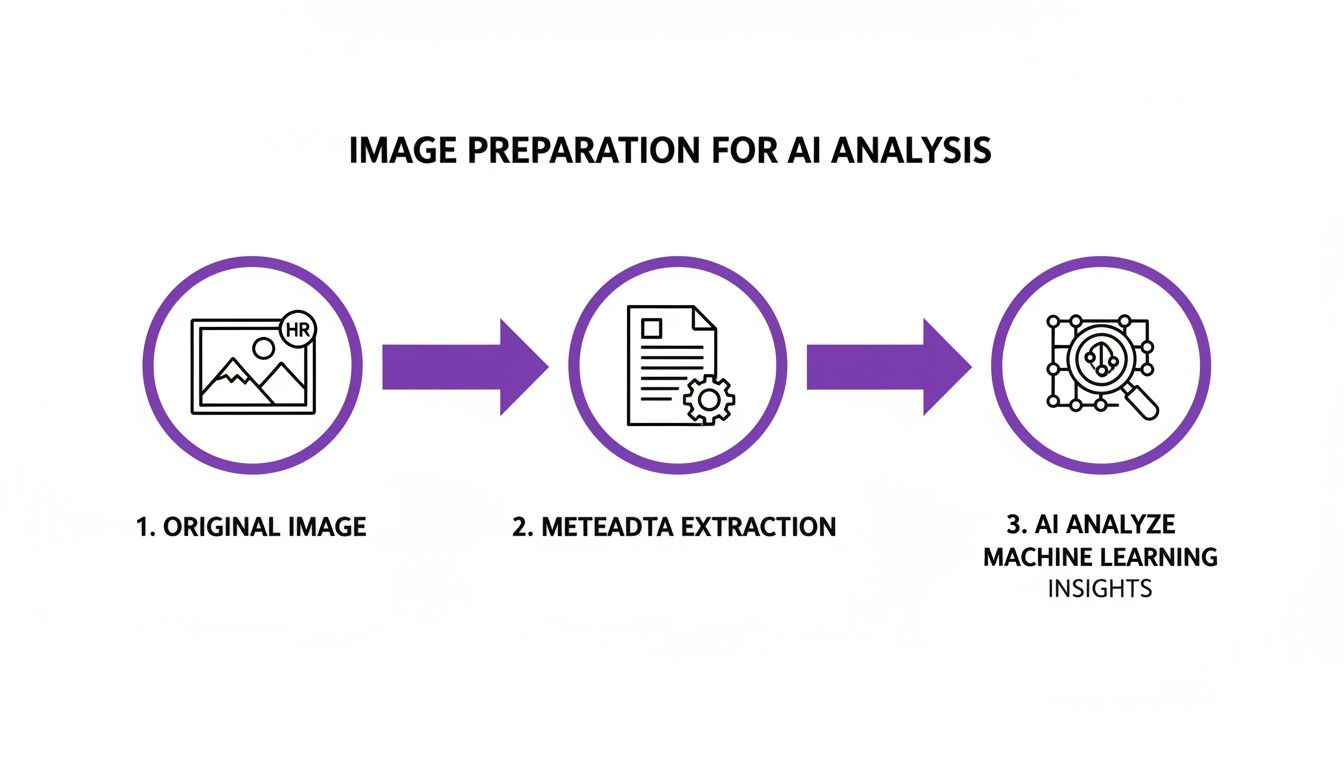
As you can see, a high-quality original and a quick metadata check are the foundations for a reliable AI analysis.
To Upload or To URL? Why It Matters
Most detectors give you a couple of ways to submit an image, and your choice can definitely impact the result.
Uploading a file directly is almost always your best bet. When you upload from your computer, you're giving the tool the cleanest, highest-quality version you have. This avoids any extra compression or resizing that websites often apply, giving the AI the purest data to analyze.
Pasting a URL is great for a quick check, but it has its limitations. You're not analyzing the original file; you're analyzing the version that a particular website serves to its visitors. This could be a heavily compressed or lower-resolution copy. Think of it as a good first pass, but for any serious investigation, always go back to a local file if you can.
When you're ready to test this out, services like the aibusted Homepage are built specifically for this purpose. The whole field is growing fast, with major tech companies getting in on the action. In 2025, North America is the clear leader in the AI image analysis market, with giants like IBM and Microsoft building these tools right into their cloud platforms.
Making Sense of the AI Detection Score
Once the analysis is done, you'll get a result—usually a percentage score or a label like "AI" or "Human." This is where your own judgment is crucial. The score isn't a simple yes or no; it's a confidence rating based on what the model has learned to recognize.
A Quick Word of Advice: If you see an 80% "Human" score, don't read it as a 20% chance of it being AI. It's more nuanced. It means the tool found strong evidence of human origin, but there might be some minor compression artifacts or unusual patterns that lowered its confidence slightly. Treat the score as a strong indicator, not an absolute fact.
Let’s imagine a real-world scenario. You're looking at a corporate headshot, but the background—a sleek, modern office—looks a little too perfect. You run it through a detector, and it comes back as "Mixed Origin." That's your cue to zoom in and examine the edges of the person's hair and shoulders. You'll likely find the tell-tale signs of where a real photo was blended with a synthetic background.
In another case, maybe a portrait has had some subtle AI-powered touch-ups. This might be enough to drop a "Human" score from a confident 99% down to 85%. The better you understand the tech, the better you can interpret these clues. Taking a moment to learn how an image AI detector actually works will pay off big time.
Going Beyond the AI Score with Human Insight
Getting an AI detection score is a great first step, but it’s rarely the final word. True verification comes from blending that tech-driven insight with good old-fashioned human critical thinking. It’s best to treat the AI score as a powerful hint—a nudge in the right direction—not an absolute verdict.
From here, your job is to build a more complete story around the image. This is where your own analytical skills really shine, turning a simple technical check into a full-on investigation.
Tracing the Digital Footprint
One of the best manual checks you can perform is a reverse image search. Tools like Google Images or TinEye are perfect for this, letting you track an image’s journey across the web. It's a surprisingly simple action that can uncover a ton of information in seconds.
A quick reverse search can help you answer some crucial questions:
- Where did this image show up first? Finding the original source is often the key to confirming its authenticity.
- Has it been used in other places with different stories? An image attached to wildly different narratives is a huge red flag for misinformation.
- Are there higher-resolution versions out there? This can sometimes lead you straight to the original creator's portfolio or a stock photo site.
For instance, finding the image on a photographer’s personal blog from five years ago or in a dated news article with a clear byline is strong evidence of its origin. But if it only pops up on a handful of brand-new, sketchy social media profiles, your skepticism is probably justified.
Adopt a 'Verify, Then Trust' mindset. Make it your default for all digital content, not just the images that immediately feel off. This habit is your single best defense against sophisticated fakes.
Cross-Referencing Contextual Clues
Once you’ve traced its online history, bring your focus back to the image itself. Scrutinize every detail within the frame. Are there street signs, brand logos, recognizable landmarks, or specific fashion styles? Every single one of these elements is a data point you can check against other sources.
Let's say an image claims to show a protest in Paris, but the cars in the background have UK license plates. The story immediately crumbles. Or maybe a "historical" photo features a smartphone. That's a clear anachronism. This is where you connect what the image claims to be with what you know about the real world.
This process is very similar to spotting traditional photo manipulations. If you want to get better at that, our guide on how to detect photoshopped images has a lot of tips that work hand-in-hand with AI detection. By combining both approaches, you build a verification process that’s far more reliable than just trusting one method alone.
When the Results Aren't So Clear-Cut
Sometimes, when you analyze an image, you won't get a clean "Human" or "AI" answer. The detector might return a low-confidence score, a "Mixed" result, or something that just doesn’t feel right. This doesn't mean the tool failed. More often, it's a sign that there's more to the story.
Learning to interpret these ambiguous results is what separates a novice from an expert verifier. These situations are becoming more common as AI image generators get more sophisticated. It’s all about having realistic expectations for what these tools can do.
Why Your Results Might Be Unclear
Poor image quality is the number one reason for a confusing result. Heavily compressed JPEGs, low-resolution files, or screenshots of other images lose the microscopic digital artifacts that AI detectors are trained to find. The compression algorithm itself can create noise that either hides or mimics the signs of AI generation.
This is exactly why you should always try to find the highest-resolution, original version of an image. Giving the detector a blurry, pixelated file is like asking a detective to solve a crime using a grainy security video from across the street—critical clues are simply gone.
Dealing with False Positives and Negatives
Another thing to get comfortable with is the reality of false positives and negatives. Let’s be clear: no detection tool is 100% perfect. You will run into errors.
False Positive: This is when a real, human-made photo is flagged as AI. I’ve seen this happen with heavily photoshopped images, professional product shots with super-smooth surfaces, or even photos from cameras that use aggressive noise-reduction software.
False Negative: The opposite scenario—a very advanced AI-generated image gets labeled "Human." This is the constant cat-and-mouse game we're in. As AI image models get better, the detection tools have to play catch-up.
When you suspect a false result, it's time to fall back on old-school investigative work. Run a reverse image search to see where else it has appeared online. Look closely for contextual clues or logical inconsistencies within the image itself. The tech is a fantastic starting point, but it's no replacement for a sharp eye and critical thinking.
Expert Insight: Remember, the AI image recognition field is moving at a breakneck pace. The global market is expected to jump from $4.97 billion in 2025 to $9.79 billion by 2030, with massive R&D happening in the Asia-Pacific region. If you're interested, you can explore more about this rapid market expansion and see where the industry is headed.
What this explosive growth means for us is that an image that fools a detector today might be easily caught by a new model tomorrow. Your best defense is to stay resourceful, combine digital tools with manual checks, and trust your gut when an analysis doesn't give you a simple yes or no.
Got Questions About AI Image Analysis? We've Got Answers.
When you start digging into AI image analysis, you quickly run into the same handful of questions. It's totally normal. Understanding what these tools can do—and just as importantly, what they can't do—is the key to using them right. Let's tackle some of the most common ones.
Just How Accurate Are These AI Detectors, Really?
This is the big one, and the honest answer is that it's a moving target. The accuracy of any AI image detector is in a constant cat-and-mouse game with the models generating the images. Every time a generator gets better at creating photorealistic fakes, the detectors have to learn to spot the new, more subtle digital fingerprints they leave behind.
Generally speaking, a top-tier detector can be incredibly accurate, often nailing clear-cut cases with over 95% confidence. But you'll see that performance start to wobble with certain types of images:
- Heavily compressed files: Aggressive compression can literally erase the digital clues the AI is searching for.
- Lightly edited content: An image with a few AI-generated touch-ups is much harder to flag than one created entirely from scratch.
- The newest AI models: The latest and greatest image generators can sometimes slip past detectors for a little while, at least until the detection models get their next update.
The best way to think about it is not as a simple "yes" or "no," but as a confidence score. A high score is a powerful piece of evidence, but it should always be paired with your own critical eye and other verification techniques.
What Kind of Image Gives the Best Results?
Not all images are created equal for analysis. If you want to give an AI detector the best shot at giving you a reliable answer, you have to feed it clean evidence. It’s a classic "garbage in, garbage out" situation.
For the most trustworthy results, the image you upload should be:
- High-Resolution: More pixels give the AI more data to analyze, making it easier to spot those faint patterns and inconsistencies.
- The Original File: If you can, always avoid analyzing screenshots or images you've saved from social media. They've almost always been re-compressed, which muddies the waters.
- A Common File Type: Stick to the basics like JPEG, PNG, or WebP. These are the formats detection models know inside and out.
Think of it this way: the closer you can get to the file as it was originally saved, the better. A low-quality, re-saved, and heavily edited image is the digital equivalent of a smudged fingerprint—there just isn't much to go on.
Can We Do This at Scale for a Business?
Absolutely. While checking images one-by-one is fine for personal use, most businesses and content teams need to verify images by the hundreds or thousands. This is where plugging an AI detection tool directly into your existing systems makes all the difference.
Many detection services, including ours, offer an API (Application Programming Interface). This is just a way for your own software to communicate with the detector automatically, no human needed. For instance, a social media platform could use an API to instantly flag suspicious new profile pictures. An e-commerce marketplace could scan product photos from vendors to make sure they're authentic. It’s what makes it possible to analyze AI images at a massive scale, protecting your platform without bogging down your team.
Ready to see for yourself? Our AI Image Detector is a free, privacy-first tool that lets you verify images in seconds. Get the clarity you need to trust what you see.


