

How to Use an AI Image Checker the Smart Way

A viral image lands in your newsroom, inbox, or moderation queue. It looks plausible, but something feels wrong. The shadows don't quite agree, the product surface looks unusually clean, or the illustration seems far beyond the student's usual work. You upload it to an AI image checker, see a confidence score, and face the genuine question: what can you responsibly do with that result?
A detector can add useful evidence, but it can't reconstruct an image's history from a single upload. The difficult cases involve copies, screenshots, recompressed files, unfamiliar generators, and images that combine human and synthetic elements. Treating the output as a verdict creates two risks at once, missing manipulated content and falsely accusing someone of using AI.
When You Need an AI Image Checker
A journalist receives a photograph allegedly showing a public figure in hospital. A teacher sees a polished illustration in a student's submission. A marketplace moderator notices that several sellers use product photos with identical lighting and suspiciously perfect backgrounds. Each case calls for evidence beyond visual intuition, especially when the file has been reposted, resized, or separated from its original context.
Human judgment is a weak control on its own. In a 2023 peer-reviewed study of StyleGAN-generated faces, participants recruited through Amazon Mechanical Turk answered correctly only 49.1% of the time in the main experiment, while average accuracy across conditions was roughly 60% to 64%. Participants scored below 50% on about one in five images, and simple interventions intended to improve detection didn't significantly raise accuracy, according to the peer-reviewed study of human detection of synthetic faces.
The right use depends on the decision at stake:
| Decision at stake | What the checker can and cannot do |
|---|---|
| Journalism | It can identify a file for further examination. Preserve the submitted copy, locate the earliest available version, and compare the result with source reporting and reverse-image evidence. It cannot establish when, where, or by whom the image was made. |
| Education | It can prompt a conversation about drafts, references, process, and attribution. It cannot prove misconduct or distinguish every legitimate editing workflow from synthetic generation. |
| Marketplaces | It can help sort large volumes of uploads for review, including repeated or suspiciously consistent product imagery. It cannot replace consistent human decisions, documented standards, or appeal procedures. |
| Identity checks | It can add one signal to a wider review. It cannot establish who captured or created an image, so document, account, and liveness controls still matter. |
Use a checker when an image could change a meaningful decision and its origin is not already documented. Preserve the original file where possible, record how you obtained it, and treat screenshots, compression, resizing, and reposting as conditions that may affect the result.
A practical rule is simple: use an AI image checker to decide what to investigate next, not whom to blame.
How an AI Image Checker Produces a Verdict
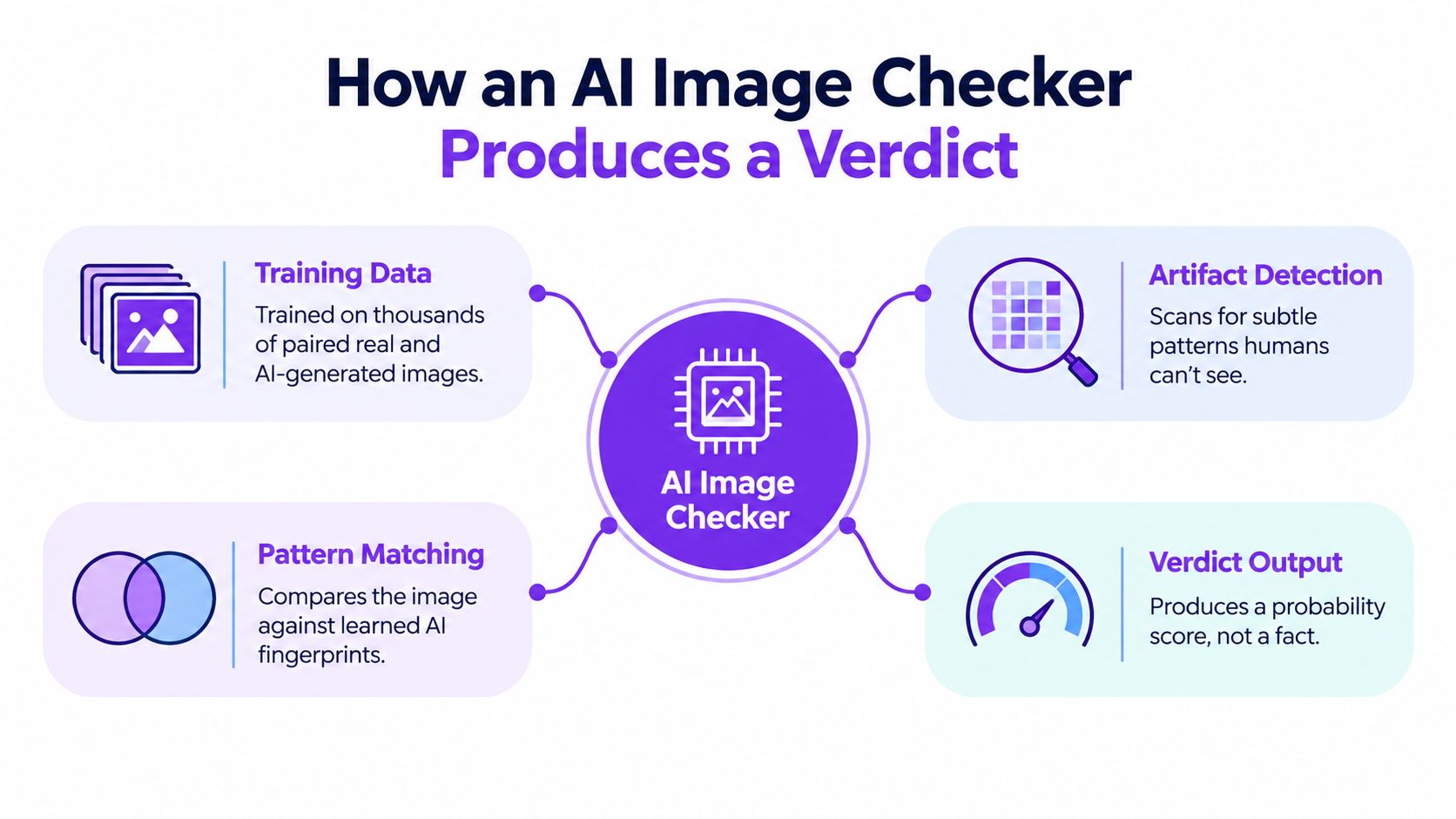
A detector doesn't see intent. It examines visual evidence and compares that evidence with patterns learned from examples labeled as authentic or synthetic. The exact implementation varies, but the practical logic usually follows four stages.
First, the system processes the image into a form its model can analyze. Resizing, color conversion, cropping, and other preprocessing can change the signals available to it. Next, the model examines local and global patterns, such as texture relationships, repeated structures, edge behavior, lighting transitions, and frequency information. These are not reliable “tells” in isolation. They become useful only as a combined pattern.
What the score represents
The model then compares the extracted representation with patterns associated with its training data. The result is generally a confidence estimate, not a factual statement about authorship. “Likely AI-generated” means the observed signals resemble synthetic examples more than the system's human examples. “Likely human” means the opposite. Neither label proves who made the file.
Benchmark literacy matters here. A 2026 survey of AI-image detection methods reports that many systems exceed 95% accuracy and reach 98% to 99% ROC-AUC on within-dataset benchmarks such as FaceForensics++, while cross-domain accuracy commonly falls to about 70% to 85%. The survey also identifies a persistent 15 to 20 percentage-point degradation when detectors encounter unfamiliar generators or domains.
That gap explains why two images created by the same tool can receive different scores. One may retain generator-specific traces, while another has been cropped, edited, exported through a different application, or composed from several sources. A checker can also learn shortcuts tied to a dataset rather than evidence that generalizes to every synthetic image.
For teams building a broader verification process, the detection algorithm overview is useful background. The same principle appears in other analytical systems, including recovered revenue examples, where a score is valuable because it directs attention and action, not because it removes the need for judgment.
Before trusting a result, ask:
- What data and generators were represented during training?
- Was the image tested in its current format and condition?
- Does the tool expose uncertainty or only a binary label?
- Can you preserve the original and reproduce the result?
Running an Image Through the Checker
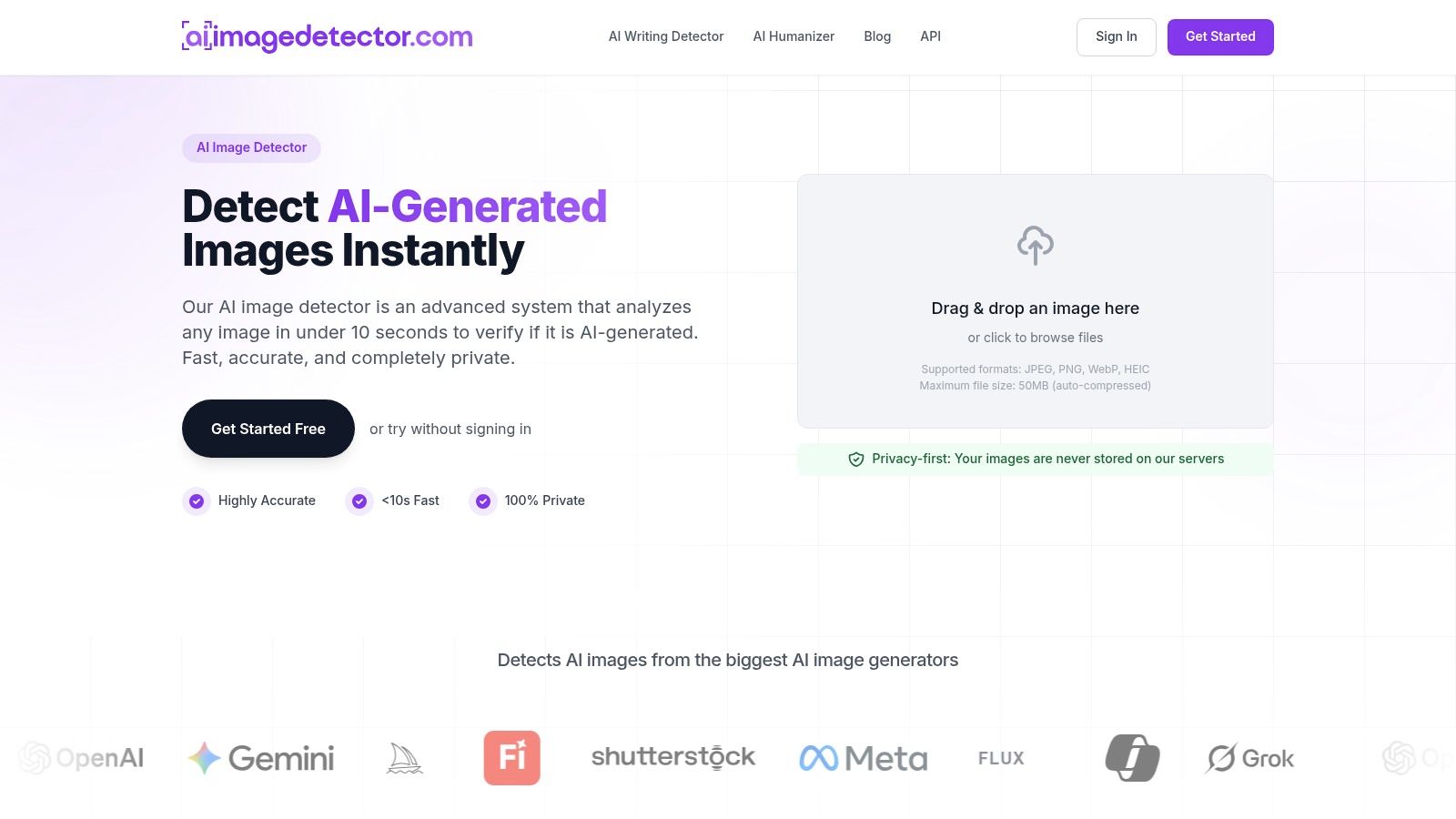
A reporter receives an image through a messaging app, while the sender still has the original attachment. Use that original file first, not a downloaded thumbnail or screenshot. Preserve the original bytes separately, then upload it by drag and drop or through the file picker. This gives later comparisons a clear reference.
AI Image Detector accepts JPEG, PNG, WebP, and HEIC files up to 10MB. See its guide to supported file types and size limits. The service provides real-time analysis, often returning a result in under ten seconds according to the publisher's product information. The core check does not require registration. An account adds history for repeat workflows.
A repeatable upload routine
Use the same handling sequence for every case:
- Record the source: Note who supplied the file, when it arrived, and whether it came from a download, message, screenshot, or export.
- Upload the original copy: Do not open and resave it before the first check. Another application may change metadata or pixel data.
- Read the full result: Review the confidence indicator, explanatory reasoning, and warnings rather than the headline label alone.
- Save the result: Record the file name, date, score, and visible warnings in your case notes.
- Create working variants: If the image has circulated online, test relevant copies separately. Do not replace the original result with a later upload.
Metadata supplies context, but rarely proves authorship. The Metadata viewer for developers can help inspect available EXIF fields, software tags, timestamps, and camera information. Missing metadata does not establish AI generation, since platforms and editing tools often remove it.
For a visual walkthrough of the upload flow, use the embedded demonstration below.
Batch work requires separate records for source and condition. Group files accordingly, flag near-duplicates, and avoid treating repeated uploads as independent proof. Registered history can simplify record-keeping, but it does not make a verdict more certain.
Reading a Confidence Score Without Fooling Yourself
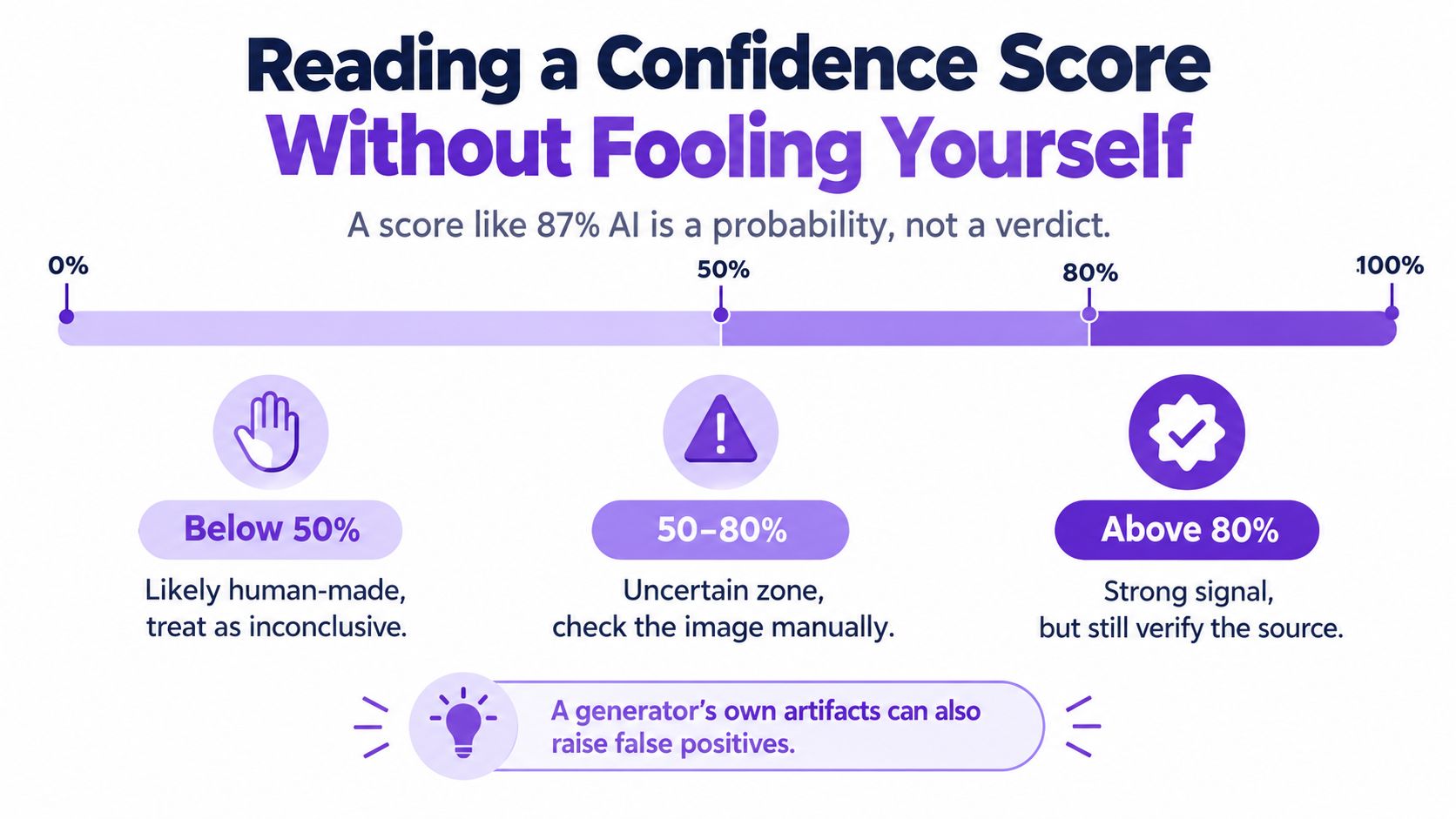
An editor receives a reposted image labeled “87% AI.” The score may justify further checking, but it cannot identify the creator, establish when the image was made, or prove that an AI tool was used. It measures how closely the submitted pixels match synthetic patterns learned by the system under that specific input condition.
Treat the score as evidence, not proof
A high result should trigger source checks, particularly when other clues support the same conclusion. It remains less dependable when the generator is unfamiliar, the file has circulated through social platforms, or the image is an edited composite. A mid-range result is a prompt for questions: is this a screenshot or resized copy, can the claimed source provide the original, and do related files from the same account produce consistent results?
A low result indicates stronger similarity to the system's human-made examples. It does not authenticate the image.
The GenImage benchmark illustrates why headline accuracy can hide a portability problem. A ResNet-50 detector trained and tested on Stable Diffusion v1.4 reached 99.9% accuracy, while the same detector reached 54.9% on Midjourney images. The generator change substantially altered performance. Read how detector accuracy is measured before comparing scores across tools or datasets.
Use the result to set the next action:
- High confidence: Request the earliest available file, examine provenance, compare related copies, and seek independent evidence.
- Middle confidence: Keep the assessment open. Test relevant variants, use another method if available, and avoid categorical wording.
- Low confidence: Record it as “likely human” rather than “verified authentic,” then assess source and contextual evidence.
A score also needs an audit trail. For teams building evidence or retrieval systems, the confidence and retrieval page distinguishes a model score from the evidence supporting a decision. Record the input condition, result, and supporting observations so a colleague can judge the conclusion without treating the number as a fact.
A confidence score describes how the model reads the file. It does not describe the file's complete history.
What Happens After Screenshots, Compression, and Resizing
The file in your evidence folder is rarely the file the generator produced. By the time a synthetic image reaches a moderation queue, it may have been screenshotted from a post, downloaded as a JPEG, cropped, or reposted. A photograph of an image on another screen introduces another layer of change. Each step can remove, mask, or add signals that an AI image checker relies on.
A screenshot can strip original metadata while adding interface elements, scaling artifacts, and display effects. JPEG recompression softens fine detail and creates block patterns that may resemble synthetic texture. Resizing changes pixel relationships directly. Printing and re-photographing add lighting, lens, paper, screen, and camera effects, making the file's history harder to interpret.
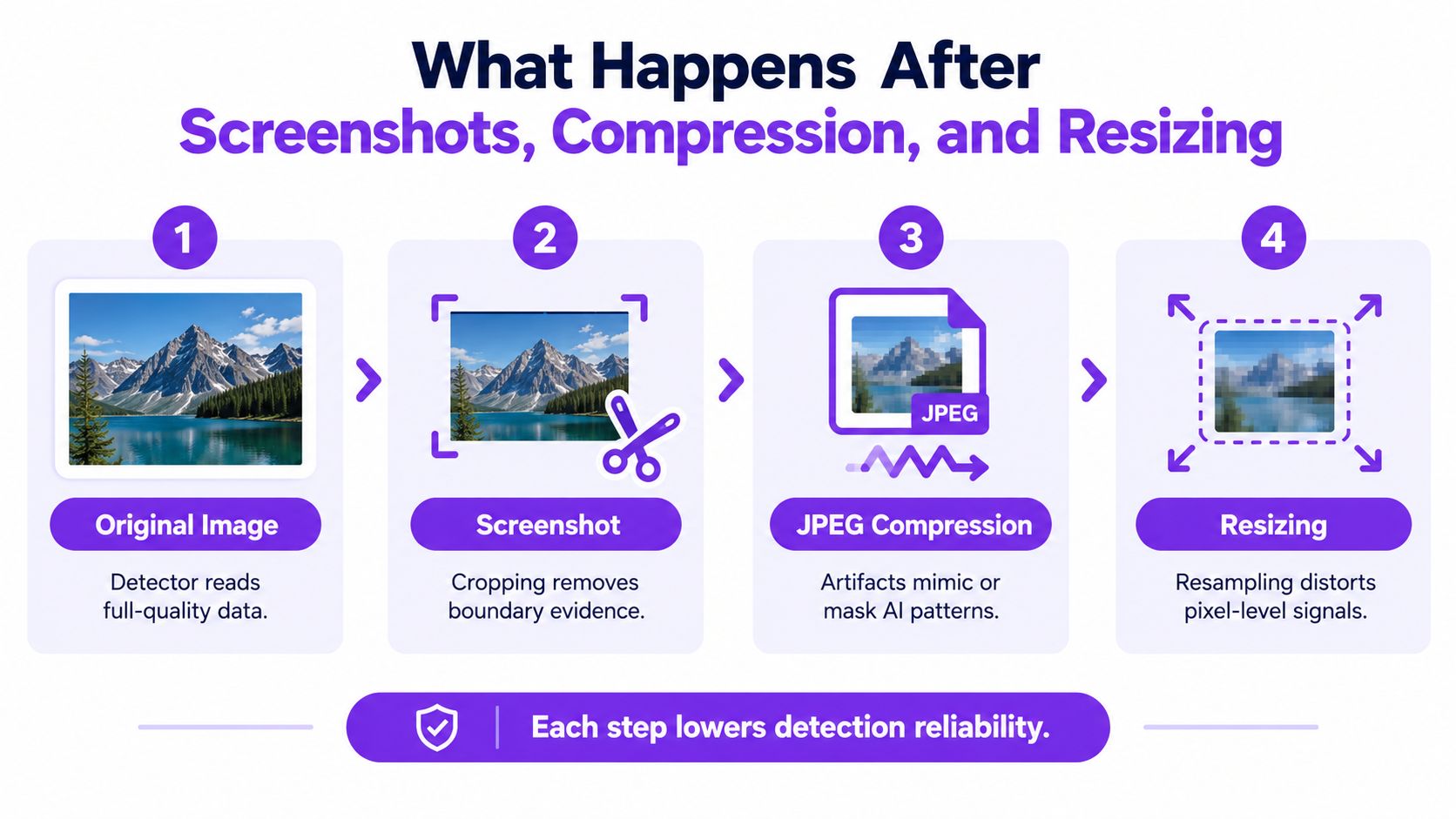
Preserve the chain before testing. Keep the earliest download, attachment, or camera file unchanged, then record every known transformation. Note whether the evidence was screenshotted, cropped, resized, recompressed, printed, or re-photographed.
Test realistic variants rather than relying on one upload. Create platform-like JPEG or WebP exports, resized copies, and screenshot-style versions when those changes match the evidence. Score each variant and retain contradictory results. If the verdict changes sharply after a plausible transformation, reduce confidence in the classification. Request the original, seek provenance records, and send consequential cases to human review.
An ICCV 2025 benchmark on real-world AI-image detection evaluated 17 detection methods and 10 vision-language models under transmission and re-digitization conditions. No detector achieved saturated performance, and the best reported accuracy was 89.59% on challenging real-world data. Clean-upload expectations therefore do not transfer safely to reposted images.
Odd hands, inconsistent lighting, strange reflections, or missing metadata can justify inspection, but none is decisive. Editing can create these signals, while authentic photographs can contain them. The strongest conclusion usually concerns the copy you received, not the unseen original scene.
Privacy, Consent, and the Limits of a Score
Before uploading an image, identify what else it contains. Faces, identity documents, private interiors, unpublished artwork, and details about vulnerable people can turn a routine check into a privacy incident. Confirm whether the service stores uploads, uses them for training, protects data in transit, and permits your organization to submit the file.
A service that deletes images after analysis lowers exposure, but your own records still require controls. Set a lawful basis or obtain consent where required. Restrict access to scores, screenshots, URLs, notes, and exported reports, then define how long each record remains available. If the image was screenshotted, resized, or reposted, treat the submitted copy and its handling history as part of the case record.
A score also reflects the detector's training and the file it received. A “human” verdict can indicate authentic content, or a case the model does not recognize well. Performance may vary with the generator, subject, visual style, resolution, and editing history. In the 2025 human identification study, participants reached 86.73% accuracy on Kolors images but only 29.04% on FLUX.1-dev images. That gap shows why a verdict is evidence about a particular image and model interaction, not proof of origin.
Set the response before the result arrives. For low-stakes moderation, use the score to prioritize manual review and request context. Editorial publication calls for source verification, provenance checks, and corroboration. Academic cases require a conversation about the work, drafts, or working files rather than a detector-only penalty. Employment, legal decisions, and content removal require documented review, an appeal route, and room for an inconclusive outcome.
Use abstention deliberately. If the file has been heavily altered, the score is borderline, or plausible copies disagree, record “unable to determine.” A forced human-or-AI label creates false certainty where the available evidence is weakest.
Practical Workflows for Journalists, Educators, and Moderators
The same checker output serves different purposes depending on who receives it. A journalist needs an evidentiary record. An educator needs a fair conversation. An artist needs provenance and comparison. A platform team needs repeatable triage with an escalation route.
Match the workflow to the decision
Journalists and fact-checkers should preserve the submitted asset, request the original from the source, and record every transformation. Run the checker on the original and relevant reposts, then compare the outcome with reverse-image searches, publication dates, source interviews, and available metadata. Phrase the conclusion narrowly: “The supplied copy shows signals consistent with synthetic generation” is more defensible than declaring that an unknown scene was fabricated.
Educators and academic researchers should keep the result confidential while investigating. Ask the student to explain the work process, provide drafts, describe references, or reproduce part of the assignment. A detector can identify a question worth discussing, but it can't replace assessment of the student's knowledge or process.
Artists and creative-rights teams should compare the disputed image with earlier work, project files, timestamps, and publication history. A detector may help prioritize alleged copies, but similarity, provenance, and licensing records carry different kinds of evidence. Don't infer infringement from a synthetic-looking score.
Trust and safety teams can use an AI image checker for queue prioritization, especially when paired with source-level signals and human review. Set separate policies for low-confidence, high-confidence, and contradictory cases. Preserve appeals data so recurring failure modes become visible instead of being treated as isolated mistakes.
Keep this checklist beside the results screen
- Preserve the earliest available file.
- Record the source and every transformation.
- Inspect the confidence range and explanatory indicators.
- Test screenshots, resized copies, and recompressed variants when relevant.
- Compare results across copies instead of selecting the most convenient score.
- Check provenance, reverse-image evidence, metadata, and contextual facts.
- Protect private images and limit access to case records.
- Abstain when the file is too degraded or the evidence conflicts.
- Escalate high-consequence decisions to trained human reviewers.
- Communicate what the detector found, and what it couldn't establish.
The portable mental model is simple: the detector evaluates a file, not a person's intent and not the complete history of a scene. Use it to narrow uncertainty, document your reasoning, and decide what evidence to collect next.
AI Image Detector lets you upload JPEG, PNG, WebP, or HEIC files for a real-time human-versus-AI likelihood assessment, with confidence indicators and explanatory reasoning. Visit AI Image Detector to test the original file first, then apply the preservation and variant-checking workflow before acting on the result.


