

How to Spot AI Images A Guide for Modern Professionals

When you're trying to figure out if an image is AI-generated, your best bet is to start by looking for the usual giveaways—weird hands, strange backgrounds, wonky shadows—and then use a dedicated AI detection tool to back up your hunch. The trick is to combine human observation with technology. Even the most sophisticated AI models still make tiny mistakes that a sharp eye can pick up.
The New Reality of AI-Generated Images

AI-generated images aren't just a quirky internet sideshow anymore. They've become a constant presence, popping up everywhere from news articles to our social media feeds. For those of us working as journalists, educators, or content moderators, being able to tell what's real from what's synthetic is now a non-negotiable part of the job.
This guide is designed to get you past the guesswork. We'll walk through a reliable workflow that blends keen human insight with the right tech, helping you spot the subtle but tell-tale flaws that AI still can't quite hide. Think of it as your field guide for a world where seeing isn't always believing.
Why Visual Inspection Is No Longer Enough
Just eyeballing it doesn't cut it anymore. Sure, early AI art was easy to spot with its mangled six-fingered hands and bizarre, melting faces. But the latest generators are frighteningly good, and the sheer volume of fake images being pumped out daily makes manual review a losing game, especially for teams sifting through thousands of posts.
The challenge isn't just about debunking one fake picture; it's about creating a sustainable process to defend an entire information ecosystem against a torrent of incredibly persuasive fabrications.
This new reality calls for a multi-layered defense. To get a handle on this, it helps to understand the broader context, including strategies to outrank AI-generated content by emphasizing uniquely human expertise. It also helps to be familiar with the different types of AI creations, which you can read about in our guide explaining what is synthetic media.
A Practical Workflow for Modern Professionals
What you really need is a clear, repeatable process for verification. This guide is built around a hybrid approach—one that trusts your professional judgment but also equips you with hard, technical evidence. The goal is to take that gut feeling that something seems "off" and turn it into a conclusion you can stand behind.
Here’s what this method helps you do:
- Boost Accuracy: Stop misclassifying images by pairing visual clues with a forensic analysis from a reliable detection tool.
- Work Smarter: Develop a faster, more systematic way to vet content, which is a lifesaver when you're on a deadline.
- Make Confident Calls: Base your decisions on a solid collection of evidence instead of just a hunch.
At the end of the day, knowing how to spot AI-generated content is more than a technical skill—it’s a fundamental part of digital literacy today. This guide gives you the tools and the mindset to navigate this new terrain with confidence.
Training Your Eye to See the Unnatural

Before you even think about using a detection tool, the most powerful asset you have is your own critical eye. Learning how to spot AI begins with developing an instinct for what looks… off. While early AI images were easy to mock for their six-fingered hands and other obvious goofs, today’s generators are far more sophisticated, hiding their tells in much more subtle details.
The goal here isn't to just run through a checklist. It's about learning to see the image as a whole and questioning the logic of the scene itself. You’re training yourself to spot the small, almost subconscious details that shatter the illusion of reality. Think of it like looking for a continuity error in a film—something that just doesn’t add up.
This manual inspection is your first line of defense. It lets you quickly triage images, flagging the most suspect ones for a deeper, tool-assisted look later on.
Analyzing Light and Shadow
Physics is still a tough subject for AI. A generative model can whip up a photorealistic object, but it often stumbles when trying to place that object into a scene with consistent physical laws. This is where light and shadow become your best friends.
First, try to identify the main light source. Is it the sun? A lamp? A bright window? Once you have a bead on it, start examining the shadows cast by different objects and people in the frame.
- Directional Consistency: Do all the shadows point away from the light source, as they should? A classic AI mistake is rendering objects with shadows that fly off in conflicting directions, as if the scene is being lit by multiple, invisible suns.
- Shadow Sharpness: Take a look at the edges of the shadows. A hard, distant light source (like the sun on a cloudless day) creates sharp, well-defined shadows. A soft, diffuse light source (like an overcast sky) makes shadows fuzzy and soft. AI often mixes these up, creating soft shadows in what should be harsh light, or vice-versa.
- Impossible Reflections: Pay very close attention to anything reflective—mirrors, water, polished metal, even the pupils of a person's eyes. The reflection should be a logical mirror of the environment. If someone is standing in a forest, their pupils shouldn't be reflecting a busy cityscape.
Scrutinizing Backgrounds and Patterns
AI image generators tend to pour most of their processing power into the main subject, leaving the background as an afterthought. This is often where the digital seams start to show.
When you're looking at a suspicious image, zoom way in on the background. Look for areas that seem warped, strangely blurred, or just plain nonsensical. You might see a brick wall where the pattern doesn’t line up, or tree leaves that blend into an abstract, repeating texture that feels anything but natural.
A key takeaway is that AI thinks in patterns, but it doesn't always understand the logic behind them. It might replicate the look of a bookshelf but fill it with books that have melted spines or nonsensical, garbled text.
This is especially true for complex, repeating patterns like you’d see in textiles, chain-link fences, or intricate tilework. The AI might start the pattern off correctly but lose the plot as it tries to continue it across the entire surface, leading to bizarre distortions or breaks in the design.
The Problem of Uncanny Perfection
Sometimes, the giveaway isn't a flaw, but an impossible level of perfection. Real life is messy. It's full of small imperfections. AI-generated content, on the other hand, can look too clean, too smooth, and just too perfect.
Keep an eye out for this kind of artificial flawlessness:
- Skin Texture: Real human skin has pores, tiny hairs, and subtle variations in color and tone. AI portraits often feature skin that looks like it's made of plastic—perfectly smooth and completely devoid of natural texture.
- Hair: Individual strands of hair are chaotic and unpredictable. AI frequently struggles here, producing hair that looks like a solid, helmet-like mass or has stray strands that seem to float, disconnected from the head.
- Fabric and Clothing: Look for the natural creases and wrinkles in clothing. AI-generated fabric can appear oddly stiff or hang in a way that defies gravity, lacking the subtle folds that come from real-world movement.
This uncanny feeling is a strong signal, but it’s crucial to remember that human intuition isn't foolproof. In fact, studies show that people are surprisingly bad at this. One report found that people correctly identified real images only 49% of the time and AI images just 52% of the time—basically a coin flip.
For professionals, this means a well-trained eye is just one part of a bigger workflow. You can learn more about these fascinating findings on how humans perceive AI images. Your eye is the first step, but technology has to be the second.
Using AI Detection Tools in Your Workflow
After you've done a thorough visual check, it's time to bring in some specialized tools. Think of an AI detection tool as a second set of eyes—a powerful one that can spot hidden signals you could never catch on your own. This isn’t about replacing your judgment; it's about backing it up with data.
These tools are designed to look beyond the surface and analyze the very fabric of the image file. They're hunting for the subtle digital fingerprints left behind during the AI generation process. When your gut tells you something is off, a good detector can often provide the evidence you need to confirm or dismiss that suspicion.
How AI Detectors Actually Work
It’s not magic. AI image detectors are built on machine learning models that have been trained on millions of real and AI-generated images. This massive training library teaches them to recognize the telltale patterns and artifacts characteristic of specific AI models.
The analysis goes much deeper than just looking for extra fingers or weird textures. Here's a peek under the hood:
- Pixel-Level Analysis: The tool scans for unnatural consistency or frequency patterns in the pixels that don't match how a real camera sensor captures light.
- Compression Artifacts: It analyzes how the image was compressed. AI-generated images often have unique compression signatures that differ from a photo saved on a camera or smartphone.
- Color Frequencies: It can identify subtle, often invisible, color banding or shifts that are common giveaways of an image created by an algorithm rather than captured from reality.
This technology is at the heart of a booming field. The global AI image-recognition market, valued at around USD 4.97 billion, is projected to nearly double to USD 9.79 billion by 2030. This growth is fueled by the urgent need for reliable verification in journalism, e-commerce, and content moderation. You can check out the full market analysis on Mordor Intelligence to see just how quickly this is scaling.
Interpreting the Results Like a Pro
Running a check is usually easy—just drag and drop the image file. The real skill is in knowing how to read the results. You’ll typically get a verdict like "Likely AI" or "Likely Human," almost always with a confidence score or percentage.
It’s tempting to treat this verdict as the final word, but that’s a rookie mistake. No detector is 100% accurate. Always think of the result as a piece of evidence, not a final judgment.
A high "Likely AI" score doesn't definitively prove an image is fake. What it does is give you a strong, data-driven reason to investigate further. It's the digital equivalent of finding a suspicious fingerprint at a crime scene.
Our AI Image Detector, for instance, gives a clear breakdown. The "Likely AI Generated" verdict is one thing, but seeing a 93.6% confidence score provides a very strong signal. It even points to the likely AI model used, giving you another layer of data to work with. Our guide on choosing the right image AI detector digs into these features in more detail.
Dealing with Ambiguity and False Positives
So, what happens when a tool returns an ambiguous result—say, a 50/50 split or a low confidence score? This doesn't mean the tool failed. It often signals a more complex situation that needs a human in the loop.
What can cause an unclear result?
- Human-AI Hybrids: The image might be a real photograph that has been heavily manipulated with AI tools, like adding a fake background or swapping a face.
- Unusual Photography: Heavily processed photos, images with strange filters, or digital paintings can sometimes confuse detectors and trigger a false positive.
- New AI Models: The image could have been made by a brand-new generator that the detection tool hasn't been fully trained on yet.
In these situations, your role becomes even more crucial. Use that ambiguous result as a cue to dig deeper into the image's context and origin. The tool has flagged a potential issue; now it's your job to do the investigative work to solve the puzzle. Never let the tool make the final call for you—it’s a partner in your workflow, not your boss.
Looking Beyond the Pixels: How to Investigate an Image
An AI detector score is a great starting point, but it's not the end of the story. To confidently call out a fake, especially when your reputation is on the line, you need to pair that tech analysis with some good old-fashioned digital detective work. This means digging into an image's history, origin, and the context surrounding it.
This approach is what turns a suspicion into solid, defensible evidence. Think about it: an image flagged as "Likely AI" that has absolutely no digital footprint is far more suspect than one you find on a professional photojournalist's portfolio from five years ago.
Let’s get into the practical techniques you can use.
Trace the Origins with a Reverse Image Search
One of the first and most powerful things you can do is run a reverse image search. This simple step can unearth an image's entire online history, showing you exactly where and when it has appeared before. I always have Google Images, TinEye, and Bing Visual Search open in my browser tabs for this.
When you run a search, you’re on the hunt for a few specific clues:
- First Appearance: Can you find the absolute earliest instance of the image online? A picture that materializes out of thin air on social media during a breaking news event is a huge red flag.
- Contextual Mismatches: Does the story told by its previous appearances match its current use? If a photo of a supposed political protest also shows up on a stock photo site labeled "crowd at music festival," you've got a problem.
- Image Degradation: Keep an eye on the image quality. Real photos tend to get compressed and lose quality each time they're reposted. If your version is significantly sharper or higher-resolution than any other copy online, it might be the original... or a freshly generated fake.
Check for Hidden Clues in the Metadata
Every digital photo carries a ghost in the machine—invisible data called metadata (or EXIF data). This can be a goldmine of information, telling you the camera model, shutter speed, GPS location, and the precise date and time the photo was taken.
Here's the key: most AI-generated images have no metadata at all. They weren't created with a physical camera, so there's no EXIF data to embed. A complete lack of this information is highly suspicious for any photo claiming to be from a real-world event. This is a massive clue.
The absence of evidence can be evidence in itself. A photograph from any modern smartphone or DSLR will almost always have rich metadata. When it’s completely missing from a supposedly authentic image, you have to ask why.
On the flip side, some AI tools are now starting to embed their own markers. The C2PA (Coalition for Content Provenance and Authenticity) is pushing for a kind of "digital nutrition label" that certifies a file's origin. While it’s not widespread yet, checking for this kind of data will become more and more important.
For a deeper dive on this, check out our guide on how to check the metadata of a photo.
Evaluate the Credibility of the Source
Finally, always, always consider the source. Where did this image come from? The credibility of the person or platform sharing it is a giant piece of the puzzle. An image from a verified journalist with a long track record is worlds away from one posted by an anonymous, brand-new social media account.
Put on your investigator's hat and ask these questions:
- Who is sharing this? Do they have a reputation to protect? Sift through their post history and see how they interact online.
- What's their motive? Are they trying to inform, persuade, or just get a reaction? An account known for posting memes should be treated differently than a news organization.
- Is anyone else confirming this? If an image claims to show a specific event, are other credible sources reporting on it with their own photos and videos? A lack of independent corroboration is a serious warning sign.
By combining these three steps—reverse image search, metadata analysis, and source evaluation—you’re no longer just looking at pixels. You’re building a complete, evidence-based workflow to make smart, accurate judgments in a world full of digital fakes.
Applying Your Skills in the Real World
Knowing the tells of an AI-generated image is one thing, but putting that knowledge to work under pressure is where the real challenge begins. Whether you're a journalist on a tight deadline, an educator evaluating student work, or a moderator trying to keep a platform safe, you need a process that works.
The biggest hurdle we all face is scale. The sheer volume of synthetic media is exploding. One analysis found that the number of deepfake files online grew from around 500,000 to nearly 8 million—that's a 16x increase. At the same time, fraud attempts are spiking. This information comes from a deepfake statistics report from DeepStrike. For newsrooms, schools, and online communities, the math is simple: when fakes multiply and human accuracy alone isn't enough, you need a solid workflow that integrates reliable tools.
For the Journalist on a Deadline
Picture this: a major news story is breaking, and your inbox is flooded with photos from "eyewitnesses." Your job is to sort the real from the fake before anything goes to print or broadcast. You have to be fast, but you absolutely cannot be wrong.
Start with a quick visual triage. Scan for the obvious giveaways we've covered—mangled hands, warped backgrounds, shadows that make no sense. If you're looking at a crowd shot, zoom in on the faces way in the back. Do you see distinct people, or just a smudged, grotesque mess?
If an image looks clean but your gut tells you something is off, run it through an AI Image Detector. A "Likely AI" score doesn't mean you automatically kill the story, but it does send that photo to the back of the line. For anything that comes back "Likely Human," the real investigation begins.
- Reverse Image Search: Use multiple engines like Google, TinEye, and Yandex to see if the photo has appeared anywhere else, in any other context.
- Check the Metadata: A photo supposedly taken moments ago on a smartphone should have EXIF data. If that data is completely scrubbed, it's a huge red flag.
- Vet the Source: Who sent this to you? A trusted stringer? A brand-new anonymous account? Corroborate their claims with other reports from the scene.
This structured process helps you make fast, defensible calls when every second counts.
The core of this process is about going beyond just looking at the pixels. It's about combining technical checks with old-school investigative work.
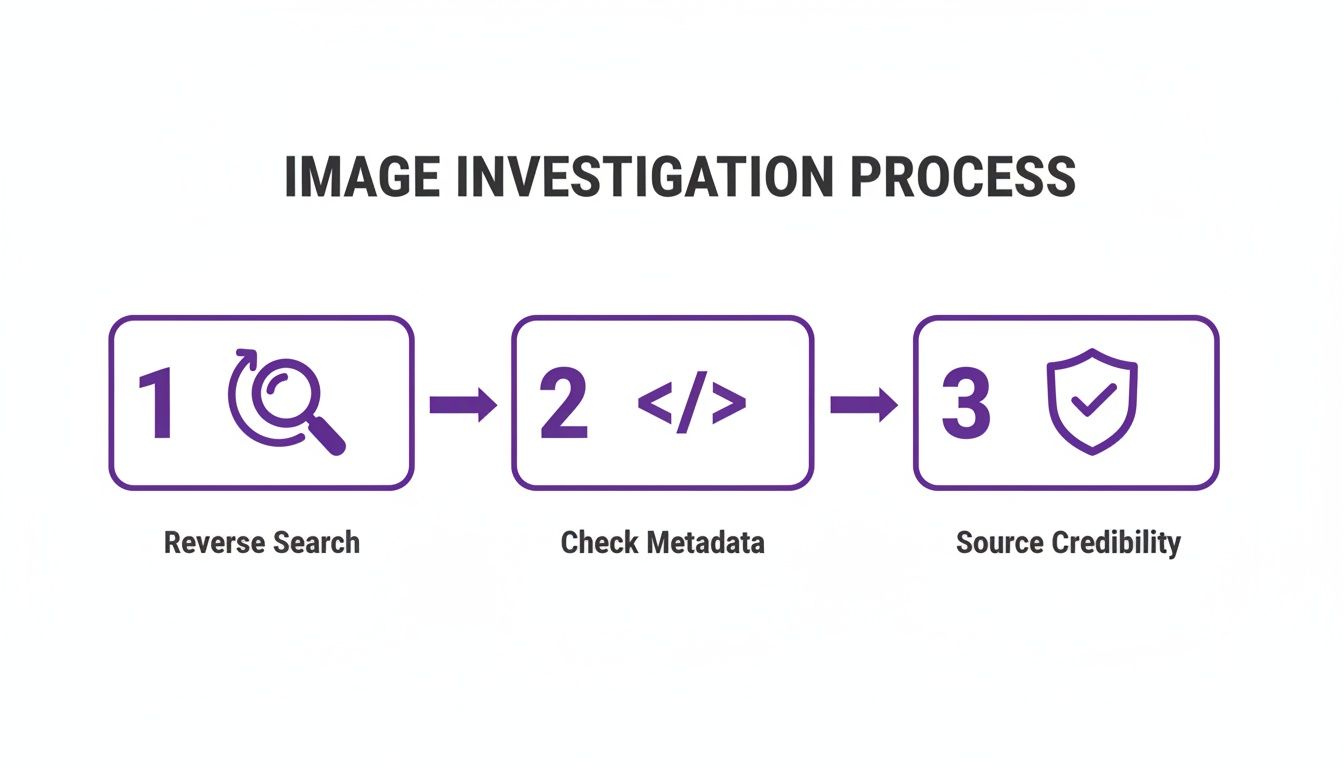
As you can see, a detector is just one piece of the puzzle. The real verification comes from putting all three steps together.
For the Educator Grading Assignments
Here's a common scenario: a student turns in a final project with a set of incredibly professional photographs or illustrations. The quality is a massive leap from their previous work, and it raises questions about authenticity.
In this case, your focus should be on consistency and style. AI art often has a very polished, almost sterile feel. Do all the images in the assignment share that same uncanny perfection?
In an academic setting, the conversation is key. An AI detector result isn't a "gotcha" tool but a starting point for a discussion about process and originality.
If you run an image through a detector and get a high AI probability, your next move shouldn't be an accusation. It should be a conversation. Ask the student to walk you through how they created the work.
- Talk About the Tools: "These images are fantastic. Can you tell me what software you used to create them?"
- Ask for Process Files: Request to see their rough drafts, different versions, or the original layered files from their design software.
- Inquire About Technique: "I love the lighting in this shot. How did you set that up?"
If a student can't explain their creative process or show any evidence of their work, that's a much more reliable indicator of academic dishonesty than a detector score by itself.
For the Content Moderator Screening Profiles
As a moderator, you're on the front lines, dealing with a constant stream of new content. Fake profile pictures used for scams, catfishing, and spam are a huge part of that. Your mission is rapid, scalable screening.
For this kind of high-volume work, an integrated API from a detection service is your best asset. You can build a workflow that automatically scans every new profile picture.
- Images flagged with a high "Likely AI" score can be automatically queued for human review or even temporarily suspended.
- Images that get a low "Likely AI" score can be approved with minimal oversight, freeing up your team.
This automated first pass lets your human moderators focus their expertise where it's most needed—on the borderline cases and the most sophisticated fakes. By blending automated detection with targeted human review, you can protect your platform far more effectively.
AI Detection Workflow by Profession
Every role faces unique challenges when dealing with synthetic media. This table summarizes a tailored approach for journalists, educators, and content moderators.
| Professional Role | Key Challenge | Recommended Workflow Steps | Critical Red Flags to Watch For |
|---|---|---|---|
| Journalist | Verifying user-generated content under tight deadlines without sacrificing accuracy. | 1. Rapid visual triage for obvious flaws. 2. Run suspicious images through an AI detector. 3. Conduct reverse image search, metadata checks, and source vetting. | Missing EXIF data on a breaking news photo; image appears in unrelated past contexts; source is anonymous and unverified. |
| Educator | Assessing the authenticity of student work that seems too polished or inconsistent with past performance. | 1. Analyze for stylistic consistency. 2. Use a detector as a prompt for discussion. 3. Ask the student to explain their creative process and show draft files. | Inability to explain techniques; no access to original or layered files; all images share a generic, "perfect" AI aesthetic. |
| Moderator | Screening a high volume of new profile pictures and other content for fake accounts and scams. | 1. Implement an automated API to scan all new images. 2. Automatically flag high-risk images for human review. 3. Prioritize manual review for borderline cases. | A sudden influx of similar-looking profile photos; accounts that are brand new but have hyper-realistic profile pictures. |
Ultimately, a good workflow isn't just about using tools; it's about building a process that empowers human judgment and expertise.
Your Questions About AI Image Detection, Answered
As you start combining a keen eye with powerful detection tools, you're bound to run into some tricky situations. This work is rarely black and white, and getting comfortable with the gray areas is what separates a novice from an expert. Let's break down some of the most common questions that pop up.
This is a fast-moving space. New AI models are released constantly, and the detection tools are always playing catch-up. That’s why your own critical thinking will always be your most valuable asset.
Can AI Detectors Be Fooled?
In short, yes. No single tool is a silver bullet, and people actively try to trick them. This is sometimes called an adversarial attack, where an image is subtly altered with digital "noise" specifically designed to confuse an algorithm.
Beyond deliberate attacks, a few common scenarios can throw a detector off the scent:
- Human-AI Hybrids: Think of a real photograph that's been heavily manipulated with AI. A real person's face might be convincingly swapped onto a completely generated background, or an AI-generated object could be dropped into an otherwise authentic scene.
- Image Degradation: Every time an image is screenshotted, resized, or re-saved as a JPEG, it loses a little bit of quality. This compression can scrub away the faint digital fingerprints that detectors need to do their job, making a definitive call much harder.
- The Newest Models: When a brand-new image generator hits the scene, it can take a little while for detection tools to gather enough examples to train their own models. An image from a "day one" release might slip through undetected for a short time.
This is exactly why a "Likely Human" result should never be the end of your investigation, especially if your gut tells you something is wrong. It’s a crucial piece of data, but it’s not the whole story.
What Do I Do with an Ambiguous Result?
So, what happens when a tool gives you a 50/50 split or a "low confidence" score? Don't get frustrated. This isn't a failure—it's a massive clue. An ambiguous result is your signal to stop relying on the tech and start digging deeper yourself.
It often means the image has traits of both human and AI creation, which strongly suggests you're looking at a hybrid or a heavily edited photo. This is where your real investigative work begins.
An uncertain score from an AI detector is your cue to switch from a technical check to a forensic one. It's time to double down on your reverse image searches, scrutinize the source, and hunt for corroborating evidence elsewhere.
Think of it this way: the tool has flagged a puzzle that only a human can solve.
How Do False Positives Happen?
A false positive occurs when a detector mistakenly labels a genuine photograph as AI-generated. It’s not an everyday occurrence, but it happens. Understanding why is key to not jumping to the wrong conclusion.
Here are a few things that can cause a real photo to get flagged:
- Aggressive Digital Editing: A professional photographer might use Photoshop to do some serious retouching, color grading, or compositing. The final result can look so polished and "perfect" that it fools an algorithm trained to spot unnatural perfection.
- Creative Photography: Certain techniques just don't look normal to a computer. Things like long-exposure light trails, surreal high-dynamic-range (HDR) images, or even heavy artistic filters can produce textures and lighting that a detector might misinterpret as synthetic.
- Poor Image Quality: A very low-resolution or heavily compressed photo is a challenge. When there isn't enough clear data to analyze, the detector can sometimes make an incorrect guess based on the limited information it has.
If a tool flags an image from a source you know and trust, pause and consider these possibilities. Your final judgment call is what truly matters.
Ready to put this into practice? With AI Image Detector, you can analyze images in seconds and get a clear, data-backed verdict to support your investigation. Our privacy-first tool gives you the confidence to make informed decisions without storing your images. Try it for free at aiimagedetector.com.


