

A Guide to Computer Generated Imaging

When you hear the term computer-generated imaging (CGI), your mind probably jumps to the mind-bending special effects in blockbuster movies. You're not wrong, but that’s just scratching the surface. At its heart, CGI is simply the art of creating or tweaking images with computer software. It’s the digital magic that brings fire-breathing dragons to life, but it's also the subtle work behind the impossibly perfect product photos in an online store.
Essentially, CGI lets us build visual worlds that would be too expensive, dangerous, or just plain impossible to capture with a traditional camera.
What Exactly Is Computer-Generated Imaging?
Think of CGI as a digital art form where pixels are the paint and code is the canvas. Artists use sophisticated software to either build images from the ground up or modify existing photos and videos. This process is so integrated into our daily lives that we often don't even realize we're looking at it.
A good way to grasp the concept is to compare it to traditional art. 2D CGI is a lot like painting; an artist uses a digital canvas to create a flat image. 3D CGI, on the other hand, is more like sculpting. The artist constructs a virtual model in three-dimensional space, giving it depth, texture, and form. This digital "sculpture" can then be lit, staged, and photographed from any angle, just like a real-world object.
The Building Blocks of a Digital Reality
Creating a believable 3D image isn't a one-click process. It's a meticulous craft that involves several distinct stages, each one adding another layer of detail and realism.
Here’s a look at the fundamental workflow:
- Modeling: This is where it all begins. An artist sculpts the basic geometric shape of an object or character, forming a digital wireframe skeleton.
- Texturing: Next, the artist "paints" the model. They apply surface details, colors, and textures—like the rough grain of wood, the subtle imperfections of skin, or the reflective sheen of polished metal.
- Lighting and Rendering: In the final step, virtual lights are placed within the digital scene to cast shadows, create highlights, and establish a mood. The computer then takes all this information—the model, textures, and lighting—and calculates the final 2D image in a process called rendering.
This step-by-step control is what allows creators to fine-tune every last pixel. It's why the aliens in sci-fi films feel so present and why architects can show you a photorealistic tour of a building before construction even starts.
Computer-generated imaging isn't just for fantasy worlds. It's a foundational technology that blurs the line between the real and the artificial, driving innovation in entertainment, product design, medicine, and science.
Getting a handle on these basics is crucial before we explore the technology's fascinating history. It’s also important to understand how traditional CGI differs from the newer wave of AI-driven image generation. We dive deeper into that specific topic in our guide on what is synthetic media. This distinction is more relevant than ever, as both technologies continue to shape what we see online.
Tracing the Evolution of CGI
The story of computer-generated imaging isn't just a timeline of technical upgrades; it's a story about human creativity pushing the boundaries of what's possible. What started as a niche tool for scientists and military planners in the 1950s has since blossomed into one of the most powerful artistic and commercial mediums in the world.
Those early pioneers laid the groundwork, proving that computers could do more than just crunch numbers—they could create images. But for decades, the staggering cost and complexity of the hardware kept CGI locked away in university labs and well-funded research facilities. It took a while for artists and storytellers to get their hands on it.
From Scientific Models to Cinematic Magic
The 1980s was the decade CGI finally stepped into the spotlight. Filmmakers began experimenting with digital worlds, creating visuals that felt entirely new. The glowing, neon-drenched landscapes of Tron (1982) gave audiences a breathtaking glimpse into a digital frontier, showing for the first time that entire environments could be built from pure code.
The journey from military applications to mainstream art really took off here. For example, the 1986 fantasy film Labyrinth wowed audiences with the first-ever realistic CGI animal—a digital owl that gracefully soared through the opening credits. This, along with effects like the 3D morphing in Star Trek IV, was a clear sign that digital creations were getting seriously lifelike. For a deeper dive, the timeline of computer animation on Wikipedia offers a great overview of these early milestones.
The Leap to Photorealism
If the 80s proved CGI was possible, the 1990s proved it could be indistinguishable from reality. This was thanks to a perfect storm: hardware costs were plummeting while processing power was skyrocketing. Suddenly, the tools once reserved for elite institutions became available to smaller studios, sparking a creative explosion in film, music videos, and TV commercials.
But the real watershed moment came in 1993 with Jurassic Park.
The film's photorealistic dinosaurs weren't just a special effect; they were a cultural event. For the first time, audiences felt genuine awe and terror toward creatures that existed only as data on a hard drive.
The visual effects wizards at Industrial Light & Magic (ILM) famously spent an entire year perfecting just four minutes of dinosaur footage. Their meticulous work, blending practical animatronics with groundbreaking digital models, set a completely new standard for realism. It proved, beyond a shadow of a doubt, that CGI could make you believe the impossible.
Just two years later, Pixar Animation Studios released Toy Story in 1995, the first feature-length film made entirely with CGI. This cemented the technology's place not just as a tool for flashy effects, but as a complete filmmaking medium in its own right.
These breakthroughs laid the foundation for the visual world we navigate today. From hyper-realistic video games and architectural mockups to medical simulations, CGI is everywhere. Understanding this rapid evolution from simple wireframes to lifelike dinosaurs gives us the perfect context for the next big leap: AI-generated imagery, which stands directly on the shoulders of these digital pioneers.
Comparing Traditional CGI and AI Image Generation
In the world of digital art, two very different but powerful methods have emerged: traditional computer-generated imaging and modern AI image generation. While both can create stunning visuals from nothing, the way they get there couldn't be more distinct. Knowing the difference is crucial for understanding the origin of the images we see every day.
Think of traditional CGI like a master sculptor or architect. An artist painstakingly builds a scene from the ground up, piece by piece. They model objects, paint textures, set up lighting, and position cameras with absolute precision. Every single pixel is the result of a direct, deliberate action. It's a highly technical, hands-on craft that demands both artistic vision and deep software knowledge.
AI image generation, on the other hand, is more like giving a creative brief to an incredibly fast, slightly unpredictable, but brilliant artist. You provide the instructions—the prompt—and the AI uses its vast "knowledge" from analyzing billions of images to interpret your request and generate a new picture. The process is less about direct control and more about guiding a powerful creative partner.
The Core Philosophies of Creation
The key difference really boils down to control versus collaboration.
With traditional CGI software, a 3D artist has total, granular control. If a light source needs to be moved one millimeter, they can do it. If a texture on a model doesn't look quite right, they can jump in and edit it by hand. This makes the process highly predictable and repeatable—something that's absolutely essential for professional pipelines in filmmaking or architectural design.
AI generation is a much more improvisational dance. The user guides the process with words and settings, but the AI fills in the blanks based on the patterns it has learned. This unlocks incredible speed and opens up wild creative possibilities, but it can also be unpredictable. Getting the exact image you have in your head often takes a lot of trial and error, refining prompts and generating variations until you land on something that works. It's a process of discovery, not direct construction.
The timeline below gives you a sense of how CGI has evolved over the decades, leading to the sophisticated AI tools we have today.
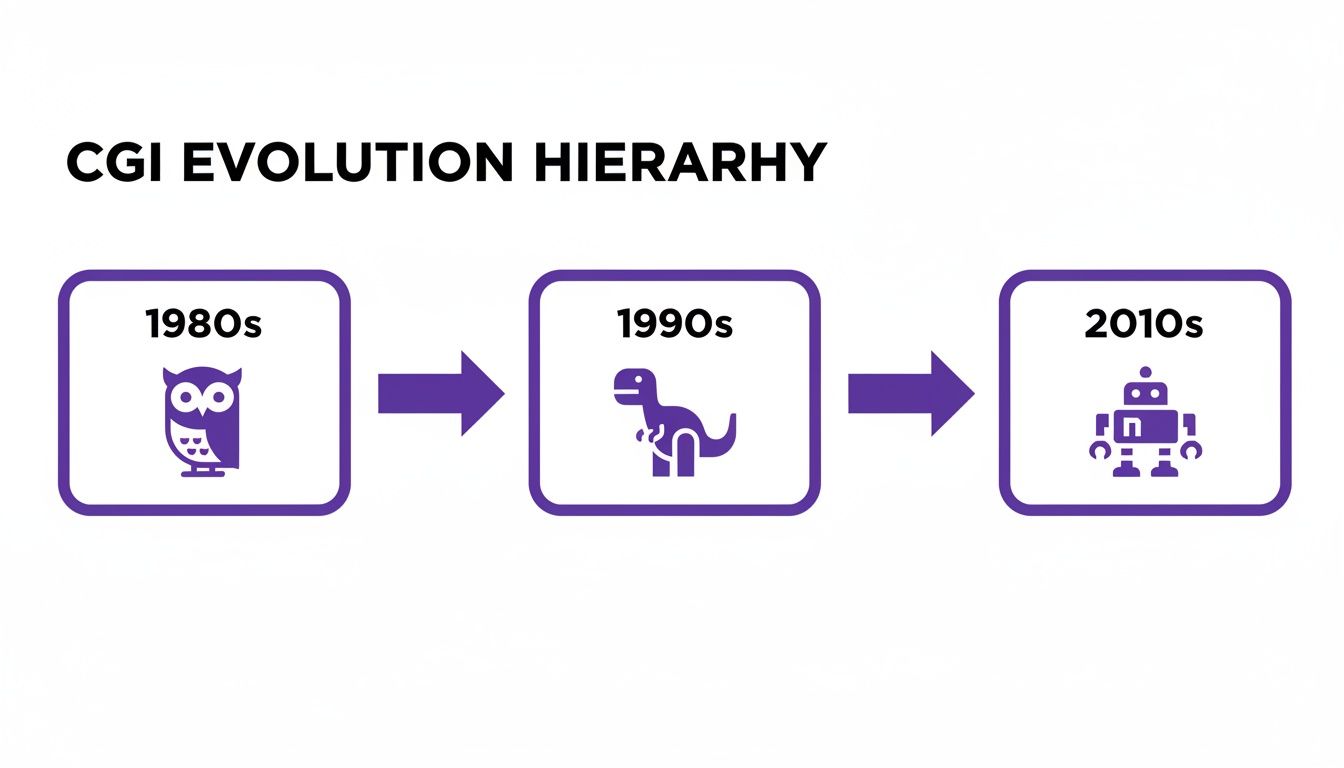
This evolution from the blocky, stylized CGI of the 1980s to the near-perfect realism of the 2010s paved the way for AI to learn from a massive library of high-quality digital images.
Traditional CGI vs AI-Generated Imagery A Comparison
To really see the differences side-by-side, it helps to break them down by their core attributes. This table highlights how each approach tackles the creative process, from initial concept to final output.
| Attribute | Traditional CGI (3D Rendering) | AI-Generated Imagery |
|---|---|---|
| Creation Method | Manual, procedural construction by an artist. | Automatic generation based on a text or image prompt. |
| User Control | High; direct manipulation of every model, texture, and light. | Indirect; control is exercised through prompt engineering and parameter tuning. |
| Predictability | High; the output is a direct result of the artist's inputs. | Variable; can produce unexpected or surreal results. |
| Time Investment | Significant; can take hours or weeks for a single complex scene. | Rapid; initial images can be generated in seconds or minutes. |
| Common Uses | Film VFX, video games, architectural visualization, product design. | Concept art, marketing content, artistic exploration, rapid prototyping. |
As you can see, their strengths are almost mirror opposites. The growing use of AI-generated content in professional settings, including the use of AI in newsrooms, underscores why being able to tell these methods apart is becoming so important.
While traditional CGI is about building a reality pixel by pixel, AI image generation is about summoning a reality from a sea of data. One is a craft of precision, the other a craft of interpretation.
Ultimately, neither approach is "better"—they are just different tools for different jobs. Traditional CGI remains the king for projects that demand absolute control, consistency, and fine-tuned detail. AI generation, meanwhile, offers incredible speed and a powerful new way to brainstorm and explore creative ideas. Understanding how each one works is the first step toward figuring out where any digital image truly comes from.
Spotting the Telltale Signs of Digital Creation

With digital images getting scarily realistic, telling what’s real from what’s fake is harder than ever. Both classic CGI and modern AI-generated images can easily trick us, but they almost always leave behind subtle clues—digital fingerprints we call artifacts—that give away their artificial roots. Spotting these signs is your first line of defense.
These artifacts aren't deliberate flaws. They're just unintended side effects of how the image was made. For AI, these mistakes pop up because the system is trying to build a believable image from a sea of data, but it doesn't actually understand how the real world works.
Common Flaws in AI Generated Images
When an AI model generates an image from a text prompt, it's brilliant at copying textures and styles it has seen before. Where it often stumbles is with logical consistency. Its knowledge is based on patterns, not real-world context, which leads to some classic giveaways.
Keep an eye out for these common AI artifacts:
- Bizarre Proportions: Hands are famously difficult for AI. Look for extra fingers, twisted limbs, or hands that just seem anatomically wrong. The same goes for teeth—you might see a few too many or a smile that looks like a jumbled mess.
- Unnatural Textures: Skin can look too perfect, almost like plastic, lacking any pores or natural imperfections. Hair might appear unnaturally glossy, with strands that seem to melt into each other or defy gravity.
- Illogical Backgrounds: Don't just focus on the main subject; the background is often where things fall apart. You might notice scrambled, unreadable text, impossible architecture, or objects nonsensically morphing into their surroundings.
- Shadow and Light Inconsistencies: AI often gets confused by the physics of light. Look for shadows pointing the wrong way, weird light sources with no clear origin, or reflections that don't match the objects they're supposed to be mirroring.
These subtle errors are like cracks in a digital facade. While they are becoming rarer as the technology improves, they remain one of the most reliable ways for a keen observer to identify a synthetic image.
Of course, these clues can be tiny and easy to miss at a glance. If you're looking to train your eye and become better at spotting them, you can learn more about how to spot AI in our detailed guide.
Giveaways in Traditional Computer Generated Imaging
Because traditional CGI is created by human artists, it usually avoids the kind of bizarre logical errors we see in AI images. Still, it often has its own tells, creating a final product that just feels a little off.
The most famous example is the "uncanny valley." This is that creepy, unsettling feeling you get when a computer-generated human looks almost perfectly real—but not quite. Our brains are so fine-tuned to human faces that even the smallest imperfections can feel deeply jarring. Other signs include textures that are too clean and repetitive or animated physics where objects don't seem to have the right weight or momentum.
The real problem is that spotting these flaws with our own eyes is becoming a losing battle. This is a huge issue for journalists verifying sources, moderators trying to keep platforms safe, and educators upholding academic standards. As the fakes get better, the need for automated, reliable tools to verify images isn't just a convenience—it's a necessity.
How to Check If an Image Is Real Using Detection Tools
Let's be honest—telling a real photo from a computer-generated one is getting almost impossible just by looking. The tiny giveaways and digital artifacts we used to spot are disappearing as AI models get smarter and artists perfect their craft. Simply relying on our own eyes isn't a reliable strategy anymore.
This is exactly why we now have specialized detection tools. They offer a much deeper, data-driven way to figure out where an image actually came from.
Tools like AI Image Detector are built to see what the human eye misses. They don't just glance at the surface; they dig into the image's digital DNA—analyzing pixel patterns, compression data, and other hidden markers to find the telltale fingerprints of digital creation. It’s the difference between making an educated guess and getting an objective, evidence-based answer.
A Quick Guide to Analyzing an Image
The great thing about these tools is that they’re designed to be simple. You don't need to be a tech wizard to use them. Whether you're a journalist verifying a source or a teacher checking a student's project, the process is usually just a few clicks.
The whole point is to give you a clear, straightforward verdict in seconds. Here’s a typical walkthrough with a tool like AI Image Detector:
- Upload the Image: First, you just need to get the image into the system. Most tools have a simple drag-and-drop box or an upload button. They work with common file types like JPEG, PNG, and WebP.
- Start the Scan: Once your image is loaded, you just hit a button to kick off the analysis. The tool's algorithms instantly get to work, scanning the image for hundreds of digital signatures that distinguish real photos from AI-generated ones.
- Get the Results: In just a few seconds, it’s done. The tool gives you a clear result, usually as a confidence score or a simple label like "Likely Human" or "Likely AI-Generated."
This is what the AI Image Detector interface looks like. You can see how an uploaded image is ready for analysis, with a clear button to start the process.

The design is clean and to the point, so you can go from upload to analysis without any hassle. It makes image verification something anyone can do.
What Do the Results Actually Mean?
A good detector does more than just give a simple "yes" or "no." Digital images can be complex. Sometimes an image isn't 100% real or 100% fake but a mix of both. That's why the results are often presented as a probability or a spectrum.
This nuance is incredibly helpful. For example, an image might be flagged with a mixed result, suggesting that a real photograph was touched up or had elements added using AI-powered editing software.
The real power of an AI image detector isn't just in spotting purely synthetic images. It’s in giving you the clarity to understand an image’s entire journey—from minor edits to a complete digital fabrication.
If you're curious about what else is out there, our guide on the best AI detectors for various use cases is a great place to start.
Real-World Examples of an Analysis
To really see how these tools work in practice, let's walk through a few common scenarios and the kind of results you might get.
- The Obvious AI Image: Imagine you upload a wild picture of an astronaut riding a unicorn on Mars. The tool would likely return a result like 98% Likely AI-Generated. It might even point out things like the unnatural texture of the unicorn's fur or weird lighting as the key red flags.
- An Authentic Human Photo: You upload a normal, unedited snapshot you took with your phone. The analysis comes back 99% Likely Human, noting the natural noise from the camera sensor and the realistic way light and shadows fall.
- An Edited or Composite Image: You test a product photo from a website that looks just a little too perfect. The tool might return a mixed verdict. It could identify the main subject as a real photograph but flag the flawlessly clean background as a sign of AI-driven editing.
This level of detail is a game-changer for professionals. A journalist can quickly confirm if a photo from a source is legitimate. A social media moderator can flag manipulated content before it spreads. And with features that protect your privacy by not storing your images and keeping a history of your analyses, these tools fit right into a professional, secure workflow.
Where Image Verification Makes a Real-World Difference
Being able to tell the difference between a real photo and a computer-generated one isn't just a party trick—it's become a vital skill in a ton of professional fields. As the tools to create digital images get better and easier to find, checking whether an image is authentic has moved from a niche problem to a daily task for many.
This kind of technology adds a much-needed layer of trust in a world where "seeing is believing" is no longer a given. From news desks to courtrooms, automated image verification gives us a practical way to deal with the flood of synthetic media.
Journalism and Fact-Checking
For journalists, getting the story right—and fast—is everything. When a photo from a supposed "breaking news" event starts making the rounds online, verifying its authenticity can be the line between good reporting and accidentally spreading harmful lies. Image verification tools give newsrooms a quick way to vet photos sent in by the public before they ever go to print.
Imagine a reporter gets a dramatic image from an anonymous source. They can upload it and get an analysis back in moments. This helps them either confirm the source's story or flag a deepfake created to sway public opinion, protecting their organization's reputation and keeping the public properly informed.
Protecting Academic Integrity
In schools and universities, AI image generators have created a new frontier for academic honesty. An art history professor, for example, might need a way to confirm that a student's submission is their own creative work, not just something typed into a prompt. A biology teacher might need to check that the photos in a lab report are from a real experiment, not fabricated.
- Verifying Original Artwork: Teachers can check student projects to ensure they reflect genuine effort and skill development, not just AI-generated shortcuts.
- Authenticating Research Data: Instructors can confirm that visual data, like microscope slides or experimental photos, are real and haven't been digitally manipulated.
By making image verification part of their process, schools can maintain their standards and make sure students are actually learning the skills they’re meant to.
Legal and Compliance Scrutiny
In the legal and business worlds, a document’s authenticity can have massive financial and legal implications. A doctored receipt, a forged signature on a contract, or a manipulated photo submitted as evidence can completely upend a legal case or cause huge compliance headaches.
Legal teams rely on image verification to examine digital evidence, making sure it’s solid before presenting it in court. In the same way, compliance officers use these tools to spot fake IDs or altered documents during "know-your-customer" (KYC) checks, which helps stop financial crime and reduces risk.
The explosion of advanced computer-generated imaging is what makes these challenges so common. Modern CGI, now often powered by AI, has completely changed entertainment but has also flung the door wide open for fraud. It’s hard to believe, but the blockbuster film Avengers: Endgame was reportedly made of 90% visual effects, a testament to the power of modern CGI. That same power is now being used to create political deepfakes, fake driver's licenses for online accounts, and plagiarized art.
For the professionals on the front lines, AI image detectors that can analyze everything from lighting to hidden digital artifacts are a critical line of defense. You can learn more about the impact of CGI and its detection from EBSCO to dig deeper into the topic.
In high-stakes situations, an automated check gives you an objective, data-backed opinion that's far more dependable than the human eye. It gives professionals the confidence to make crucial decisions.
Common Questions About Computer-Generated Imaging
As computer-generated images pop up more and more, it's totally normal to have questions. This technology is powerful and moves fast, so let's clear up a few common points to help you make sense of the digital world around you.
We'll tackle some of the most frequent questions about CGI, deepfakes, and the right way to use AI in creative projects. The goal here is to give you straight, simple answers that build on what we've already covered.
Can Computer-Generated Imaging Be Completely Undetectable?
Even though AI and CGI are getting scarily good, they almost always leave behind tiny digital breadcrumbs that specialized software can follow. These "artifacts" might be weird patterns in the image's background noise, lighting that just doesn't follow the rules of physics, or microscopic flaws in textures that our eyes would never catch.
Sure, a casual glance might not reveal anything amiss in a high-quality rendering. But tools like an AI image detector are built to spot those specific giveaways because they've learned from millions of examples. As the creation tools get better, so do the detection tools trying to keep up.
Think of it as a constant cat-and-mouse game. For now, advanced analytical tools still have the upper hand in spotting the subtle fingerprints that separate a digital creation from a real photograph.
What Is the Difference Between CGI and a Deepfake?
This is a big point of confusion, but the difference is actually pretty simple. CGI is the umbrella term for any image or video made with computer graphics. A deepfake is a very specific—and often nasty—type of CGI.
Deepfakes use a kind of AI called deep learning to map one person's face onto another's in a video, making it look like they said or did something they never actually did. So, all deepfakes are CGI, but most CGI isn't a deepfake. From animated movies to architectural mockups, CGI is used for countless legitimate and creative purposes.
How Can I Ethically Use AI-Generated Images?
Using AI-generated images responsibly really boils down to three things: transparency, respect, and good intentions. Stick to these, and you'll be using this amazing technology as a tool for creativity, not deception.
- Always Disclose: Be upfront when an image is made by AI. This is especially crucial in fields like journalism, advertising, or academic research where people assume they're seeing the real deal.
- Respect Copyright: Only use AI models trained on ethically sourced or public domain images. This helps ensure you're not accidentally stealing from human artists.
- Avoid Harmful Content: A simple rule: don't create images intended to deceive people, spread lies, harass someone, or push harmful stereotypes.
Ethical use is all about treating AI as a creative assistant without tricking your audience or stepping on the rights of others.
Ready to tell the difference between a real photo and a digital creation? The AI Image Detector gives you the power to check any image in just a few seconds. Get a clear, reliable analysis and move forward with confidence. Try AI Image Detector for free today!


