

Your Guide to Using an Image Photoshop Detector

An image photoshop detector is simply a tool that digs into a picture's digital guts to see if it’s been manipulated or cooked up by artificial intelligence. These detectors are becoming essential for telling fact from fiction, as they can catch the tiny pixel-level inconsistencies and digital fingerprints that our eyes would never notice.
Why Spotting Edited and AI Images Matters More Than Ever
We used to say "seeing is believing," but that's a dangerous assumption to make these days. The line between a real photograph and a convincing fake has all but disappeared, thanks to incredibly powerful editing software and AI image generators. Being able to spot a manipulated image isn't just a niche skill for tech geeks anymore; it's a critical part of being digitally literate.
The fallout from doctored images is real and it's serious. We see it everywhere—from deepfake videos created to spread political lies to altered product photos on shopping sites designed to mislead customers. A single fake image can shift public opinion, wreck a company's reputation, or even be passed off as evidence in a legal dispute.
The Growing Threat of Digital Deception
This problem isn't just lingering; it's accelerating. With the boom in generative AI, anyone with a keyboard can conjure up hyper-realistic, yet completely fabricated, scenes from a simple text prompt.
This flood of synthetic media makes things incredibly difficult for journalists, researchers, and even everyday consumers who depend on visual information to make good decisions. The consequences can be as small as buying a product that looks nothing like its online photo or as big as undermining an entire election.
The need to spot manipulated images is especially crucial in online reputation management. Think about it: one fake image can do lasting damage to a person or a brand's credibility. That's why exploring effective online reputation management tools often includes verifying the authenticity of visual content.
A Market Responding to a Critical Need
As you'd expect, this has created a huge demand for reliable ways to verify images. The market for AI detection tools, which includes image analysis, is set to explode from USD 0.58 billion in 2025 to USD 2.06 billion by 2030. That kind of growth screams one thing: we urgently need better tools to fight the chaos caused by synthetic media. You can get a better sense of this by reading up on the trends shaping the AI detector market.
At its core, using an image photoshop detector is about re-establishing a baseline of trust. It gives people and organizations the power to:
- Verify sources: Journalists and fact-checkers can confirm an image's authenticity before it goes to print or online.
- Protect against fraud: E-commerce sites can weed out sellers who use misleading product photos.
- Ensure academic integrity: Educators can check if a student's submission is AI-generated or has been dishonestly altered.
Knowing how these tools work is no longer a "nice-to-have." It’s our best defense against the rising tide of digital deception.
How to Run Your First Analysis with an AI Image Detector
Jumping into an image photoshop detector is surprisingly fast. I've found that from the moment you select a file to seeing the final results, the whole process usually clocks in at under ten seconds. For anyone on a tight deadline, like a journalist verifying a source or a moderator on an e-commerce site, that speed is a game-changer.
The mechanics are straightforward. You'll typically find a simple drag-and-drop box or an upload button, and it will accept standard formats like JPEG, PNG, or WebP. One thing I always look for is a tool that processes images on the fly without storing them, like AI Image Detector. It's a critical privacy feature that ensures your sensitive work stays confidential.
This decision tree gives you a good mental model for approaching an image before you even start the deep-dive analysis.
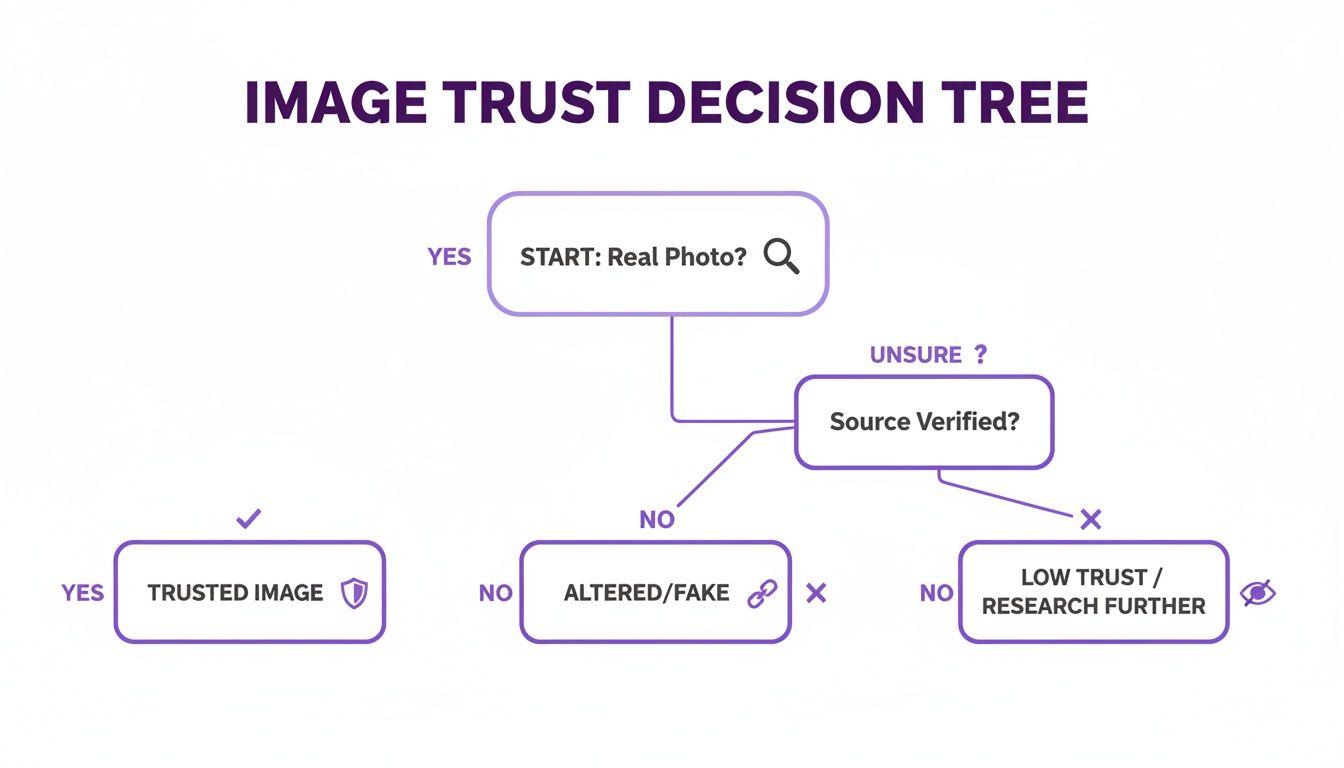
It’s all about making that initial call: does this look trustworthy, has it clearly been altered, or does it fall into a gray area that demands a closer look?
Understanding the Results
Once your image is uploaded, the AI begins its work. It’s not just scanning for clumsy Photoshop mistakes. Instead, it’s conducting a pixel-level investigation, hunting for the subtle digital fingerprints left by AI generators and advanced editing tools.
What is it actually looking for? Here are a few tell-tale signs:
- Inconsistent noise patterns: A real camera photo has a consistent grain or noise. AI often creates patches that are unnaturally smooth or have a strange, blotchy texture that doesn't match the rest of the image.
- Logical flaws in lighting: The tool is trained to spot things that defy physics—shadows that fall the wrong way, reflections that don't match their supposed source, or bizarre lighting from multiple directions.
- Subtle artifacts: AI models often have their own "tells," like weird textures on skin, warped patterns in the background, or strange blending where two objects meet.
The platform then spits out a clear verdict, like "Likely AI-Generated" or "Likely Human-Made," usually paired with a confidence score. Seeing a 95% confidence score for "AI-Generated" is a pretty strong signal. On the flip side, a low score or an "Uncertain" result doesn't automatically mean the image is real. It could be a heavily edited photo—a hybrid that requires you to roll up your sleeves and do some manual checking.
The AI detector's verdict is your starting point, not your final answer. Its real power is in quickly clearing the obviously fake images and flagging the suspicious ones, so you can focus your forensic energy where it truly matters.
From Verdict to Action
This initial, automated scan is the foundation of a modern verification workflow. For many situations, a high-confidence result gives you enough information to act. A news editor might immediately discard a dubious photo from an unverified source. An online marketplace might automatically reject a product listing with a fake-looking image.
But what if the results are ambiguous? That's your signal to shift gears and bring in manual forensic techniques. The AI has done its job by raising a red flag, giving you a solid reason to dig into the image’s metadata, lighting, and other hidden clues.
If you're interested in the technology behind this first step, our guide on the fundamentals of a reliable image AI detector is a great place to start.
Digging Deeper with Manual Forensic Techniques
An automated image photoshop detector is a fantastic starting point, giving you a powerful head start. But its verdict is often just the beginning of the investigation, not the end. When a result comes back as uncertain, or you need absolute proof, it’s time to put on your detective hat and dive into the manual forensic techniques that professionals rely on.
These methods help you build a much stronger case for or against an image's authenticity.

Think of it this way: the AI detector is the smoke alarm that alerts you to a potential problem. Your manual checks are the firefighter who finds the source of the fire. You really need both for a complete picture.
Manual vs Automated Detection Techniques
So, when should you rely on a quick AI scan versus a deep manual dive? It all comes down to balancing speed, skill, and the stakes involved. An AI tool gives you instant results, but a trained human eye, backed by forensic methods, provides the context and confirmation that software alone can't. Here’s a quick breakdown of how they stack up.
| Technique | Best For | Speed | Required Skill Level | Key Limitation |
|---|---|---|---|---|
| Automated AI Detector | Quick, high-volume initial screening; identifying common AI artifacts. | Seconds | Low | Can produce false positives/negatives; may lack context for subtle edits. |
| Manual Forensics | In-depth investigation; legal/journalistic verification; when AI results are ambiguous. | Minutes to Hours | High | Time-consuming; requires specialized knowledge and a trained eye. |
Ultimately, the two approaches are most powerful when used together. The AI flags potential issues, and your manual analysis confirms or debunks them, creating a comprehensive and reliable workflow.
Uncovering an Image's Digital History with Metadata
Every digital photo carries a hidden story tucked away in its EXIF (Exchangeable Image File Format) data. This metadata is like a digital birth certificate, recording crucial details about the camera, the lens, and the exact settings used when the shutter clicked. More importantly, it can reveal the fingerprints of editing software.
If you inspect the metadata and find a tag for "Adobe Photoshop," you have a smoking gun. It doesn't automatically mean the image is a malicious fake, but it's undeniable proof that it's not an untouched original. For a more detailed walkthrough, you can learn how to check the metadata of a photo and what to look for.
Of course, this data can be intentionally stripped. A savvy manipulator will often wipe this information clean, but a blank slate is its own red flag. An original photo straight from a camera almost always has rich EXIF data; its complete absence is highly suspicious.
Training Your Eye to Spot Visual Inconsistencies
Beyond the data, your own eyes are a surprisingly powerful detection tool. You just need to know what to look for. Digital forensics experts learn to scrutinize images for violations of real-world physics—the kind of mistakes that editing software and AI generators make all the time.
Start with the lighting and shadows. Do they all fall in a consistent direction based on the main light source? Are some shadows razor-sharp while others are blurry? In a composite image where a person is dropped into a new background, mismatched lighting is one of the most common giveaways.
Next, get granular with these elements:
- Reflections: Check any reflective surfaces like windows, sunglasses, or even a puddle of water. Do they accurately mirror the surrounding environment? Impossible or distorted reflections are a huge red flag.
- Perspective and Geometry: Look closely at straight lines, like the edges of buildings or furniture. Do they converge correctly toward the horizon, or do they seem warped and unnatural? AI especially struggles to maintain perfect geometric consistency.
- Focus Consistency: In a real photo, objects at the same distance from the camera should share a similar level of focus. If one person is perfectly sharp but the person standing right next to them is inexplicably blurry, something is likely amiss.
Using Error Level Analysis to Reveal Hidden Edits
When an image is saved in a compressed format like JPEG, some data is lost. Error Level Analysis (ELA) is a clever forensic technique that uses this compression to its advantage. It works by re-saving the image at a known compression level and then highlighting the differences between the original and the newly saved version.
ELA can make invisible edits practically scream for attention. An untouched photo should have a fairly uniform error level across the entire image. But a section that was copied, pasted, or otherwise altered will have been compressed differently, causing it to stand out brightly in an ELA scan.
This technique is a lifesaver for detecting subtle cloning or object removal that the naked eye might miss. While it takes some practice to interpret the results accurately, ELA provides another critical layer of evidence. It beautifully complements an automated detector's findings and your own visual inspection.
You can also use tools like MD5 hash generators to check an image’s integrity. This creates a unique digital fingerprint, allowing you to instantly verify if a file has been altered from a known, trusted original.
How Professionals Use Image Detectors Every Day
It's easy to talk about image detectors in theory, but where do they actually make a difference? The answer is in the daily grind of professionals who live and breathe visual content. For them, these tools aren't just for catching wild deepfakes; they're an essential part of the job, protecting credibility in fields where one bad image can cause a world of trouble.
The applications are immediate, practical, and span from bustling newsrooms to university art departments.
Journalism and Fact-Checking
For any journalist on a deadline, verifying a photo from a source is make-or-break. An image photoshop detector is the first line of defense. Think about a reporter getting a powerful, dramatic photo from a protest—the kind that could define a story. Before it goes to print, a quick scan can flag tell-tale signs of AI or heavy-handed editing. This simple check can prevent a career-damaging mistake.
This kind of rapid verification helps news teams:
- Vet user-generated content: When photos pour in from a breaking news event or a conflict zone, they need to know what’s real. Fast.
- Kill viral hoaxes: Before that suspicious image trending on social media goes mainstream, they can analyze and debunk it.
- Fortify investigative work: It adds a crucial layer of technical proof to visual evidence gathered in the field.
Academic and Educational Integrity
Professors are facing a new reality, too, especially in creative and technical fields. A student turns in an unbelievably polished piece of digital art or a flawless architectural rendering. Is it raw talent or an AI prompt? A quick analysis helps faculty uphold academic standards and keeps the playing field fair.
This isn't just a hypothetical problem. In Japan, some universities estimated that as many as 35% of assignments showed signs of being AI-generated. That statistic alone is fueling a huge demand for reliable detection tools.
This trend is particularly explosive in the Asia Pacific region. The AI detector market there is on track to grow at over 35% CAGR between 2025 and 2033. It's not just academia driving this; large-scale smart-city projects that rely on pristine image verification are also a huge factor. You can dig deeper into these global AI detector market trends to see the full picture.
Marketplace Safety and Legal Evidence
The need for visual truth extends right into e-commerce and the courtroom. Online marketplaces like Amazon or Etsy can use image analysis to screen product photos, flagging sellers who use doctored images to make their products look better than they are. It’s a simple, automated way to protect buyers and keep the platform trustworthy.
Then you have the legal world, where the stakes are incredibly high. When a photograph is submitted as evidence, its authenticity is everything. An image photoshop detector can spot subtle tampering that the human eye might miss, helping ensure that only untainted visual evidence makes it into a courtroom. Whether it’s protecting online shoppers or upholding the law, these tools provide a fundamental layer of verification that professionals rely on every single day.
Navigating the Limits of Detection Tools
While an image photoshop detector is a fantastic starting point, it's important to remember these tools aren't magic. They're powerful, but they aren't infallible. Think of a detector's result as a strong clue in your investigation, not the final verdict.
No tool can promise 100% accuracy, and understanding their boundaries is what separates a novice from an expert user.
One of the biggest hurdles you'll run into is the false positive. This is when a genuine photograph gets flagged as suspicious simply because it's been heavily, but conventionally, edited. Imagine a professional photographer who dramatically boosts the saturation on a sunset, sharpens the details on a mountain range, and clones out a distracting sign. These intense, yet normal, edits can sometimes create digital artifacts that look a lot like AI fingerprints, causing the tool to raise an alarm.
On the flip side, there's the false negative, where a very polished AI-generated image slips by completely unnoticed. The AI models are getting smarter every day. They're learning to avoid the classic giveaways we used to look for, like mangled hands or shadows that defy physics, which makes them much harder to catch with an automated scan alone.
The Rise of Hybrid Images
Where things get really murky is with hybrid images. This is the gray area that trips up even the best detectors. These are real photos that have been tweaked with AI-powered features, like using a generative fill to seamlessly add a new person to a group shot or erase an ex from a family picture.
When the detector analyzes these images, it gets mixed signals:
- Most of the photo looks perfectly authentic and human-shot.
- But the AI-inserted patches carry subtle, strange digital signatures.
This conflict often leads to an ambiguous or low-confidence score, leaving you wondering what to do next. When you see an uncertain result, take it as a clear signal: it's time to roll up your sleeves and start your manual forensic checks. Digging into the specific challenges in digital forensics can shed more light on why these hybrids are so tough to pin down.
An ambiguous result from an image photoshop detector isn't a failure of the tool. Instead, view it as a critical piece of intelligence pointing you toward a more complex manipulation that requires a deeper, human-led investigation.
Ultimately, your goal is to create a workflow that combines the raw speed of an AI detector with the nuanced judgment of a human analyst. Let the tool flag the weird stuff, but it's your critical thinking that makes the final call on whether an image is the real deal.
Answering Your Top Questions About Image Detection
Even with the best tools in your corner, you're bound to have questions. When you're digging into something as subtle as image manipulation, it's natural to hit a few tricky spots. Let's walk through some of the most common questions I hear from people just getting started.
Can a Detector Tell Me if an Image Was Made with Photoshop?
This is probably the number one question people ask, and it stems from a common misunderstanding. An image photoshop detector is designed to spot the evidence of manipulation, not to name the specific tool used. Think of it as a pixel detective—it’s trained to find inconsistencies in digital noise, compression artifacts, and weird pixel patterns that scream "something's not right here."
It doesn't really matter if the changes were made in Photoshop, GIMP, or some obscure mobile app. The signs of tampering are often universal.
Now, you might get lucky and find a clue in the image's metadata, which sometimes lists the software used. But don't count on it. Anyone trying to be deceptive will almost certainly scrub that data clean. It's the first thing they do.
A detector's job isn't to tell you how an image was changed, but if it was changed. It focuses on the visual evidence left behind in the pixels themselves, which is much harder to fake.
I like to use the analogy of a crime scene. An investigator can tell if a lock was picked by looking at the scratches and damage, but they probably can't tell you the exact brand of lockpick used. The detector works the same way—it's all about the evidence of tampering.
What Should I Do When the Result is Uncertain?
Getting a "50/50" or "Uncertain" result can feel like a dead end, but I see it differently. It's not a failure; it's a critical piece of intel. More often than not, this result points to a hybrid image—a genuine photo that has been heavily edited or had AI-generated elements stitched into it. The detector is flagging this because it sees conflicting signals: some parts look real, while others look synthetic.
An uncertain result is your signal to shift gears from automated tools to hands-on forensic work. This is when you roll up your sleeves and apply the manual checks we've covered:
- Dig into the Metadata: Is there anything left that hints at the image's origin or edit history?
- Check Shadows and Reflections: This is a classic giveaway. Look for lighting that doesn't make sense or reflections that are just plain wrong.
- Run an Error Level Analysis (ELA): This technique is great for spotting areas with different compression levels, which often highlights sections that have been pasted in or altered.
Use that uncertain result as a starting point, not an endpoint. It’s the detector telling you, "Hey, you need to look closer at this one."
Can These Tools Keep Up with the Newest AI Generators?
It's no secret that AI image generation is moving at a breakneck pace. It's a constant cat-and-mouse game where the generators get better at hiding their tracks, and the detectors have to get smarter to find them.
The teams behind reliable detection tools know this. They are constantly retraining their models on massive datasets filled with images from the very latest AI generators. This is how they learn to spot the new, more subtle digital fingerprints these models leave behind.
While no image photoshop detector can promise 100% accuracy against technology that hasn't even been invented yet, the best platforms are deeply committed to this race. They are, without a doubt, your best first line of defense against the ever-evolving world of synthetic media.
Ready to bring clarity and confidence to your image verification process? The AI Image Detector offers a fast, private, and powerful way to spot manipulated and AI-generated content. Get your free analysis now.


