

Is This Photo Photoshopped? is this photo photoshopped: A Quick Visual Guide

"Is this photo photoshopped?" It’s a question we’re all asking more and more. We see images every day, from quick social media snaps to major news events, and it's getting harder to know what's real. With AI now in the mix, the lines are blurrier than ever.
The Growing Challenge of Fake Images
We’re all swimming in a sea of digital images, and telling fact from fiction feels like a full-time job. The problem goes way beyond basic photo edits. We're now up against incredibly sophisticated, AI-generated content that can trick even the sharpest eye. This isn't just about silly memes; manipulated images have serious, real-world consequences, shaping public opinion and even moving financial markets.
The impact can be staggering. Take May 2023, for example. A single AI-generated image that appeared to show smoke near the Pentagon sent the Dow Jones into a nosedive. The market temporarily lost an estimated $500 million in value over a complete fabrication. Considering that studies show people can only spot AI images correctly about 61.3% of the time, it's clear we need better tools and skills.
Why Verification Skills Matter Now
Having a good eye and a reliable verification process isn't just for journalists anymore—it’s a crucial skill for everyone. To cut through the noise and spot doctored visuals, you have to constantly enhance your information literacy skills. This guide will give you a practical, no-nonsense roadmap to do just that.
Modern tools are designed to make this process easier, offering a simple way to upload an image and get an instant analysis. It's often the perfect first step in any verification workflow.
In this guide, I'll walk you through the core techniques of photo forensics. We'll build a practical toolkit so you can confidently answer the question, "is this photo real?" We’ll cover everything from simple visual gut checks to more advanced digital deep dives.
The goal isn't just to spot fakes. It's about building a habit of critical thinking that helps you question, analyze, and verify the visual information you encounter every day.
To kick things off, the table below gives a quick summary of the methods we’ll explore. Think of it as a handy cheat sheet as we dive into the world of image verification.
Quick Guide To Photo Verification Methods
| Verification Method | What It Checks | Best For |
|---|---|---|
| Visual Inspection | Look for oddities like weird hands, unnatural textures, and mismatched shadows. | A quick, initial gut check that anyone can do. |
| Reverse Image Search | Searches for the image's origin and other places it has appeared online. | Finding the original source and debunking out-of-context images. |
| Metadata (EXIF) Analysis | Examines hidden data in the image file, like camera model and edit history. | Uncovering clues about the image's history and potential software manipulation. |
| Error Level Analysis (ELA) | Highlights parts of an image with different compression levels, signaling edits. | Detecting subtle copy-paste edits or additions that aren't obvious to the eye. |
| AI Detection Tools | Uses algorithms to find patterns and artifacts common in AI-generated images. | A fast and powerful way to flag images created by generative AI models. |
This overview gives you a solid foundation for the specific, actionable steps we're about to cover. Let's get started.
Start With a Good Old-Fashioned Look
Before you even think about firing up any software, your most powerful tool is right in front of you: your own eyes. It’s amazing how many fakes—whether from old-school Photoshop or new-school AI—have little tells that give the game away. Honing your ability to spot these flaws is the first and most critical step in figuring out if a photo is legit.
This isn’t about some kind of forensic magic; it's about being systematic. You just need to know where to look and what questions to ask. We’ll walk through the key things I always check, starting with the main subject and then digging into the background details that editors often miss.
Look Closely at People
People are the number one subject of manipulated photos, for reasons ranging from simple vanity to full-blown disinformation campaigns. When you’re looking at a person, zoom in on the parts of the body that are notoriously hard for both humans and AI to get right.
Hands are the classic AI giveaway. Keep an eye out for the wrong number of fingers, weird waxy skin textures, or joints that bend in ways they just… shouldn't. Teeth are another weak spot. AI often fumbles the details, creating a smile that's a single, solid white bar or just a little too perfect to be real.
Then there’s the skin. Professional photo retouching has been a thing for decades, but modern apps can smooth out a face until it has zero natural texture. No pores, no lines, nothing. This is everywhere on social media, where one study found that 71% of people edit their photos with apps like FaceTune before posting. Ask yourself: does the skin look like plastic, or does it have the tiny imperfections that make a face look human?
Pro Tip: Don't forget the eyes and ears. Are they symmetrical? Do the pupils catch the light in a believable way? Mismatched earrings or one ear being higher than the other can be a dead giveaway that someone has mirrored or warped part of the image.
Analyze the World Around the Subject
I've found that the biggest mistakes are often in the background. The forger gets so focused on making the person look perfect that they get sloppy with everything else.
Start with the straight lines. In the real world, door frames, horizons, and floor tiles are straight. If you see them bending or warping, especially right around a person's body, that's a huge red flag. It’s a classic sign that the "liquefy" tool was used to digitally tuck in a waistline or beef up a bicep.
Here’s a common scenario: a celebrity posts a vacation photo, but the tile pattern on the floor behind them seems to bend strangely around their legs. That subtle distortion is all the proof you need that they’ve tweaked their body shape. It’s an amateur mistake that instantly kills the photo's credibility.
Once you’ve checked for warped lines, scan for repeating objects. The "clone stamp" tool is great for removing unwanted things from a photo, but it can leave tell-tale patterns. A lazy edit might leave you with identical clouds in the sky, the same face popping up multiple times in a crowd, or a patch of grass that’s been copied and pasted. Your brain is wired to spot repetition, so if something just feels off, trust that instinct.
Follow the Light (and Shadows)
Light and shadow follow the unbending laws of physics—something that can't be said for digital editing tools. Inconsistent lighting is one of the most reliable ways to spot a fake, particularly if it’s a composite of multiple images stitched together.
Picture two people standing outside. If the sun is on their right, the shadows for both of them have to fall to the left. If one person has a shadow on the left and the other has one on the right, it’s a physical impossibility. That tells you one of them was almost certainly dropped into the scene from another photo.
Here’s a quick mental checklist I run through for lighting:
- Shadow Direction: Do all the shadows make sense with a single light source? Check where they point and how long they are.
- Shadow Quality: Objects close to a light source cast hard, sharp shadows. Objects farther away cast softer, fuzzier ones. Does the photo follow this simple rule?
- Reflections: Check for reflections in shiny surfaces like sunglasses, windows, or even a person's eyes. Do they actually reflect the environment we see in the photo?
By methodically working through these visual cues—from the hands on the subject to the shadows on the ground—you can build a very strong case for whether an image is real or not, often without needing to go any further.
Digging Into an Image's Digital History
Beyond what you can see with the naked eye, every digital photo carries a hidden backstory. This digital trail, known as metadata or EXIF data, is like a photo’s birth certificate, holding critical clues about its origin and any changes made along the way.
Getting your hands on this information is usually pretty simple. If you're on Windows, just right-click the image file, hit "Properties," and head to the "Details" tab. For Mac users, open the image in Preview, go to the "Tools" menu, and select "Show Inspector." There are also plenty of free online EXIF viewers where you can just upload a file and see its data in seconds.
What the Digital Clues Tell You
Once you've got the metadata open, you're essentially a detective looking for evidence. Certain data points are far more revealing than others when you're trying to figure out if a photo is real or has been doctored.
- Camera Model: Does the data point to a high-end Canon DSLR when the picture looks like a grainy smartphone snap? A mismatch like that is an immediate red flag.
- Date and Time: The timestamp is your first stop for verifying a photo's timeline. Does it match the event it supposedly captures?
- Software Tags: This is often the smoking gun. If you see a tag for "Adobe Photoshop" or another editing program, you have concrete proof the image was opened and saved in that software.
A word of caution, though: this data isn't foolproof. Metadata can be wiped clean, sometimes intentionally to cover tracks, but often unintentionally by social media sites like X (formerly Twitter) and Instagram, which strip it to save server space and protect user privacy. For a more detailed walkthrough, you can check out our guide on how to check the metadata of a photo.
When metadata is missing or looks off, it doesn't automatically mean the image is fake. But it's a solid reason to be more skeptical. An image with zero history should make you dig deeper, not trust it more.
Tracing a Photo’s Journey Across the Web
When the metadata trail runs cold, your next move is to establish the image’s provenance—basically, its origin story and where it’s been online. The best tool for this job is a reverse image search.
Services like Google Images, TinEye, and Bing Visual Search let you upload a picture and will scour the web to find where else it exists. This is an incredibly powerful technique. You might just find the original, unedited version, which you can then compare side-by-side with the one you're investigating.
I’ve seen this countless times. A photo goes viral showing a shark swimming down a flooded city street after a hurricane. A quick reverse image search reveals the shark was plucked from a National Geographic photo taken years earlier and dropped into a completely unrelated picture of a flood.
Finding the Original Context is Everything
Pinpointing the first time an image appeared online is like finding the primary source in an investigation. Your goal is to see the photo in its natural habitat before it was re-shared and re-contextualized a thousand times.
- Who posted it first? Was it a major news outlet, a personal blog, or some anonymous account on a forum? The source matters.
- What did the original caption say? Crucial context often gets lost as images are stripped of their original descriptions and repurposed.
- Has it already been debunked? You'll often find your work has already been done for you by fact-checking organizations that have analyzed the same image.
By combining a close look at the metadata with a thorough search for its online history, you start to build a much more complete and reliable assessment of whether a photo is the real deal or a clever fake.
Diving Into Simple Forensic Techniques
When your gut says something is off but a visual check and metadata review come up empty, it's time to pull out the digital magnifying glass. Simple forensic techniques can uncover manipulations that are completely invisible to the naked eye. You don't need a forensics lab or expensive software—just a bit of know-how to make a computer reveal an image's hidden story.

One of the most useful tools in your kit is Error Level Analysis (ELA). The name sounds technical, but the idea behind it is simple. Every time a JPEG file is saved, it gets compressed and loses a tiny bit of quality. An original, untouched photo should have a fairly uniform compression level across the whole picture. But if someone pastes a new element into the image, that pasted section will have a completely different compression history.
ELA is designed to highlight these differences. When you run an image through an ELA tool, manipulated areas often pop out, appearing much brighter or having a different texture than the rest of the picture. This is because their "error level" is out of sync with the original. Plenty of free online tools, like FotoForensics, can run an ELA scan in seconds.
How to Read the Clues
Getting an ELA result is one thing; knowing what it means is another. A bright spot doesn't automatically scream "fake!" You have to interpret the results in context.
- High-Contrast Edges: Don't be fooled by naturally sharp edges, like the outline of a building against the sky. These will almost always appear brighter in an ELA scan, and that’s perfectly normal.
- Uniform Textures: Look at areas that should be consistent, like a clear blue sky or a flat-colored wall. These areas should look dark and uniform in the analysis. If you see bright patches or weird textures here, that's a red flag.
- The Foreign Object: A pasted element often sticks out like a sore thumb—a brightly colored shape or a textured blob that just doesn’t blend with the ELA signature of its surroundings.
Imagine a photo of a celebrity supposedly meeting a politician. It looks convincing at first glance. But an ELA scan might show the politician's entire figure glowing brightly while the background remains dark. That’s a classic sign their image was dropped into the scene.
ELA isn't foolproof, but it’s a fantastic tool for spotting inconsistencies. It really shines at catching classic copy-paste jobs and other manipulations where objects have been added or removed.
Following the Light (and Shadows) Like a Pro
We already talked about giving shadows a quick once-over, but a forensic approach means getting meticulous. You're essentially checking if the image obeys the laws of physics. One of the most common blunders in a doctored photo is getting the shadows wrong.
Here's a trick: if you see a group of people standing outside, try drawing imaginary lines from the same point on each person (say, the top of their head) through the very tip of their shadow on the ground. In a real photo, these lines should all converge on a single point (the light source) or run parallel if the light source, like the sun, is extremely far away. If those lines go in all different directions, you're almost definitely looking at a composite.
Also, pay close attention to cast shadows. When an object rests on a surface, it should cast a small, dark shadow right where it makes contact. Look at the soles of people's shoes. Is there a subtle, dark line where the shoe meets the pavement? A missing contact shadow makes a person look like they're floating—a dead giveaway that they were added in later.
Hunting for Mismatched Noise and Grain
Every digital camera sensor creates a tiny amount of random visual static, which we see as image noise or grain. In a real photo taken with one camera, this noise pattern should be consistent across the entire image. This is where many photo manipulations fall apart.
Think of noise as the photo's digital fingerprint. If a section of the photo was copied from another image taken with a different camera or in different lighting, its "noise fingerprint" just won't match the rest of the picture.
To see this, you’ll probably need a high-resolution version of the image and have to zoom way in.
Here’s what you’re looking for:
- Smudged or Blurry Patches: To hide rough edges, an editor might use a blur tool. That blurred area will look unnaturally smooth and have far less noise than the pixels around it.
- Inconsistent Grain: Compare the noise pattern in different parts of the image, like the texture on a person's face versus the grain in the sky. If one area is perfectly clean and another is noticeably grainy, it’s a huge indicator that the image is a composite.
This technique is a real ace in the hole when you're asking, "is this photo photoshopped?" and dealing with a really high-quality fake. A skilled manipulator can match colors and lighting almost perfectly, but faking a consistent noise pattern across different image sources is incredibly difficult. It gives you one more powerful way to uncover the truth.
Using AI to Catch AI
Sometimes, the best way to fight fire is with fire. As AI image generators get scarily good, our own eyes are no longer reliable enough. That's where AI-powered detection tools come in, serving as a powerful ally in your verification workflow.
These detectors aren't just looking for the obvious glitches we used to see, like six-fingered hands. They've been trained on millions of real and AI-generated images, learning to spot the subtle, almost invisible digital fingerprints that generative models leave behind. Think of it as analyzing an image's DNA—pixel patterns, noise, and color distributions that are unique to an algorithm, not a camera sensor.
Why an AI Detector Sees What You Can't
Let's be real: humans are surprisingly bad at this. Studies show a sobering 38.7% misclassification rate when people try to separate real photos from AI fakes. That's like flipping a coin and still getting it wrong nearly four out of ten times. By comparison, advanced AI models failed only 13% of the time in the same tests, as detailed in Genmind's research on AI detection reliability.
This gap is precisely why a tool like AI Image Detector is so vital. It provides a quick, data-driven analysis that cuts through our human biases and gives you a strong starting point for any investigation.
Interpreting the Results: It’s More Than Just a "Yes" or "No"
Using an AI detector is usually as simple as dragging and dropping a file. The real skill is in understanding what the results actually mean. You won't get a definitive "yes" or "no" but rather a confidence score.
Here's a practical guide to making sense of the verdicts you'll encounter.
Interpreting AI Image Detector Results
Understanding the confidence scores and what they mean for your image verification process.
| Detector Verdict | What It Means | Recommended Action |
|---|---|---|
| Likely Human-Created | The tool found no significant markers of AI generation. The image has a high probability of being an authentic photograph. | Proceed with confidence, but still perform a quick visual check for context or obvious edits. This is a strong green light. |
| Possibly AI-Generated | The analysis is inconclusive. This could be a real photo that's been heavily edited or a very sophisticated AI image. | Time to dig deeper. This is your cue to fire up other techniques—check the metadata, run a reverse image search, and look for more evidence. |
| Likely AI-Generated | The detector found multiple strong indicators and digital artifacts consistent with known AI models. | Treat this image as synthetic unless you have overwhelming proof otherwise. Avoid publishing or sharing it without a clear disclaimer. |
A "Likely AI-Generated" verdict isn't a guess. It's based on the tool identifying mathematical hallmarks of the generation process that are completely invisible to the human eye.
Remember, a detection tool is one piece of the puzzle. It gives you powerful evidence, but it should be combined with other verification steps for a complete picture.
If you want to get into the weeds of what these tools are actually looking for, you can learn more about detecting AI-generated images in our detailed article.
Built for the Speed and Privacy of Professional Workflows
For journalists, researchers, and content moderators, time and confidentiality are everything. You can't afford to wait hours for a result when a story is breaking, nor can you upload sensitive material to a service that might store it.
This is where a professional-grade tool shines. An analysis that takes seconds, not minutes, lets you vet images in real time. More importantly, a privacy-first policy means your images are processed and then deleted—never stored. That's absolutely critical when you're handling unreleased or confidential photos. This blend of speed and security is what makes an AI detector an indispensable part of any serious fact-checking process.
Building a Responsible Verification Workflow
Having the right tools is one thing, but knowing how to use them effectively is what separates a guess from a verification. A solid, repeatable process is your best defense against misinformation, whether you're a journalist chasing a deadline, a moderator trying to keep a community safe, or an educator teaching critical thinking.
The golden rule here is to never, ever rely on just one method. You need to layer your checks. Start with a quick visual inspection, then dig into the metadata, run a reverse image search, and finally, use a dedicated AI detection tool. Think of it as building a case for or against an image's authenticity—one piece of evidence might be misleading, but several together tell a story.
Best Practices for Different Roles
The stakes change depending on your job. For journalists, getting it right is everything. Folding these verification steps directly into your reporting process is non-negotiable for maintaining credibility. Every single image that feels even slightly off should go through the full gauntlet before it ever sees the light of day. This is ground zero for systematic and independent verification in the newsroom.
Platform moderators, on the other hand, are fighting a battle of scale. You're dealing with a firehose of content, so you need tools that can handle the volume. A smart workflow here might involve using an AI detector to automatically flag suspicious images, creating a queue for a human team to make the final call on the tricky ones. This lets you tackle fake profiles and harmful content without getting overwhelmed.
This is where a clear process comes in handy.
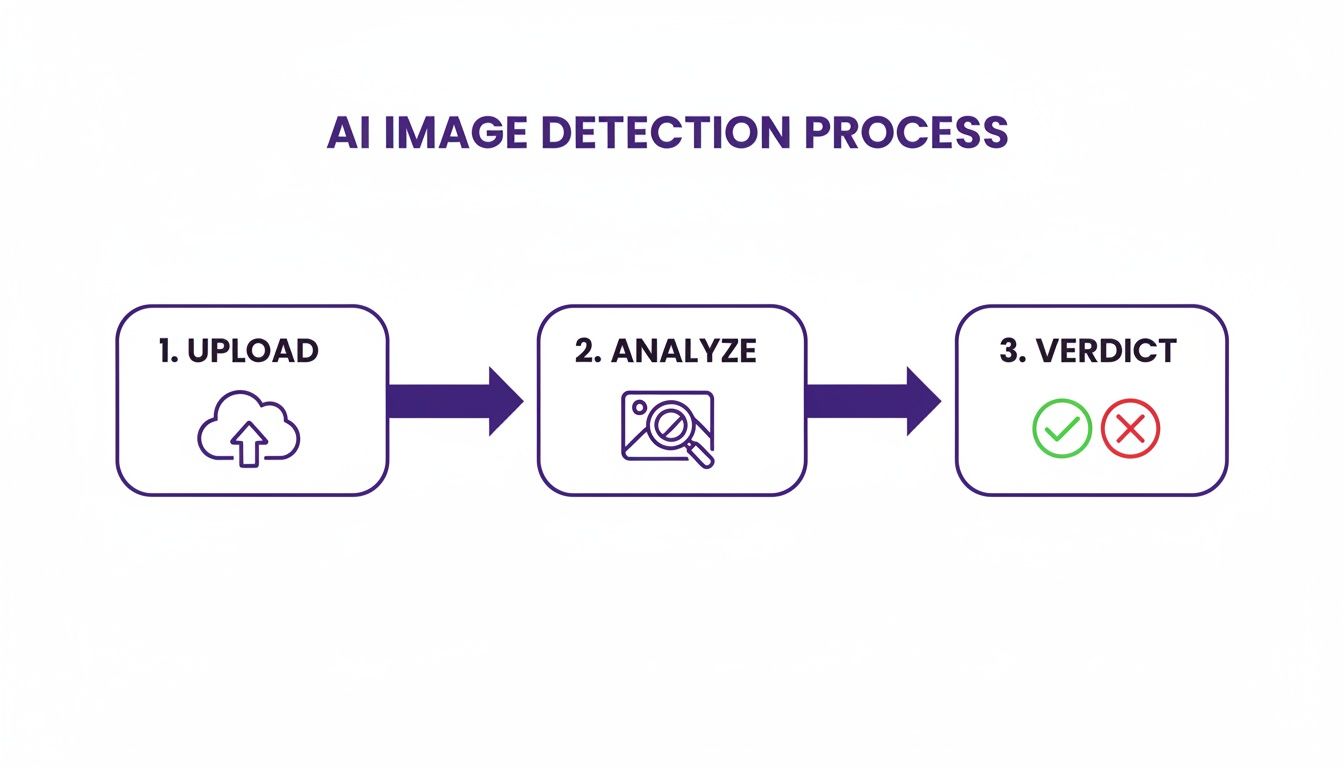
By having an automated first pass, you free up your team to focus their energy where it's needed most: on the images that are ambiguous, high-risk, or require nuanced judgment. You can see more on how this is applied to combating fake news in our dedicated guide.
Educators and academics have a different challenge. Manually verifying every image in a research paper is often impossible; it can take an expert a full week for a single paper. With studies showing humans misclassify AI images a staggering 38.7% of the time, automated tools are becoming essential for preserving academic integrity.
A responsible workflow isn't a checklist you tick off. It's a mindset rooted in professional skepticism. It means you treat every image as unverified until you've gathered enough evidence to prove otherwise.
Ultimately, the goal is to blend your own critical judgment with the power of good technology. That’s how you can navigate the modern visual landscape with real confidence.
Common Questions About Image Verification
When you're trying to figure out if an image is real, a few key questions always pop up. Let's tackle some of the most common ones you'll run into.
Are AI Image Detectors 100% Accurate?
No tool is perfect, and that includes AI detectors. Think of them as providing a strong, evidence-based probability, not an absolute certainty. They're trained to spot the subtle, almost invisible patterns and artifacts that AI models leave behind.
While these tools are far more reliable than just eyeballing it, they are in a constant cat-and-mouse game with AI image generators, which get better every day.
Key Takeaway: Use the detector's score as a powerful piece of evidence, but never the only piece. Always back it up with your own visual inspection and other verification steps.
Does Saving an Image Over and Over Affect Detection?
Absolutely. This is a big one. Every time a JPEG file is saved, it goes through what's called lossy compression. In simple terms, the file discards a tiny bit of data to stay small, which creates digital noise.
Save it enough times, and those compression artifacts can build up, potentially confusing forensic tools like Error Level Analysis (ELA). It can also make it harder for an AI detector to isolate the specific fingerprints of a generative model. This is exactly why tracking down the highest-quality version of an image should always be your first move.
What’s the Real Difference Between a Photoshopped and an AI-Generated Image?
It all comes down to the source.
- Photoshop is about manipulation. A human takes a real photo—or pieces of real photos—and manually edits, combines, or retouches them. The building blocks of the image came from a camera at some point.
- AI generation is about creation. An AI model builds an image from the ground up, based only on a text prompt. Nothing in that final picture ever existed in the real world.
While both can mislead, AI detectors are specifically tuned to catch the unique, algorithmic signatures left behind by the generative process itself, which are very different from the traces of human editing.
Ready to see how your images stack up? AI Image Detector gives you a fast, private, and reliable analysis in seconds. Upload your image and get an instant verdict.


