

Mastering AI Photo Identification

AI photo identification is all about using specialized software to look at a digital image and figure out if it was made, or heavily tweaked, by artificial intelligence.So, what exactly is AI photo identification?
It's the process of using specialized software to analyze a digital image and figure out if it was created or significantly altered by artificial intelligence. This has become an absolutely vital skill for anyone trying to detect synthetic media—a challenge that grows tougher as AI-generated visuals get more realistic and spread across the internet.
https://www.aiimagedetector.com/blog/what-is-synthetic-media
Why AI Photo Identification Is an Essential Skill
We're all swimming in a sea of digital images, and the line between what's real and what's AI-generated is getting blurrier by the day. This isn't some far-off future problem. It's happening right now, completely reshaping creative industries and marketing as we know it.
Since just 2022, a staggering 15 billion AI-generated images have flooded the internet. Think about that. On average, that's around 34 million new AI images created every single day. This explosion is mostly thanks to platforms using stable diffusion technology, which is behind about 80% of all AI-generated images out there. To put that into perspective, it took traditional photography nearly 149 years to produce a similar volume.
The Growing Need for Verification
With this massive wave of synthetic content, mastering AI photo identification has become a crucial capability, not just some niche technical skill. New, more sophisticated AI models pop up all the time, which just underscores how badly we need reliable ways to spot them. Just look at the latest advancements in AI image generation to see how fast this field is moving.
For professionals in a few key fields, this challenge is already part of their daily routine:
- Journalists and Media: For them, verifying the authenticity of images in news reports is everything. It's fundamental to maintaining public trust and fighting the spread of disinformation.
- Trust and Safety Teams: These teams are on the front lines, vetting user-generated content to stop harmful fakes, scams, and manipulated media from going viral.
- Educators and Researchers: Teaching students how to critically look at visual sources is a cornerstone of modern digital literacy.
- Legal and Security Professionals: Being able to identify a forged document or manipulated piece of evidence is absolutely critical for investigations and corporate security.
The core issue here isn't just about spotting poorly made "deepfakes" anymore. It's about building a consistent, reliable process to evaluate incredibly realistic imagery that can convincingly pass for the real thing. This takes a smart combination of human intuition and powerful analytical tools.
Understanding the Stakes
Let's be clear: failing to properly identify AI-generated photos comes with serious risks. A news outlet that publishes a synthetic image could see its credibility destroyed overnight. A social media platform that lets fake profiles with AI-generated pictures run rampant becomes a breeding ground for fraud and manipulation. Understanding what synthetic media is and the impact it can have is the first step in building a solid defense.
This guide is designed to give you the practical, hands-on knowledge you need to navigate this new reality, setting you up for the detection workflows we'll cover next.
Training Your Eyes to Spot AI-Generated Photos
Before you reach for any kind of ai photo identification software, remember that your most powerful tool is right behind your own two eyes. Think of this as developing a new kind of visual literacy. Early AI images were a dead giveaway with their six-fingered hands and melty, dream-like faces, but today's generators have gotten much smarter. To keep up, you have to train yourself to spot the subtle, almost subconscious mistakes that even the most advanced models still make.
This human-first analysis is your baseline skill. It’s about cultivating an instinct for what looks real versus what just feels a little off. With practice, you’ll start to see the tiny inconsistencies that an algorithm might glide right over but the human brain can flag instantly.
Beyond the Obvious Flaws
Let's dig deeper than the classic tells. Modern AI models are phenomenal at creating a convincing main subject, but they often fall apart when it comes to the intricate dance of light, texture, and real-world logic within a complete scene.
Inconsistent Lighting and Shadows: Question the light source. Is the subject illuminated from the right, but their shadow is cast directly behind them? Do the reflections in someone's eyes show a window that doesn't exist anywhere else in the shot? AI frequently struggles to paint a scene with a single, consistent light source.
Unnatural Textures: Zoom in and inspect the surfaces. Skin can look eerily smooth and poreless, almost like polished plastic, lacking the tiny imperfections that make us human. Fabric might have a strangely repetitive pattern, or the grain on a wooden table might flow in an impossible direction. If you're looking to spot fake people, our guide on images of fake people dives deeper into these kinds of unnatural features.
Bizarre Background Details: The background is often where the AI’s logic really starts to fray. Look for nonsensical text on signs, objects that seem to merge into one another, or architectural features that defy the laws of physics. A brick wall might abruptly transform into a chain-link fence for a few feet before turning back into brick.
Here's the key takeaway: AI generators are brilliant mimics, but they don't actually understand the world. They stitch images together from patterns learned across billions of examples, but they have no grasp of the physics or context they're trying to create. That gap between mimicking and understanding is your biggest advantage.
Common Flaws in AI-Generated Images
To help sharpen your eye, here’s a quick reference guide for the subtle inconsistencies that often give away an AI-generated image. These are the details many people miss at first glance.
| Artifact Type | What to Look For | Common Scenario |
|---|---|---|
| Reflections and Glass | Distorted, blurry, or missing reflections in mirrors, windows, or water. | A person standing before a mirror where the reflection is warped or doesn't accurately match their pose. |
| Patterns and Symmetry | Repetitive patterns that are too perfect; asymmetrical features on a symmetrical object. | A tiled floor where every tile is identical, lacking any natural variation or wear. |
| Hair and Strands | Individual strands of hair that look like spaghetti, merge unnaturally, or float disconnected from the head. | A portrait where flyaway hairs look painted on or blend seamlessly into the background. |
| Jewelry and Accessories | Earrings that are mismatched, chains that disappear into the skin, or glasses with illogical frames. | A photo where a necklace chain appears to go through the person's neck instead of around it. |
Looking for these specific artifacts can quickly turn a suspicious feeling into a concrete piece of evidence.
The Ever-Evolving Detection Challenge
This cat-and-mouse game between image generators and detectors is accelerating at an incredible pace. The AI landscape is evolving faster than anyone could have predicted. In fact, nearly 90% of significant new AI models in 2024 came from industry, with the computing power used for training doubling roughly every five months. You can discover more insights from the 2025 AI Index Report to get a sense of just how fast things are moving.
This relentless progress means that what works for detection today might be outdated tomorrow. That’s precisely why your human intuition is so critical. As the technology shifts, your trained eye for what makes logical sense remains your most reliable and consistent asset.
Ultimately, training your eye boils down to repeatedly asking one simple question: "Does this actually make sense?" By methodically questioning the light, textures, background, and tiny details, you build a powerful mental framework for identifying AI photos that will serve you well, no matter what tool you use.
Building Your AI Detection Workflow
A reactive, one-off approach to AI photo identification just doesn't cut it. When you're trying to figure out if an image is real or fake, you need a structured, repeatable process. A solid workflow is your best defense—it turns a gut feeling into a methodical investigation and ensures you don't skip critical steps when you're under pressure.
Of course, your exact process will depend on what you do for a living. But the core principles are always the same: you have to blend sharp human analysis, the right tech tools, and some good old-fashioned contextual investigation.
Let's break down some battle-tested workflows for different professions. Think of these as starting points you can adapt for your own daily grind.
This flowchart gives a great overview of that initial human-led analysis, zeroing in on the classic weak spots where AI models often trip up.
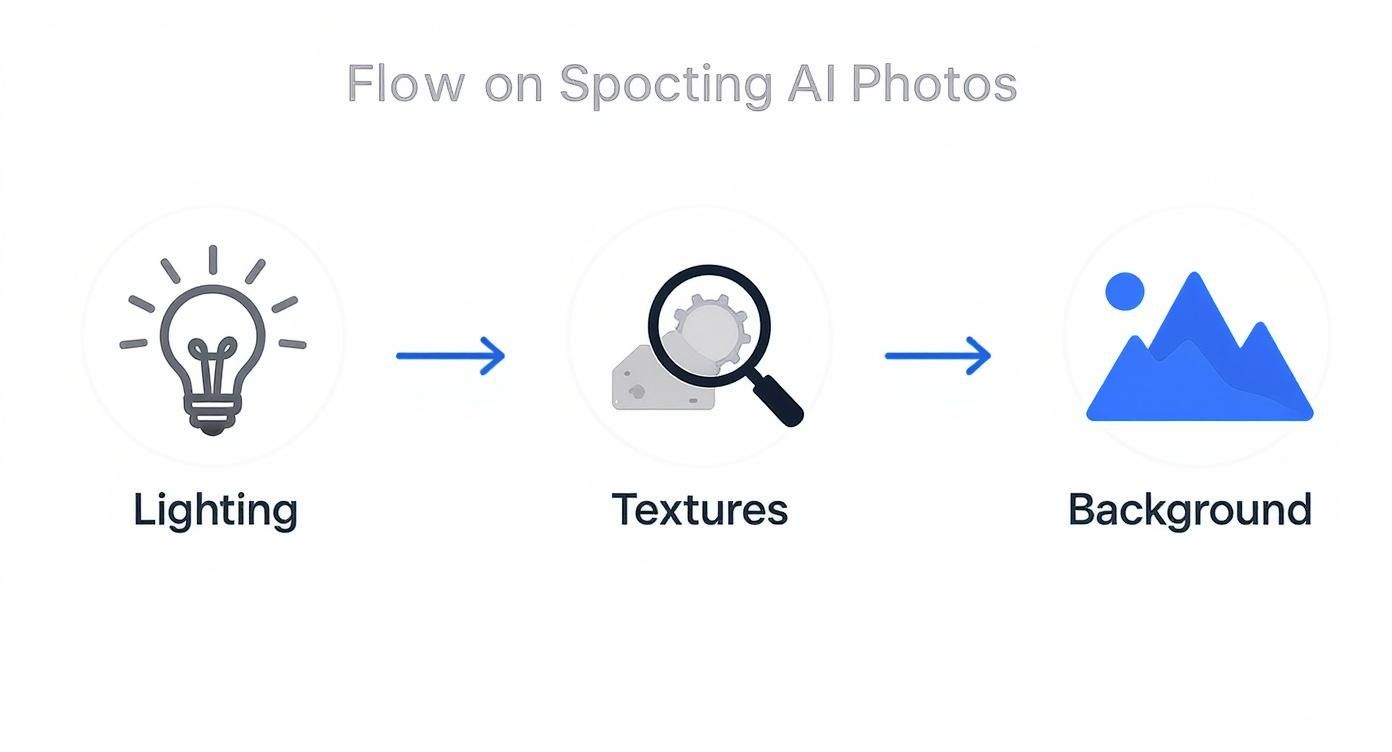
The key takeaway here? A thorough manual check of the lighting, textures, and background logic should always be your first move before you even think about firing up any software.
A Workflow for Journalists and Fact-Checkers
For journalists, this is all about verification. Accuracy is everything, and so is public trust. Any image you run with a story has to be vetted, especially if it comes from an unverified source or shows a sensitive event. The stakes couldn't be higher; one fake image can torpedo your credibility in an instant.
Your best bet is a layered workflow, starting broad and then drilling down.
- Your Initial Gut Check: Start with the visual analysis techniques we’ve covered. Scan for anything that looks off—unnatural lighting, bizarre textures, or background details that make no sense. This first pass is crucial for flagging images that need a much closer look.
- Dig into the Source and Context: Where did this image come from? Was it sent to you directly, or did it pop up on social media? Use reverse image search tools like Google Images or TinEye to uncover the photo's digital footprint. This helps you trace its origin and see if it's been used elsewhere in a different context.
- Play Digital Detective with Metadata: Sometimes, the data baked into an image file can offer powerful clues. EXIF data might reveal the camera model, date, and time a photo was taken, though this info can be easily stripped or faked. It's worth learning how to find metadata in a photo to see what secrets an image file might be hiding.
- Run It Through an AI Detector: Next, upload the image to a reliable AI detection tool. The software will scan it for digital artifacts and statistical patterns common in synthetic media and give you a confidence score. This score is a vital piece of the puzzle, but it should never be the only thing you rely on.
- Make the Final Call and Document Everything: Pull all your findings together. If your visual assessment, the reverse image search, and the AI detector all point to the image being AI-generated, you can be pretty confident. If the results are conflicting, document the inconsistencies and report with transparency, making it clear what you know for sure and what’s still up in the air.
A Workflow for Trust and Safety Teams
If you're on a trust and safety team at a social media company or an online marketplace, you're facing a completely different beast: sheer volume. You have to sift through thousands, maybe millions, of user-submitted images every day to catch spam, scams, and harmful content. Here, efficiency is the name of the game, which demands a smart mix of automation and manual review.
This workflow is all about building scalable, automated flagging systems.
- Automated Triage at Scale: The first line of defense is an AI detection API that automatically scans every single image that comes in. You can set a confidence score threshold—say, 85% likely AI-generated—to automatically flag content for a human to review. This pass filters out the overwhelming majority of authentic images, letting your team focus only on high-risk cases.
- Look for Patterns: Don't review images in a vacuum. You need to look for patterns of behavior. For example, a brand-new account that rapidly uploads dozens of profile pictures, all of which get flagged as AI-generated, is a massive red flag for a bot network or a coordinated scam.
- The Human Review Queue: Any image that gets flagged lands in a human moderation queue. Here, moderators use those same visual inspection skills, but they're also looking for context the AI might have missed. Is the AI-generated image being used for art (which is often fine) or to create a fake identity to scam people (a clear violation)?
- Enforce and Escalate: Based on this review, moderators enforce the platform's policies. This could mean taking down the content, suspending the account, or escalating the case to a specialized team to investigate the entire network.
For trust and safety teams, the workflow is less about proving a single image is fake and more about mitigating risk at a massive scale. The goal is to quickly and efficiently shut down bad actors who are using synthetic media to harm the community.
A Framework for Educators
For educators, the goal of AI photo identification is different yet again. It's all about teaching critical thinking and media literacy. You're not trying to moderate a platform; you're trying to empower students to thoughtfully analyze the flood of visual information they see every day.
An inquiry-based framework works wonders here.
- Start with the "Why": Begin by explaining why AI-generated images exist in the first place, covering everything from cool creative tools to a weapon for disinformation. Show them clear examples of both obvious fakes and the really subtle ones.
- Create a "Verification Checklist": Develop a simple checklist that students can use whenever they come across a questionable image online. It should prompt them with questions like:
- Who made this image?
- Why did they make it?
- Do the shadows and light look right?
- Are there any weird or illogical details in the background?
- Have I seen this image anywhere else before?
- Get Their Hands Dirty: Give students a mix of real and AI-generated photos and have them work in small groups to analyze them using the checklist. This kind of active, hands-on learning is what really builds practical skills and confidence.
- Talk About the Ethics: Go beyond simple detection. Spark a conversation about the ethical implications. When is it okay to use AI-generated images? What responsibility do we have as people who create and share media online? This fosters a much deeper, more nuanced understanding of the technology's real-world impact.
Making Sense of Inconclusive Results
https://www.youtube.com/embed/ftYdEm6pEkE
Let's be realistic: not every scan will give you a clean, 100% "Human" or "AI" answer. More often than not, you’ll find yourself looking at results that live in the gray area—a 60% confidence score, a "Potentially Edited" flag, or an "Inconclusive" notice. This is where the real work begins, and where your own expertise truly matters.
An ambiguous result doesn't mean the tool failed. It's simply reflecting the messy reality of how images are made today. The line between a real photo and a synthetic one is getting blurrier by the day, so it’s better to think of the detector’s output as a probability score that needs a human to interpret it.
For example, a 70% "Likely AI" score doesn't mean there's a 30% chance the photo is completely untouched. It’s a clue that something more is going on. It could point to a few different scenarios:
- It’s a real photo that’s been heavily manipulated with AI-powered filters, upscalers, or editing tools.
- The image is a composite—a mix of real photographic elements and AI-generated additions.
- The AI model that created it is so sophisticated that it leaves behind very few of the usual tell-tale artifacts.
- The image is low-quality or heavily compressed, which makes it harder for the algorithm to get a clean read.
The Challenge of Hybrid Images
One of the main culprits behind these murky results is the rise of hybrid images. These aren't entirely fake pictures cooked up from a text prompt. Instead, they’re real photographs that have been tweaked with generative AI, like using Adobe’s Generative Fill to remove an unwanted object from the background.
Think of a real estate agent who zaps a car out of the driveway in an otherwise authentic photo of a house. An AI detector will likely pick up on the fact that the pixels filling that empty space were artificially created. The result isn't a "fake" photo, but a real one with a specific AI modification.
This changes the question you need to ask. It's no longer a simple "Is this real or fake?" Instead, you should be asking, "How much has this image been modified, and does that change what it's trying to communicate?" The answer almost always depends on context.
Dealing with False Positives and Negatives
No detection model is perfect. You will run into false positives (a human photo flagged as AI) and false negatives (an AI photo that gets a pass). Knowing why these happen is half the battle.
- False Positives often pop up with highly processed photos. Think of images with aggressive noise reduction, heavy-handed artistic filters, or extreme color grading—these can sometimes create patterns that trick an algorithm into seeing AI artifacts.
- False Negatives are a bigger issue with the newest, most advanced AI models. These generators are literally designed to fool both human eyes and detection algorithms, so they’re always a step ahead.
When a tool gives you a result that clashes with what your own eyes are telling you, don't just throw one out. Treat that discrepancy as a red flag. It’s a signal to go back and look closer for subtle flaws you might have missed, while also keeping the tool's limitations in mind.
A Framework for Your Final Judgment
When the tech and your own gut feeling are sending mixed signals, you need a clear process for making the final call. This isn’t about finding one right answer, but about building a conclusion you can stand behind.
First, document everything. Log the output from every tool, including confidence scores. Take screenshots of reverse image searches. Make a note of any specific visual oddities you found during your own manual check.
Next, evaluate the intent. What was the goal behind the potential modification? Adding a mountain range to the background of a beach resort photo is clearly deceptive. But using AI to remove a photobomber from a family picture? That’s generally harmless. The context and source of the image are critical here.
Finally, be transparent about what you found. When you report your conclusion, be honest about any uncertainty. Instead of a flat "This is fake," you’ll sound more credible saying something like, "Our analysis shows a high probability of AI modification in the background, though the main subjects appear to be from an authentic photograph."
Your job is to pull all the threads together—the machine's analysis, the image's digital history, and your own expert observation—into a clear and well-reasoned conclusion. That way, even when the results aren't black and white, your judgment is sound.
Navigating the Ethical and Legal Minefield
Using an AI photo identification tool is one thing, but using it responsibly is a whole other ball game. When you start verifying images, you're stepping into a tangled web of ethical, legal, and privacy concerns that you absolutely cannot ignore. These aren't just abstract ideas; they have real-world consequences for people and organizations.

This is about more than just the technical steps. It’s about building an ethical framework around your entire verification process to protect your organization from legal trouble and ensure you respect individual rights.
Understanding Data Privacy and Third Party Tools
Think about it: when you upload an image to an online detector, where does that file actually go? It’s a critical question. Many free tools are a bit of a black box when it comes to data handling, and uploading sensitive material can be a major privacy risk.
Let's say a journalist uploads a confidential photo from a source, or a company checks a proprietary product image before a launch. If the service’s terms are murky, that data could be stored, analyzed, or even used to train other AI models without anyone knowing.
Key Takeaway: You should always assume that any image uploaded to a public, third-party server could be exposed. If you're handling sensitive content, you need to use tools that explicitly state they process images in real-time and never store them.
This is exactly why we built our AI Image Detector with a privacy-first approach. We don’t store the images you analyze, which means your confidential material stays that way.
Navigating Copyright and Ownership in the AI Era
Copyright law is playing catch-up with generative AI, and it's created a confusing situation for everyone. The big question is whether an AI-generated image can even be copyrighted in the first place. Right now, the legal thinking in many places is that if a work is created entirely by AI without significant human input, it can't be copyrighted.
This has a few important implications:
- For Creators: If you're using AI to generate art, your claim to owning it might be shaky. That could leave your work open for others to use without your permission.
- For Verifiers: Figuring out an image is AI-generated can be the first clue in a copyright headache. A company might use a synthetic image for marketing, thinking it’s royalty-free, only to discover it’s a near-copy of a copyrighted work that the AI was trained on.
Compliance with Data Protection Regulations
If you handle data from people in Europe, you're bound by the General Data Protection Regulation (GDPR). Using AI photo identification on images with people's faces or other personal information is considered data processing under GDPR, and that comes with strict rules.
This means you need a legitimate reason for processing that data. Getting it wrong can lead to massive fines. For a solid breakdown of what’s required, this practical AI GDPR compliance guide is essential reading for building a process that won't get you into trouble.
In the end, creating an ethical framework is all about being proactive. It means choosing secure tools, getting a handle on the legal gray areas of copyright, and sticking to data protection laws. When you build these principles into your workflow, you’re not just detecting AI images—you’re verifying them with integrity.
Common Questions on Spotting AI Photos
When you're in the trenches dealing with digital media, the same tough questions and tricky scenarios come up again and again. Here are some straight answers to the most common questions I hear about identifying AI-generated photos, designed to help you in your day-to-day work.
Can Detection Tools Really Catch Every AI Image?
The short answer is no. No tool is perfect. Think of it as a constant cat-and-mouse game: as soon as detection models get good at spotting the tells of one AI generator, a new, more advanced one comes out that's even more realistic. The best generators today can produce images that sail right past many detectors.
This is exactly why you can't rely on a single tool. A solid workflow always involves multiple layers. You start with a reliable AI detection tool, but you back it up with your own trained eye, looking for those weird little flaws in shadows, skin texture, or backgrounds. Then, you layer on traditional methods like a reverse image search to see if the photo has a history online.
Treat a detector's score as a strong signal, a major piece of evidence, but never as the final, absolute verdict.
AI Detectors vs. Reverse Image Search: What's the Difference?
This is a big point of confusion, but the two tools do completely different jobs. You really need both in your toolkit.
A reverse image search, using something like Google Images or TinEye, scours the web to see where else a picture has appeared. It's all about finding the photo's origin story—where it came from, how it's been used, and if it's been altered along the way.
- It answers: "Where has this photo been before?"
An AI photo identification tool does a forensic analysis of the image file itself. It’s not looking online at all. Instead, it’s examining pixel patterns and digital fingerprints left behind by the generation process.
- It answers: "How was this photo made?"
You can see why you need both. A reverse search can instantly debunk an old photo being passed off as new, while an AI detector is your only shot at flagging a brand-new fake that has never existed online before today.
How Should I Handle Hybrid Images?
We're seeing more and more "hybrid" images—real photos that have been edited with AI tools like Adobe's Generative Fill. These are tricky because they blur the line, and a simple "real vs. fake" label just doesn't cut it. The goal here is to focus on transparency and context.
Your first step is to figure out what, exactly, was changed. The point isn't just to slap a "fake" label on it, but to understand what was modified and why. Was a distracting trash can removed from the background of a product shot? Or was a person added to a political rally to completely change the story?
Your response really depends on the situation. If you're a journalist, any generative change that alters the factual reality of a news photo has to be disclosed. If you're on a trust and safety team, it comes down to your platform's policy—did the edit create a harmless meme or a piece of malicious disinformation?
No matter what, document what you find and be clear about the nature of the edits.
Are There Privacy Risks with Online Detection Tools?
Yes, absolutely. Be careful here. When you upload a photo to most free online detectors, you're sending your data to someone else's server. You have to read the fine print—the terms of service and privacy policy—to see what they do with it.
If you're handling sensitive material, like pre-release product images, confidential legal documents, or photos from an ongoing investigation, using a public online tool is a bad idea. For that kind of work, you need to look for professional-grade tools with explicit data privacy guarantees or on-premise solutions that run locally.
Always put data security first. Assume anything you upload could be exposed unless the provider explicitly promises it won't be.
Ready to verify images with confidence and security? The AI Image Detector was built with a privacy-first commitment. We analyze your images in real-time and never store them on our servers, ensuring your sensitive content remains confidential. Get a clear, reliable verdict in seconds. Try it for free today at https://aiimagedetector.com.


