

The Ultimate Guide to Analysis of Photos for Journalists and Creators

The term "analysis of photos" is all about looking deeper into an image to figure out if it's real, what its story is, and what secrets it might be hiding. It’s a process of going beyond what you see at first glance, digging into everything from the photo's hidden data and lighting to signs of digital tampering or AI generation. In a world flooded with visuals, this has become an essential skill for just about everyone.
What Is Photo Analysis In A Digital World?
We used to say, "seeing is believing," but with today's powerful editing software and AI image generators, that's just not true anymore. Photo analysis has evolved from a specialized forensic science into a critical part of everyday digital literacy. Think of it like a detective investigating a crime scene—every single part of an image is a potential clue to its origin, its integrity, and the real story it tells.
Every pixel, shadow, and reflection can tell you something. Whether you're a journalist, a creative professional, or just scrolling through social media, knowing how to do a basic analysis of photos is vital. It helps you answer the important questions and protects you from being duped by misinformation.
Why Photo Analysis Matters Now More Than Ever
The need for sharp photo analysis skills has absolutely exploded. The line between real and fake has become so blurry that anyone can create convincing fakes designed to sway opinions, start rumors, or even commit fraud.
Getting a handle on how images are made and manipulated is your first line of defense. Even understanding technical details by Choosing the Best Image Format for Web Performance can offer insights into an image's digital DNA.
This guide will take you beyond just looking at a picture and teach you the hands-on techniques and modern tools you need to verify images with confidence. We’ll get into how to:
- Uncover Hidden Data: Learn to read an image’s digital footprint—the metadata that can reveal exactly when and where it was taken.
- Spot Visual Inconsistencies: Train your eye to catch things that just don't look right, like unnatural lighting, impossible shadows, or weird blurs that signal manipulation.
- Identify AI Artifacts: Discover the subtle giveaways that AI generators often leave behind, from strange background details to textures that don't quite make sense.
Think of photo analysis as critical thinking for the visual age. It's not about being cynical; it's about being discerning and arming yourself with the knowledge to tell fact from fiction when images are the main form of communication.
Ultimately, the goal is to feel confident when you come across a questionable image. Whether you're a reporter verifying a source, a teacher showing students how to navigate online media, or a designer checking your assets, these skills are indispensable. This guide will show you the way, from old-school manual inspection to using powerful tools like an AI Image Detector.
Uncovering Clues Hidden in Plain Sight

Think of yourself as a digital detective. Every single image you see carries a trail of hidden information—subtle visual cues and tiny inconsistencies that tell a story far deeper than what you see on the surface. Learning how to spot these clues is the first real step in a proper photo analysis.
This isn’t about making wild guesses. It’s a methodical process of examining both the visible and invisible parts of an image file. We'll start with the most straightforward evidence, the data baked right into the photo, before moving on to the more subtle visual checks that require a trained eye.
Reading the Digital Fingerprints in Metadata
Every time you snap a picture with a modern camera or smartphone, a surprising amount of information gets stored directly inside the image file itself. This is called EXIF (Exchangeable Image File Format) data, and it's essentially the photo's digital birth certificate.
This metadata can reveal an incredible amount of detail, often including:
- Camera and Lens: The exact model of the camera or phone, and even the lens used for the shot.
- Camera Settings: The nitty-gritty technical details, like shutter speed, aperture, ISO, and focal length.
- Timestamp: The precise date and time the photo was taken, sometimes right down to the second.
- Geolocation: GPS coordinates pinpointing exactly where the photo was taken (if the feature was turned on).
Imagine an image claims to show a protest in Paris, but its GPS data points to a location smack-dab in the middle of New York City. That's a massive red flag. Or what if the timestamp doesn't line up with the event it supposedly shows? Its authenticity is immediately suspect. Just remember, this data can be stripped or altered, so think of it as one powerful clue, not the final word.
A photo’s metadata gives you the foundational context for your investigation. It's the very first place you should look to verify the who, what, when, and where of an image before you start diving into a more complex visual analysis.
Unmasking Edits with Error-Level Analysis
When a photo is edited and re-saved—especially in a format like JPEG—the altered parts often compress differently from the original pixels. Error-Level Analysis (ELA) is a clever technique that highlights these compression differences, making manipulations practically jump off the screen.
Think of ELA as using a blacklight at a crime scene. To the naked eye, everything looks clean. But under the blacklight, hidden stains and substances are suddenly visible. An ELA scan does something similar, revealing parts of an image that have a different compression history than the rest.
Here is an example of what an ELA result looks like from the popular tool FotoForensics.
In a genuine, untouched photo, the ELA result should look fairly uniform and consistent. If you spot specific objects or areas that are noticeably brighter or darker than their surroundings, it's a very strong sign that those parts were added, cloned, or otherwise manipulated after the fact.
Analyzing Light and Digital Artifacts
Beyond the technical tools, nothing beats a careful visual inspection. Your own eyes can often spot inconsistencies that software might miss, especially when it comes to the basic laws of physics and the tell-tale signs of digital meddling.
One of the most reliable methods is to analyze the lighting. Look for consistency in how shadows and highlights behave. Are all the shadows in the image falling in the same direction, as if from a single light source? Do reflections in shiny surfaces, like a person's eyes or a window, make logical sense? Manipulated images almost always fail this simple test.
The challenge is getting harder every day. The boom in AI image generation is flooding our feeds with synthetic photos, making advanced analysis tools more critical than ever. The global AI Image Generator Market is projected to grow by USD 2,392.3 million between 2025 and 2029, with an incredible CAGR of 31.5%. This growth is fueled by tools that create hyper-realistic images and edits, making manual detection trickier. You can find out more about the explosive growth of the AI market and its impact.
Finally, keep an eye out for digital artifacts. These are the subtle giveaways left behind by algorithms, and they're especially common in AI-generated images. Pay close attention to:
- Unnatural Textures: Skin that looks too smooth or has a waxy, plastic-like sheen.
- Illogical Details: People with six fingers, nonsensical text on signs, or objects that merge into each other bizarrely.
- Background Strangeness: Warped lines, distorted patterns, or nonsensical elements lurking in the background.
These forensic techniques—from checking metadata to spotting AI artifacts—give you a powerful toolkit for deconstructing any image. By combining them, you can shift from being a passive viewer to a sharp, critical analyst.
How to Spot AI-Generated Images with Confidence

The single biggest challenge in photo analysis today is telling a real photo from one made by artificial intelligence. AI image generators have gotten so good that our own eyes often can't tell the difference anymore. That’s why specialized AI detection tools are becoming essential; they give us a data-driven way to find the truth.
Think of an AI detector as a digital forensics expert trained on millions of images. It's been shown countless real, camera-shot photos alongside a vast library of synthetic, AI-generated ones. Through that process, it learns to spot the subtle, almost invisible artifacts that AI models tend to leave behind.
These are tiny patterns and inconsistencies that a human would likely miss, but to a trained algorithm, they're dead giveaways.
Recognizing the Telltale Signs of AI
While AI is impressive, it’s far from perfect and still makes predictable mistakes. Knowing what to look for is a critical part of photo analysis. Even when using an automated tool, a quick visual inspection for common AI quirks can help validate its findings.
Keep an eye out for these classic indicators:
- Waxy or Overly Smooth Skin: AI often renders skin with an unnatural, airbrushed perfection, making people look like they're made of wax or are part of a digital painting.
- Illogical Anatomy: The infamous six-fingered hand is the classic example, but also watch for bizarre proportions, limbs that bend the wrong way, or objects that just defy physics.
- Messed-Up Backgrounds: The edges of an image are often where AI gets lazy. Look for nonsensical shapes, distorted buildings, or text that looks like a garbled alien script.
- Inconsistent Details: Do the earrings match? Does a pattern on a shirt warp unnaturally? Are the reflections in a window or a pair of sunglasses correct?
These little flaws are the cracks in the AI's otherwise convincing illusion. Learning to spot them gives you another layer of confidence on top of what a detection tool tells you. To really hone your skills, check out our guide on how to spot the subtle signs of AI in images.
The Power of Speed and Confidence Scores
If you're a journalist, researcher, or content moderator, you don't have time to spend hours squinting at every single image. Speed is everything. This is precisely where tools like an AI Image Detector become so valuable, delivering a verdict in seconds.
Better yet, they don't just give you a simple "yes" or "no." Instead, you get a confidence score—a percentage that represents the probability that an image was made by AI. It’s a far more practical and nuanced result.
A confidence score is your analytical North Star. It helps you move from a gut feeling to a data-backed conclusion, quantifying the likelihood of AI involvement so you can make decisions quickly and with greater certainty.
This kind of efficiency is becoming non-negotiable. The global AI Image Recognition Market was valued at USD 50.36 billion and is projected to hit USD 163.75 billion by 2032, growing at a 15.8% clip. This explosion in growth underscores the urgent need for trustworthy verification tools. You can learn more about the trends shaping the AI recognition market and what they mean for digital trust.
Introducing a Privacy-First AI Image Detector
When you're analyzing photos, especially if they're sensitive or belong to a client, privacy is paramount. Many online tools make you upload your files directly to their servers, leaving you wondering who has access to them and how they're being used.
That’s why a privacy-first approach is so important. A tool like the AI Image Detector from aiimagedetector.com is designed to perform its analysis locally in your browser. Your images are never uploaded or stored, ensuring your work stays completely confidential.
The tool itself is designed for a fast, no-fuss workflow:
- Broad File Support: It works with all the common formats—JPEG, PNG, WebP, and HEIC—so you don't have to waste time with file converters.
- Clear, Simple Results: The output plainly states whether the image is "Likely Human" or "Likely AI-Generated" and gives you the all-important confidence score.
- No Sign-Up Needed: You can run checks for free without creating an account, making it perfect for quick, on-the-fly verifications.
By combining the speed of an automated detector with a firm commitment to user privacy, you can integrate AI verification into your photo analysis process confidently and responsibly.
Putting Photo Analysis Into Practice: Your Workflow
Knowing the theory is one thing, but applying it under pressure is a different beast altogether. To really get good at analyzing photos, you need a structured, repeatable workflow. Think of it as your personal checklist—a way to make sure you cover all the important bases without getting lost in the details, whether you're chasing a deadline or guiding a classroom.
A solid workflow is more than just a list of steps. It’s a way of thinking that trains your brain to approach images like a seasoned analyst. It blends a quick visual once-over with deep technical data and the smart use of modern tools. By sticking to a process, you're far less likely to miss a critical clue and can stand by your conclusions with real confidence.
A Rapid Verification Workflow for Journalists
For journalists and fact-checkers, the clock is always ticking. When news breaks, a single image can circle the globe in minutes, and confirming its authenticity is everything. This workflow is built for speed without sacrificing accuracy.
Scenario: A dramatic photo of a protest in a major city hits your feed. The source is shaky, and you have to decide—fast—if it's credible enough to report on.
- The 60-Second Triage: First, do a quick gut check. Does anything just feel… off? Look for tell-tale AI artifacts like mangled hands, nonsensical backgrounds, or weird, garbled text on signs.
- Check the Metadata: Immediately pull the image's EXIF data. Does the timestamp line up with when the event supposedly happened? If there are GPS coordinates, do they match the location? You can dive deeper into this crucial step with our guide on how to check the metadata of a photo.
- Run an AI Detection Scan: While you’re looking at the metadata, upload the image to a privacy-first tool like the AI Image Detector. Within seconds, you’ll get a probability score—a powerful piece of data that can either back up or challenge your initial read.
For a journalist, this isn't about achieving absolute certainty in two minutes. It's about finding red flags fast. A metadata mismatch or a high AI score is an immediate signal to pause and investigate further, not publish.
An Educational Workflow for Teachers
As an educator, you're on the front lines of building digital literacy. This workflow isn't just about getting an answer; it's about teaching students the critical thinking skills to analyze images themselves, turning every picture into a teachable moment.
Scenario: A student turns in a historical photo for a project, but it looks a little too crisp and perfect. The goal isn't just to call it out but to teach the student how to figure it out on their own.
- Step 1: Start with Questions: Instead of giving answers, ask questions. "Where did you find this?" "What makes you think it's from that time period?" "What details in the photo seem to support that story?" This is the Socratic method in action.
- Step 2: Analyze Together: Pull the image up and look at it as a team. Discuss the clothing styles, the technology in the background, or the architecture. Ask if the lighting and shadows look natural for the scene.
- Step 3: Introduce the Tools: Now, show them how technology helps. Walk them through using an AI detector and explain what a confidence score really means. This is the perfect way to show how tech can support—but not replace—human judgment.
This approach flips photo analysis from a simple true/false task into a rich lesson on evidence, critical thinking, and what it means to be a responsible citizen online.
A Protective Workflow for Content Creators
If you're a designer, photographer, or artist, photo analysis works both ways. You need to verify the images you use and protect your own creations from being stolen or misused.
- Verify Your Sources: Before you incorporate any stock photo or user-submitted image into your work, run it through a quick verification checklist. Look for signs of manipulation and run an AI detection scan to make sure you aren't accidentally using synthetic media.
- Watermark Your Work: Add visible or invisible watermarks to your original creations. It's a simple but effective deterrent that makes it much harder for someone to pass off your work as their own.
- Monitor with Reverse Image Search: Every so often, use tools like Google Images to do a reverse image search on your most important pieces. This is a great way to find unauthorized copies floating around the web so you can take action.
By tailoring a workflow to your specific needs, analyzing photos stops being a chore and becomes a powerful, proactive skill.
How to Interpret Your Analysis Results
Getting the data back from your photo analysis is just the first step. The real art is in knowing what to make of it all. You might see a high confidence score from an AI detector, but that isn't a simple "guilty" or "not guilty" verdict. Think of it as a probability score—a single piece of a much larger puzzle you need to assemble.
For instance, a "Likely AI-Generated" flag is a huge red flag, but it doesn't automatically mean the entire image is a fabrication. It could simply be pointing out that a genuine photo has been heavily edited with AI tools, like those sky replacement or magic eraser features now built into many apps. Your interpretation has to be more nuanced than a simple pass/fail.
The infographic below shows a straightforward but powerful workflow for taking your analysis from start to finish.
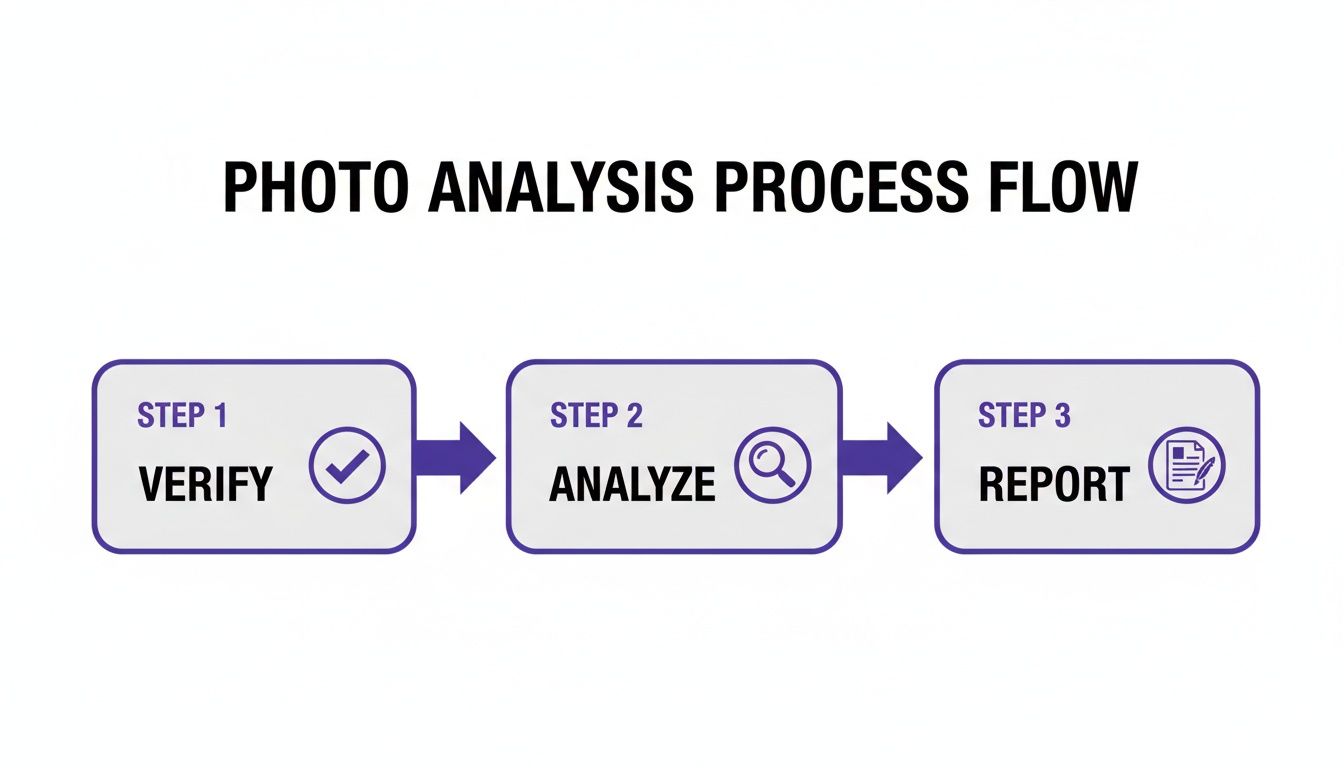
It’s a simple framework: verify, analyze, then report. Following this keeps your process logical and ensures your final conclusion is built on a solid foundation of evidence.
Decoding Ambiguous Results
So, what happens when the results are murky? Maybe you get a 55% confidence score for AI generation—basically a statistical coin toss. This is where your human intuition and critical thinking really have to take over.
An ambiguous result isn't a sign the tool failed; it’s an invitation to dig deeper. This often happens with "hybrid" images, where real photos have been altered with AI. The detector is essentially telling you it sees conflicting signals, which is a valuable clue in itself.
When you're in that gray area, it's time to gather more evidence.
- Re-examine Visual Clues: Go back to the image. Are there any unnatural shadows, weird textures, or odd lighting you might have overlooked the first time?
- Check the Source: Who posted the image? Do they have a track record of sharing manipulated content or misinformation? A little context goes a long way.
- Seek External Verification: Can you find other, trustworthy photos of the same event or place? Comparing it to a known-good source is one of the best ways to spot a fake.
This approach stops you from jumping to a conclusion based on a single, inconclusive data point.
Your goal isn't to prove your initial hunch right. It's to follow the evidence wherever it leads. The most credible conclusions come from piecing together multiple, independent lines of evidence that all point in the same direction.
Avoiding Confirmation Bias
One of the biggest traps in any kind of analysis is confirmation bias. It's that natural human tendency to look for evidence that confirms what we already believe. If you think an image is fake from the get-go, you'll unconsciously interpret every little clue as proof.
To fight this, you have to actively challenge your own assumptions. Play devil's advocate with yourself. Ask, "What evidence would it take to convince me this image is actually real?" This simple mental check forces you to look at all the clues objectively and makes your final judgment much stronger.
The need for this kind of accuracy is what's driving incredible growth in this space. The AI Detector Market is projected to explode from USD 453.2 million to USD 5,226.4 million by 2033. That massive jump is happening because reliable verification is no longer a niche concern. You can read more about the maturing AI detection market to get a sense of where things are headed.
Ultimately, interpreting results is about building a defensible case. When you combine the technical data with contextual clues and a healthy dose of skepticism, you can move from a place of uncertainty to a confident, well-reasoned conclusion.
Navigating the Legal and Ethical Landscape of Image Analysis
Being able to dissect an image is a powerful skill, but it's one that comes with serious responsibility. Photo analysis isn't just a technical exercise; it forces you to navigate a tricky maze of legal and ethical minefields. Every choice you make, from which image you analyze to how you share your findings, has real-world consequences.
The Copyright Conundrum
First up is the constant issue of copyright. Just because a picture is on the internet doesn't mean it's fair game. Using and re-publishing a copyrighted photo without permission, even if your goal is to debunk it, can land you in legal hot water.
This gets especially complicated with AI-generated images, where the very concepts of ownership and infringement are still being hammered out in the courts. It's crucial to stay informed about the evolving legal policies regarding AI-generated media to make sure you're not crossing a line.
Upholding Privacy and Dignity
Beyond the legalities of ownership, you have to think about the people in the photos. Analyzing images of private individuals without their consent is a major ethical red flag.
Journalists, for example, have a duty to treat sensitive images—especially those showing personal tragedy or vulnerability—with the utmost care. It's a tough balancing act between the public's right to information and an individual's right to privacy and dignity.
The stakes are incredibly high if you get it wrong. A flawed analysis can be devastating. A news outlet might have to print a retraction that shatters its credibility, or worse, an innocent person could be publicly shamed based on a doctored photo. These aren't just simple mistakes; they can destroy reputations and cause genuine harm.
Integrity in photo analysis means putting accuracy and ethics ahead of speed or a sensational headline. You have a responsibility not just to the image itself, but to the people and the stories it represents. Your work should build trust, not break it.
Ultimately, a commitment to fairness and transparency is non-negotiable. For creators and businesses, this also means being proactive about protecting your own visual work. You can dive deeper into this with our guide on protecting intellectual property rights in an increasingly digital world.
Frequently Asked Questions About Photo Analysis
As you start digging into photo analysis, you'll naturally have questions. It's a field that's moving fast, blending old-school detective work with new technology. Let's tackle some of the most common ones to help you get started on the right foot.
What Is the Most Important First Step in Photo Analysis?
Your very first move should always be to check the image’s metadata, also known as EXIF data. Think of it as the photo's digital birth certificate. It’s packed with details like the camera model, the precise time the picture was snapped, and sometimes even the GPS location.
This initial step gives you an immediate frame of reference. If the story behind the photo doesn't match the data, you've found a major red flag right from the get-go. A picture claiming to be from a protest this morning with a timestamp from 2018 is immediately suspicious, long before you even look for visual clues.
Think of metadata as the foundation of your entire investigation. It anchors your analysis in concrete data, letting you either validate the image's story or challenge it from the very beginning.
Can AI Detectors Be Fooled?
Absolutely. While incredibly helpful, AI detection tools aren't foolproof. They can definitely be tricked, especially by the latest and greatest AI image generators that have learned to hide their tracks and produce fewer of the tell-tale artifacts detectors look for. Even a real photo with subtle AI edits can sometimes fly under the radar or return a confusing result.
This is exactly why a confidence score is so much more valuable than a simple "AI" or "Human" label. It gives you a sense of probability, acting as a guide rather than a final judgment. The best approach is to treat an AI detector as one powerful instrument in your investigative toolkit, not the only one. Always back up its findings with your own manual check of the lighting, shadows, and overall context.
Is It Legal to Analyze Any Photo I Find Online?
For your own personal research or verification, analyzing a photo you find online is generally fine. But the moment you decide to republish, share, or use that image commercially without getting permission, you risk stepping into a legal minefield of copyright infringement. This is a huge deal if your analysis includes the original image itself.
Always keep copyright and fair use laws in mind. Things get even murkier with AI-generated images, where the question of who actually "owns" the picture is often up for debate. Beyond the law, there are serious ethical lines to consider, especially when you're looking at photos of private individuals. Your goal is to uncover the truth, not to violate someone's privacy or rights.


