

Is This Photoshopped? Your Guide to Spotting Fake Images

Wondering "is this photoshopped?" has become a knee-jerk reaction for most of us, and it's easy to see why. Between sophisticated editing software and the rise of AI, the line between what's real and what's fake gets blurrier every single day. The hard truth is, our eyes alone just aren't good enough to catch every manipulation.
Why Spotting Fake Images Matters More Than Ever
In a world drowning in digital content, knowing how to verify an image isn't just a skill for journalists anymore—it's a critical part of modern literacy. The game has changed. We've moved beyond spotting simple photo touch-ups to confronting complex deepfakes and entirely synthetic visuals cooked up by artificial intelligence.
This isn't just about calling out silly celebrity mashups, either. The real-world stakes are high and getting higher. A single doctored image can shape public opinion, ruin a brand's reputation overnight, or even be used as fraudulent evidence in serious matters.
We're All Vulnerable to Fakes
The simple fact is, our instinct to trust what we see is being systematically exploited. A fascinating 2023 study uncovered a pretty sobering statistic: humans mistake AI-generated images for real photos with a 38.7% error rate. Think about that—we get it wrong nearly four out of every ten times. This is exactly why you need a reliable process, not just a gut feeling.
Trust in visuals is the bedrock of communication. Whether you're a fact-checker looking at a photo from a conflict zone or just a consumer trying to figure out if a product review is legitimate, authenticity is everything.
Having worked with trust and safety teams for years, I've seen firsthand how they build a case for or against an image's authenticity. It's never about finding one "gotcha" clue. It's always a multi-layered investigation that combines several powerful techniques:
- A Solid Visual Inspection: This is where you learn to see the subtle giveaways that manipulations almost always leave behind, from shadows that defy physics to textures that just feel... off.
- A Bit of Digital Detective Work: You'll learn to dig into an image’s metadata to uncover its history, including what software might have been used to alter it.
- Using the Right Tech: We’ll lean on powerful tools like reverse-image search and dedicated AI detectors to get a data-driven second opinion.
This guide is designed to walk you through that exact workflow, step by step, so you can move from a simple suspicion to a well-founded conclusion.
Quick Image Verification Checklist
Before we dive deep, here’s a quick-reference table that summarizes the core methods we'll be covering. Think of it as your cheat sheet for a fast initial assessment.
| Verification Method | What to Look For | Best For |
|---|---|---|
| Visual Inspection | Unnatural shadows, inconsistent lighting, distorted backgrounds, odd proportions, weird-looking hands or text. | A first-pass, common-sense check on any image. |
| Metadata & Provenance | EXIF data (camera, date), edit history, digital watermarks. | Investigating the origin and history of an original photo file. |
| Reverse Image Search | Where else the image has appeared online, its first-known posting, and different versions. | Finding the original source and context of an image. |
| Forensic & AI Tools | Error Level Analysis (ELA), noise inconsistencies, AI artifacts. | Getting a technical, data-backed analysis for tough cases. |
Each of these methods offers a different piece of the puzzle. By combining them, you can build a much more complete and reliable picture of an image's authenticity. Now, let's get into the details.
Train Your Eye to See What's Not Real
Before you even think about using a tool, your best detector is right between your ears. Honing your visual intuition is your first and most powerful line of defense against both human-edited and AI-generated fakes. It's all about learning to spot the tiny inconsistencies that digital manipulation almost always leaves behind.
Most people assume they're looking for a huge, obvious error. But in my experience, it's rarely one big thing. It’s usually a collection of small details that just feel off. Getting familiar with common manipulation tricks, like how an image resizer can subtly alter visuals, is a great way to start sharpening that instinct.
Look for Flaws in Light and Shadow
Physics is a tough thing to fake. One of the most common giveaways in a doctored image is lighting that just doesn’t make sense. Take a close look at every person and object in the photo and ask yourself: where is the light coming from?
Once you’ve got a bead on the main light source, scrutinize the shadows.
- Shadow Direction: Do all the shadows fall logically away from the light? If one person's shadow points left while another's points right, something’s not right.
- Shadow Hardness: Objects under a harsh, direct light source cast sharp, defined shadows. Objects under softer, more diffused light cast blurry shadows. If you see a mix of hard and soft shadows that don't match the scene, that’s a major red flag.
- Missing Shadows: Every object standing on a surface should cast a shadow. If you see a person or an item that seems to be floating without one, chances are it was dropped into the image later.
I once analyzed a group photo where one person was lit brightly from the front, yet their shadow fell directly behind them. It was a physical impossibility that just screamed "fake."
Examine Textures and Unnatural Perfection
Real life is messy and imperfect. Manipulated images, on the other hand, often smooth away those imperfections to an unnatural degree. This is especially true with pictures of people, where social media has created an arms race for flawless looks. One study even found that a staggering 71% of people edit a photo of themselves before posting it.
When you suspect an image has been retouched, zoom in and pay attention to these areas:
- Skin: Is it completely poreless and smooth, like a mannequin? Real skin has texture, pores, and subtle color variations. Heavy-handed editing erases all of that.
- Backgrounds: Keep an eye out for repeating patterns. The "clone stamp" tool is a favorite for removing unwanted objects, but lazy editors often create identical patches of clouds, bricks, or grass that look bizarre on close inspection.
- Edges: When something is cut out and pasted onto a new background, the edges are often a dead giveaway. They might look too sharp and crisp, or they might be blurry and pixelated. Sometimes you can even spot a faint, unnatural halo of color around the edited object.
The Bizarre World of AI Artifacts
AI-generated images have their own unique brand of weirdness that sets them apart from typical Photoshop jobs. AI models are getting scarily good, but they still have trouble with certain complex details. If you really want to go down the rabbit hole, our guide on how to spot AI-generated images covers these tells in much more detail.
For a quick check, here are a few classic AI giveaways:
- Hands and Teeth: AI has a notoriously difficult time with hands, often spitting out images with too many fingers or mangled digits. Teeth are another weak spot, sometimes looking eerily uniform or even blending together.
- Asymmetrical Features: Look closely at things like earrings, glasses, or patterns on clothes. AI will often generate slightly different or mismatched designs on each side.
- Nonsensical Text: If you see signs or labels in the background, try to read them. AI often produces a garbled mess of characters that looks like text from a distance but is complete gibberish up close.
By learning to spot these visual cues first, you can quickly decide if an image warrants a deeper, more technical investigation.
Uncovering an Image’s Digital Fingerprint
Every photo you take has a hidden trail of information baked right into the file—a digital fingerprint we call metadata. When you’re trying to figure out if an image is real or photoshopped, learning to read this data is a game-changer. It takes you beyond just what you can see and into the realm of hard evidence.
This info, technically called EXIF data, is automatically embedded by the camera or phone that captured the image. It’s a goldmine of details: the exact camera model, the lens used, shutter speed, ISO, and even the precise date and time the photo was snapped. An authentic, untouched image tells a consistent story through its metadata. But once it's been manipulated, that story starts to fall apart, or the data gets wiped clean.
What to Look For in an Image's Metadata
Honestly, the absence of metadata can be as telling as its presence. While social media sites often strip this data to protect privacy, an original file sent straight from a camera or phone should have it all there. If it’s gone, you have to ask why.
When you do find metadata, here's what to zero in on:
- Software: Is there a tag that names an editing program? Seeing "Adobe Photoshop" or "GIMP" is a dead giveaway that the image has been opened and re-saved in editing software.
- Timestamps: Look for weird gaps. If the "Date Time Original" (when the shutter clicked) is hours, days, or even years apart from the "Date Time Digitized" (when it was last modified), you can bet some post-processing happened.
- Camera Information: Does the camera model make sense? If a photo claims to be from a 2005 family vacation but the metadata says it was taken with an iPhone 14, you've found your smoking gun.
I once analyzed a photo submitted as evidence in a legal dispute. A quick look at the EXIF data showed the "Software" field clearly listed Adobe Photoshop, with a modification timestamp just hours before it was submitted. That single piece of information completely undermined its credibility.
Don't let the technical terms scare you off. Getting into this is easier than it sounds. For a more detailed walkthrough, you can learn more about how to check the metadata of a photo with some simple online tools.
The Future of Image Provenance
While EXIF data is incredibly useful, it’s not foolproof—a determined person can alter it. That's where a new standard called the Coalition for Content Provenance and Authenticity (C2PA) comes in. The goal here is to create a secure, verifiable history for digital media.
Think of it as a tamper-proof digital birth certificate for an image. Tech giants like Adobe and Microsoft are already on board, building tools that attach a secure "Content Credential" to images. This credential acts as a verifiable log, showing every single edit made since its creation. As this technology becomes more common, it will make spotting fakes and manipulations infinitely easier for all of us.
When you've exhausted what your own eyes can tell you, it's time to bring in the heavy hitters. Digital tools can spot things we simply can't, picking up on the subtle digital fingerprints left behind by manipulation that even a seasoned expert might otherwise miss. They give you a powerful, data-driven second opinion when you're wrestling with the question, "is this photoshopped?"
One of the easiest and surprisingly effective first steps is a good old-fashioned reverse image search. Using a service like TinEye isn't just about spotting copies; it’s about tracing an image’s history across the internet. You can often find the very first time it appeared online, which is usually the original, untouched version. Seeing how a photo has evolved over time is one of the most definitive ways to confirm it's been altered.
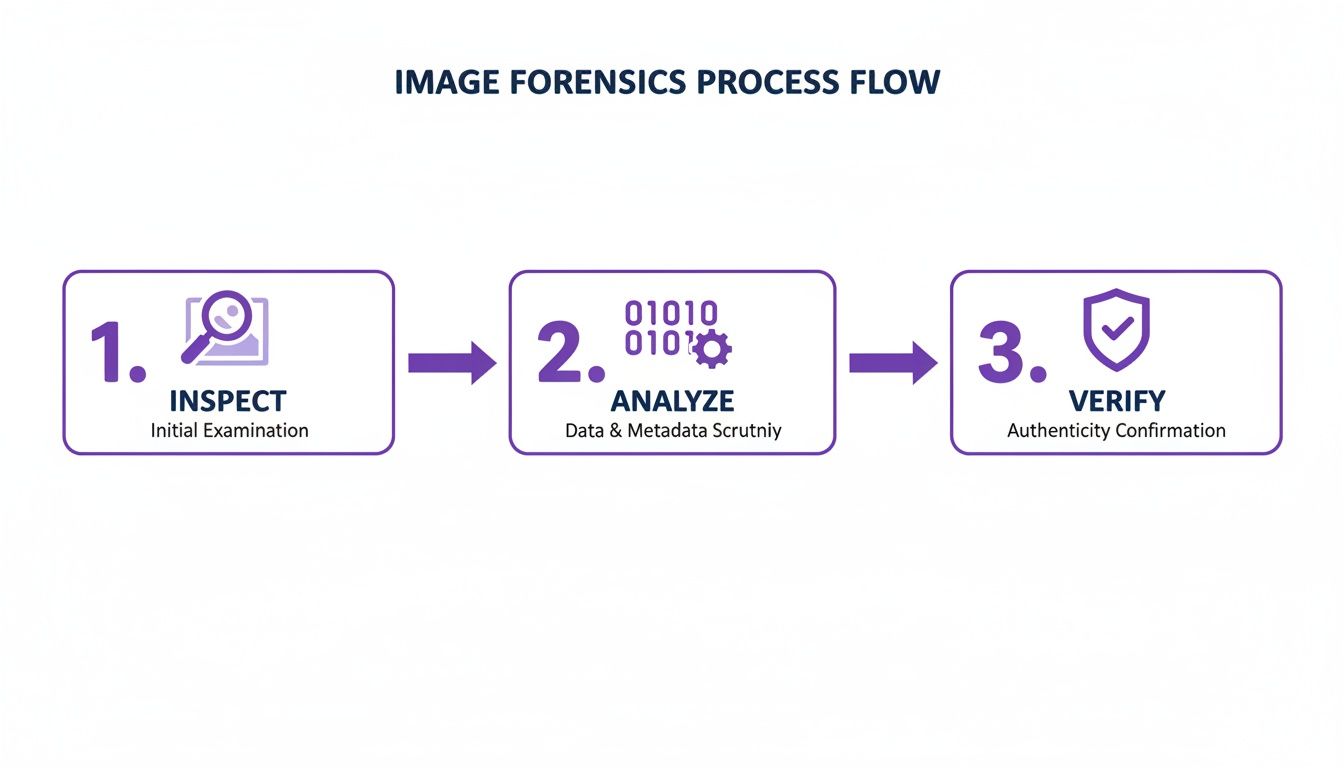
This process isn't about finding one single "gotcha" clue. It's about layering your evidence—combining what you see with what the technology reveals to build a solid case for or against an image's authenticity.
Diving into Digital Forensics
For a deeper look, forensic tools are where the real magic happens. Error Level Analysis (ELA), for example, is a classic technique. It doesn't show you the edit itself. Instead, it highlights parts of an image that have different JPEG compression levels.
Think of it this way: when you edit and re-save a part of a photo, its compression "signature" changes. ELA visualizes these differences, often making the manipulated areas pop out as brighter or having a different texture than the rest of the image.
To really get a handle on what you're looking for, it helps to understand the other side of the coin. Getting familiar with professional photo editing techniques used by pros in programs like Lightroom and Photoshop gives you insight into the artifacts they might accidentally leave behind.
Key takeaway: These tools don't give you a simple "yes" or "no." They provide clues. A bright spot on an ELA scan doesn't scream "fake," but it tells you exactly where to point your magnifying glass for other signs of tampering.
Comparing Image Verification Tools
To make sense of the options available, it helps to see how different technologies stack up. Each tool has its own strengths, whether you're tracing an image's origin or digging into its pixel-level data.
| Tool Type | Primary Function | Key Advantage | Limitation |
|---|---|---|---|
| Reverse Image Search | Finds other instances of the image online to trace its origin and evolution. | Excellent for finding the original, unedited source. | Not effective for brand-new or privately shared images. |
| Metadata Viewer | Reads the EXIF data embedded in the image file (camera, date, settings). | Provides concrete data about the original capture conditions. | Metadata can be easily stripped, edited, or faked. |
| Forensic Analyzer (ELA) | Detects inconsistencies in JPEG compression levels across an image. | Highlights areas that may have been altered, cloned, or inserted. | Requires interpretation; not a definitive "fake" indicator. |
| AI Image Detector | Uses a machine learning model to identify patterns unique to AI generation. | Highly effective at spotting artifacts from generative AI. | Can be less reliable for subtle Photoshop edits or older AI models. |
Ultimately, a multi-tool approach is always the most reliable. Starting with a reverse image search and then moving to more specialized tools like an AI detector gives you the most comprehensive picture.
Using AI to Catch AI
Without a doubt, the biggest change in this field has been the arrival of AI-powered detectors. These platforms are trained on millions of images to spot the unique, often invisible signatures left behind by AI generators. They analyze pixel relationships in ways our brains are not built to, looking for the tell-tale mathematical patterns of different AI models.
For instance, some advanced models are now capable of pinpointing forged regions with incredible accuracy. This isn't just a party trick; it's a critical capability for legal teams examining evidence or content moderators trying to shut down sophisticated online scams.
Tools like our own AI Image Detector make this technology accessible. You just upload an image, and the system gives you an immediate analysis with a confidence score on the likelihood of it being AI-generated.
The system delivers a clear verdict—from "Likely Human" to "Likely AI-Generated"—giving you a fast, data-backed assessment to guide your investigation. While no tool is infallible, using a dedicated photoshopped image detector adds a crucial layer of technical evidence to your workflow. It helps you move from a hunch to a confident, informed conclusion.
Putting It All Together: From Clues to a Conclusion
Verifying an image isn’t about finding that one "gotcha" moment. It's more like building a case, piece by piece, until the full picture emerges. After you've done your visual checks, dug into the metadata, and run the image through your toolkit, you're left with a pile of clues. The real skill is in weaving those clues together to form a solid, defensible conclusion.
This is where your judgment comes into play. What happens when your gut says an image is fine, but an AI detector screams "Likely AI-Generated"? How do you balance stripped metadata from an anonymous account against a clean file from a trusted journalist? It’s not about just checking boxes; it's about weighing the evidence.
Think of yourself as a juror. A single piece of testimony rarely decides the verdict. You have to look at how everything fits together.
Weighing Conflicting Evidence
It's completely normal to get mixed signals. A photo might look perfect to the naked eye—no six-fingered hands or bizarre shadows—but a forensic tool might light up with signs of manipulation. This doesn't mean your investigation hit a dead end. It just means the story is more complicated.
Here’s a practical way to think through these contradictions:
- Source Matters: Where did the image come from? A photo from a major news agency with all its metadata intact is far more credible than an image posted on a brand-new social media account with zero history.
- The Strength of the Clue: A clear "Adobe Photoshop" tag baked into the metadata is a pretty strong signal. It’s much stronger evidence than a faint, ambiguous smudge you spotted in an Error Level Analysis. Likewise, a 95% AI-generated confidence score from a tool is a whole lot more convincing than a shaky 55% guess.
- Look for Corroboration: Do different tests point to the same story? If a reverse image search turns up older, slightly different versions of the photo and the metadata has been wiped clean, your confidence in manipulation should be climbing.
In my experience working with platform moderators, a common task is checking a user-submitted ID. If the text looks just a little bit off and an AI detector flags it with moderate confidence, that's usually enough to ask the user for a new photo. It's about managing risk, not finding absolute, courtroom-level proof.
Deciding on a Confidence Level
Your final call should almost never be a simple "real" or "fake." It's far more honest and useful to classify your findings based on how confident you are, especially when the stakes are high.
I personally use a three-tiered system to frame my conclusions:
- High Confidence: All the evidence points in the same direction. For instance, the metadata is gone, ELA shows obvious edits, and the source has a history of sharing fake content. You've got a slam dunk.
- Moderate Confidence: You have conflicting evidence, but the scale is clearly tipping one way. Maybe a visually clean image from a reliable source still gets flagged for subtle edits by a tool. It's likely been retouched, but not necessarily deceptively.
- Low Confidence / Inconclusive: The evidence is just too weak or contradictory to make a definitive call. And that’s a perfectly valid outcome! It’s always better to admit you're not sure than to make the wrong call.
Getting comfortable with this framework is crucial, especially when you consider that the number of deepfake files is projected to jump from 500K in 2023 to 8 million by 2025. The problem is growing, but so are the defenses. New techniques are emerging that can add invisible watermarks or disruptions to an image's pixels, making it harder for AI models to alter them later. The more you learn about these protective measures, the better you'll get at spotting when an image lacks them.
Ultimately, your goal is to evolve from asking "Is this photoshopped?" to being able to state, "Based on my analysis, I have high confidence this image was manipulated."
Common Questions About Image Verification
As you start digging into whether an image is real or fake, you'll inevitably run into a few recurring questions. It can feel like a complex world at first, but a few core concepts make it much easier to navigate. Let's walk through some of the most common things people ask when they're just starting out.
Can AI Image Detectors Be Fooled?
This is probably the biggest question people have, and the short answer is yes. No single tool is infallible. The AI models creating these images are constantly getting smarter, and the detection tools are in a perpetual race to keep up.
That’s exactly why you’ll see a confidence score—like "85% Likely AI-Generated"—instead of a simple "yes" or "no." This isn't a bug; it's a feature. It reflects the reality that detection is a game of probabilities, not certainties. The best approach is to treat a detector's output as one strong piece of evidence in a larger puzzle, right alongside your own visual checks and metadata analysis. Never rely on just one signal.
What's the Difference Between "Photoshopped" and "AI-Generated"?
People often use these terms interchangeably, but they describe two very different things. While both are forms of image manipulation, understanding the distinction is key to knowing what you're looking for.
- Photoshopped: This usually means a real photograph was altered by a person using editing software like Adobe Photoshop. Think of it as modifying an existing reality—retouching a portrait, removing an object, or combining two real photos.
- AI-Generated: This is an image created from scratch by an AI model based on a text prompt. It's a completely synthetic creation that never existed as a physical scene.
This distinction is crucial because each process leaves behind a different set of digital breadcrumbs. Manual edits can create subtle clues like mismatched lighting or cloning artifacts. AI images, on the other hand, often have their own unique tells, like warped text, bizarre background textures, or that classic "too many fingers" problem.
Knowing how an image was likely made tells you what kind of clues to hunt for. You wouldn't look for AI artifacts in a simple color-corrected photo, just as you wouldn't run Error Level Analysis on a purely synthetic image.
Is Manipulating an Image Illegal?
Finally, let's talk about the law. Simply changing a photo isn't illegal in itself. Context and intent are what matter. Creative artwork, product marketing, or just touching up your vacation photos are all perfectly normal and legal. In fact, one study found that 71% of people edit their photos before posting them online.
Things get illegal when the manipulation is meant to deceive or cause harm. That includes things like:
- Fraud: Creating a fake ID or altering a legal document.
- Defamation: Doctoring a photo to damage someone's reputation.
- Copyright Infringement: Taking someone's copyrighted photo, changing it, and passing it off as your own without permission.
For most of us, though, the concern is less about the law and more about ethics and credibility. A journalist who secretly alters a news photo breaks a fundamental trust with their audience. The bottom line is always about ensuring that images presented as real aren't actually misleading people.
Ready to put these ideas to work? The AI Image Detector is a great first stop for getting a quick, data-backed opinion on any image you're not sure about. Try it for free and start verifying with more confidence.


